Crafting Memorable User Experiences with Intuitive Design

In the digital age, where user attention spans are fleeting, crafting memorable user experiences through intuitive design has become paramount. Intuitive design not only captivates users but also simplifies their journey, leading to increased engagement and conversions. This article delves into the core principles of intuitive design, explores practical techniques for enhancing usability, addresses the critical aspect of privacy in UX, and examines real-world success stories. Additionally, it looks ahead at how emerging technologies are shaping the future of intuitive design.
Key Takeaways
- Intuitive design is underpinned by an understanding of user psychology, ensuring simplicity, clarity, and consistency across platforms.
- Usability can be significantly improved through testing and feedback, designing for accessibility, and balancing aesthetics with functionality.
- Privacy considerations are integral to UX design, demanding transparency in data handling and incorporating privacy by design principles.
- Case studies of high-conversion websites and UX failures provide valuable insights into effective storytelling and innovative navigation in design.
- The evolution of intuitive design is closely linked to emerging technologies like voice interfaces, AR/VR, and AI-driven personalization.
The Pillars of Intuitive Design
Understanding User Psychology
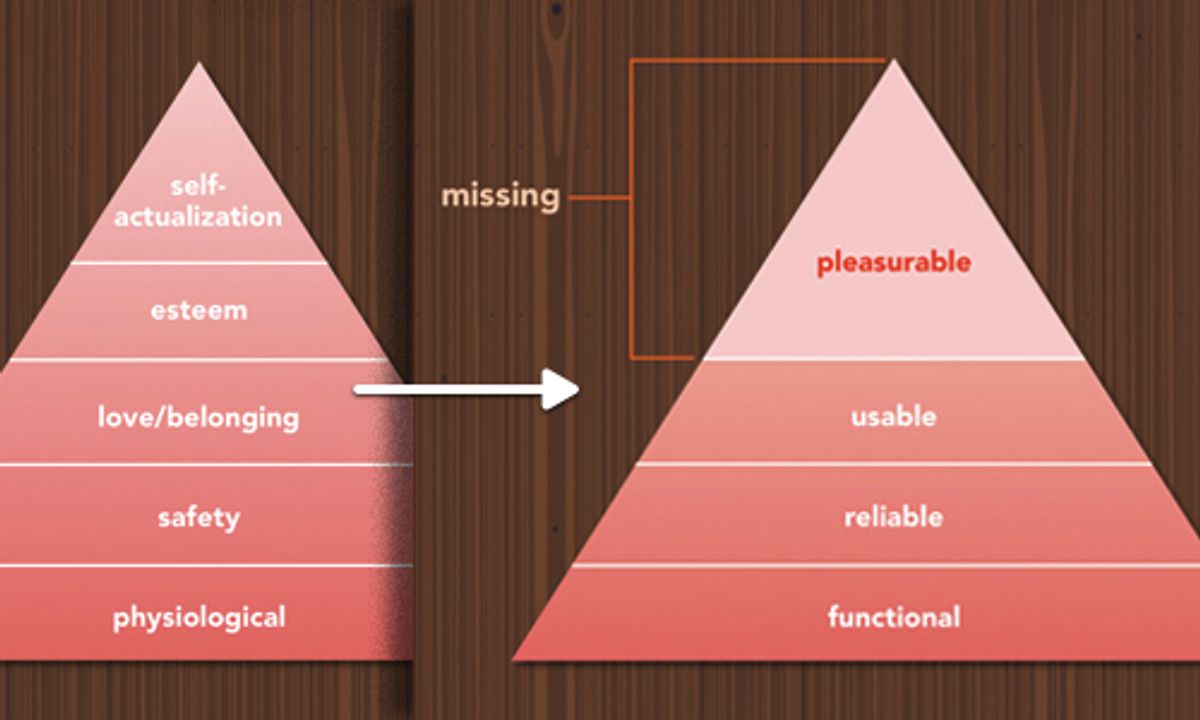
At the heart of intuitive design lies a profound understanding of user psychology. By delving into how users think, feel, and behave, designers can create experiences that are not only functional but also resonate on a deeper level. User research is the cornerstone of this process, providing valuable insights into user needs, preferences, and frustrations.
Creating user personas is a strategic approach to empathize with the audience. These fictional characters represent the different user types that might use a site, brand, or product in a similar way. Personas are instrumental in guiding decisions about features, interactions, and visual design of digital products.
By aligning design choices with user psychology, we can foster a connection that goes beyond the surface, leading to increased engagement and loyalty.
Understanding the user journey is crucial for a seamless and intuitive experience. It involves mapping out every step a user takes, from initial contact through the various touchpoints, up to the final interaction. This journey should be as frictionless as possible, guiding users towards their goals with ease and efficiency.
Simplicity and Clarity
In the realm of intuitive design, simplicity and clarity stand as fundamental principles. By stripping away the non-essential and focusing on the core functionality, designers can create interfaces that are not only aesthetically pleasing but also highly usable. This approach minimizes user confusion and enhances the overall user experience.
The essence of intuitive design is to make the complex feel simple. It’s about creating an environment where users can navigate with ease, without the need for extensive instructions or assistance.
However, achieving this balance is not without its challenges. Designers must ensure that in their pursuit of simplicity, they do not sacrifice the power and flexibility of the product. The goal is to harmonize simplicity with usability, crafting a seamless experience that feels almost invisible to the user.
Here are some key considerations for maintaining simplicity and clarity in design:
- Use familiar icons and symbols for common actions.
- Prioritize content and features based on user needs.
- Employ a clear visual hierarchy to guide user attention.
- Provide direct and concise feedback for user interactions.
- Implement intuitive navigation that aligns with user expectations.
Consistency Across Platforms
Achieving consistency across platforms is crucial for crafting memorable user experiences. It ensures that users feel at home regardless of the device or platform they are using. This adaptability enhances the user’s experience by reducing friction when switching between devices, such as from an Android phone to a tablet.
Consistency in design elements like colors, fonts, and icons is key. It allows users to quickly learn the app’s visual language, making navigation intuitive.
Here are some practical steps to maintain consistency:
- Use consistent design elements to maintain a visual language.
- Implement progressive disclosure to manage user focus.
- Optimize touch targets for ease of interaction.
Creating a cohesive brand identity not only streamlines marketing efforts but also builds credibility and improves the overall user experience.
Responsive and Adaptive Design
In the realm of responsive and adaptive design, the goal is to create interfaces that cater to a multitude of devices, screen sizes, and orientations. This adaptability is not just a convenience but a necessity in our mobile-centric world. It’s essential to distinguish between responsive design, which fluidly changes based on the screen size, and adaptive design, which uses distinct fixed layouts for different screen sizes.
The seamless integration of responsive design elements ensures that users enjoy a consistent and frictionless experience, regardless of the device they use.
Interactive elements such as buttons and links must be easily clickable and distinguishable, contributing to an intuitive form design with clear labels and instructions. Microinteractions, like subtle animations or feedback during interactions, can significantly enhance the user experience.
Ultimately, the implementation of responsive and adaptive design principles is a testament to an intuitive design rooted in user psychology, usability, emotional connection, analytics, and creativity. It’s a user-centric approach that demands ongoing research, testing, and empathy to deliver an exceptional user experience.
Enhancing Usability for Better Engagement

Usability Testing and Feedback Loops
Usability testing is a non-negotiable step in the journey towards intuitive design. By engaging real users in the testing process, designers can uncover usability issues and gather valuable feedback for refinement. This feedback is then integrated into an iterative design strategy, ensuring that the product evolves to meet user needs effectively.
To systematically collect user feedback, a variety of methods can be employed:
- Surveys to gauge user satisfaction and pinpoint areas for improvement
- User testing sessions to observe interaction with the product
- Analytics to track user behavior and identify patterns
Continuous user feedback, simplified navigation, and thorough research are key to enhancing user experience. Balancing aesthetics and functionality leads to increased satisfaction and loyalty.
The insights gained from usability testing and feedback loops are instrumental in crafting a user-centric design. Companies that prioritize this approach can expect to build an optimized website aligned with user preferences, ultimately fostering increased engagement and loyalty.
Designing for Accessibility
Designing for accessibility is not just about compliance; it’s about creating an experience that is usable and enjoyable for all users, regardless of their abilities. By incorporating accessibility features from the start, we ensure that our products are inclusive and reach a wider audience. This includes providing alternative text for images, ensuring color contrast for readability, and using keyboard-friendly design elements.
Accessibility should be seen as an opportunity to innovate and improve the user experience for everyone.
To achieve this, a few key practices should be followed:
- Conducting thorough usability testing with participants who have disabilities.
- Adhering to established guidelines such as the Web Content Accessibility Guidelines (WCAG).
- Continuously seeking feedback from users to refine and enhance accessibility.
Remember, designing for accessibility is an ongoing commitment that benefits not only users with disabilities but also provides a more intuitive and flexible interface for all.
Conversion Rate Optimization
Conversion Rate Optimization (CRO) is a critical component in crafting memorable user experiences that not only captivate users but also drive them towards making a decision. By optimizing conversion paths, such as streamlined checkout processes or enticing calls-to-action, businesses can significantly boost conversion rates. This not only enhances user satisfaction but also increases the likelihood of conversion as customers feel more connected to the brand.
Personalized user experiences are paramount in today’s digital landscape. Through techniques like user segmentation, A/B testing, and personalization algorithms, designers can tailor content and offerings to match the specific needs and interests of individual users.
Moreover, tracking and measuring tools are essential for understanding user interaction and performance. Insights gained from data allow for continuous improvement, ensuring that every visit to a website is maximized for potential conversions. Post-launch support and regular website health audits further contribute to maintaining optimal performance and accessibility, enhancing user satisfaction and driving conversions.
Balancing Aesthetics with Functionality
In the realm of user experience design, balancing aesthetics with functionality is a delicate dance. Visual appeal can captivate users, but without a functional backbone, the experience falls flat. Conversely, a highly functional interface that lacks aesthetic touchpoints can fail to engage users at an emotional level. This balance is not just about making compromises; it’s about creating harmony where both elements enhance each other.
The key is to integrate intuitive navigation and clear calls-to-action with a visually appealing interface. This synergy ensures that users not only enjoy the look and feel of a product but can also navigate it with ease, leading to a seamless user experience.
To achieve this equilibrium, designers must consider various factors. Here’s a list of considerations that can guide the process:
- Prioritizing user needs and behaviors
- Employing design strategies like progressive disclosure
- Ensuring the interface complexity does not hinder usability
- Staying adaptable to user feedback and evolving design trends
Each of these points requires careful thought and a deep understanding of the end-user. By adhering to these principles, designers can craft experiences that are both aesthetically pleasing and functionally robust, ultimately leading to higher user satisfaction and engagement.
Navigating the Privacy Landscape in UX Design

Incorporating Privacy by Design
In the realm of user experience, privacy by design stands as a foundational principle that ensures user trust and legal compliance. It’s a proactive approach that embeds privacy into the design process from the very beginning. By doing so, products and services are inherently secure and privacy-respecting, without sacrificing functionality.
Privacy by design is not just a regulatory checkbox but a commitment to user rights and ethical design practices. It involves a series of steps that designers and developers must follow to protect user data by default.
Key elements of privacy by design include minimizing data collection, securing data through encryption, and providing users with control over their personal information. These practices are essential for building trust and fostering a transparent relationship with users. To effectively incorporate privacy by design, consider the following steps:
- Design with intention
- Prioritize user feedback
- Practice minimalism in data collection
- Ensure consistency in privacy practices across all platforms
- Balance privacy with customization needs
By adhering to these steps, designers can create experiences that not only respect user privacy but also enhance the overall user experience by making it more intuitive and user-centric.
Transparent User Data Handling
In the realm of user experience, transparency in data handling is paramount. Users are increasingly aware of their digital footprint and the potential misuse of their personal information. To address these concerns, UX designers must ensure that privacy policies are not only accessible but also understandable to the average user.
Transparency is not just about fulfilling legal requirements; it’s about fostering an environment of trust. By clearly communicating how user data is collected, used, and protected, companies can build a stronger relationship with their customers.
A practical approach to transparent data handling involves clear consent mechanisms. Users should be able to easily find and adjust their privacy settings without feeling overwhelmed by legal jargon or complex navigation. Here’s a simplified breakdown of consent categories and their descriptions:
- Analytics: Information collected to improve website performance and user experience.
- Functional: Cookies that enable essential website functionalities.
- Performance: Data used to measure website efficiency and speed.
- Necessary: Cookies required for the website to function properly.
Each category should be accompanied by straightforward options to accept or reject cookies, ensuring users feel in control of their online presence.
Building Trust Through Design
In the realm of user experience, trust is a fundamental element that can significantly influence user behavior and brand perception. To foster trust, designers must prioritize user-centered approaches, ensuring that every aspect of the interface feels familiar and intuitive.
- Prioritize user-centered design: Focus on understanding and addressing user needs and expectations.
- Implement navigational simplicity: Create clear paths for users to follow, reducing confusion and building confidence.
- Balance aesthetics with usability: A visually appealing design should not come at the cost of functionality.
- Emphasize user feedback: Incorporate mechanisms for users to provide feedback, demonstrating that their opinions are valued.
By embedding these principles into the design process, we can create experiences that not only meet but exceed user expectations, leading to increased loyalty and advocacy.
Building trust with first-time users is about crafting a clear, supportive, and inclusive experience that is unmistakably user-focused. Establishing credibility through seamless interactions, secure payment gateways, and responsive customer support is just the beginning. Positive user experiences and customer testimonials can further reinforce trust, encouraging repeat visits and referrals.
The Impact of Cookie Consent on UX
The introduction of cookie consent banners was a significant step towards transparency in data collection, but it also introduced new challenges for user experience (UX) designers. The goal is to inform users without overwhelming them, ensuring that consent is both informed and unobtrusive. A balance must be struck between legal compliance and maintaining a smooth user journey.
Cookie consent mechanisms should be designed to be as simple and intuitive as possible, allowing users to make quick and informed decisions.
Here’s a brief overview of common cookie categories and their typical durations:
| Cookie Category | Duration | Description |
|---|---|---|
| Analytics | 11 months | Stores user consent for analytical cookies. |
| Functional | 11 months | Records consent for functional cookies. |
| Necessary | 11 months | Essential for basic site functionalities and security. |
| Performance | 11 months | Stores consent for performance-enhancing cookies. |
| Others | 11 months | Covers additional cookie categories not specified. |
Users should have the ability to easily change their preferences at any time, which not only respects their autonomy but also reinforces trust in the brand. By carefully considering the design and implementation of cookie consent forms, businesses can ensure compliance without sacrificing the quality of the user experience.
Case Studies: Success Stories in Intuitive UX
Analyzing High-Conversion Websites
High-conversion websites are the epitome of effective user experience and design alignment. These sites not only captivate users but also guide them seamlessly towards making a purchase or taking a desired action. Understanding the underlying principles that drive such high conversion rates is key to replicating their success.
One common thread among high-conversion sites is the strategic use of calls-to-action (CTAs). These CTAs are not just well-placed but also well-timed, appearing at the moment when the user is most likely to take the next step. Additionally, these websites often employ persuasive design elements that subtly influence user behavior without being overbearing.
The goal is to create an environment where users feel informed, comfortable, and compelled to act. This is achieved through a combination of aesthetic appeal, intuitive navigation, and clear messaging.
Another critical aspect is the personalization of user experiences. High-conversion websites leverage data analytics to understand user preferences and tailor the content accordingly. This not only enhances the user experience but also increases the likelihood of conversion as customers feel more connected to the brand.
Finally, continuous optimization is a hallmark of successful websites. Through A/B testing, user feedback, and performance analytics, these sites constantly evolve to meet the changing needs and expectations of their audience.
Learning from User Experience Failures
The journey of creating intuitive design often involves learning from past mistakes. User experience failures provide a rich soil for growth, offering insights into what can alienate or confuse users. By dissecting these failures, designers can pinpoint the exact elements that need refinement.
Iterative improvements are crucial in evolving a product’s design. They allow for the gradual enhancement of user experience by building on user feedback and real-world usage.
A common thread in many UX failures is the neglect of user needs and preferences. To avoid these pitfalls, here are some steps to consider:
- Conduct thorough usability testing at various stages of development.
- Integrate user feedback loops to capture and act on user insights.
- Prioritize accessibility to ensure inclusivity for all users.
- Balance aesthetics with functionality to create a harmonious user interface.
By embracing these practices, designers can transform failures into stepping stones towards success, ultimately crafting experiences that resonate with users and stand the test of time.
The Role of Storytelling in UX
In the realm of UX design, storytelling is a powerful tool that can transform a user’s interaction with a product into an engaging narrative. It’s not just about the content itself, but how the content is structured and presented to guide the user through a seamless journey. Storytelling in UX design enhances user engagement by simplifying complexity, fostering emotional connections, and creating memorable experiences. Intuitive design principles focus on usability and accessibility for a seamless user journey.
By weaving a story into the user experience, designers can create a context that resonates with users, making the interface more intuitive and the interaction more meaningful.
Effective storytelling in UX can be broken down into several key components:
- Establishing a clear narrative that aligns with the brand’s values and user expectations.
- Utilizing visual hierarchy and design elements to support the story and guide the user’s eye.
- Creating interactive elements that encourage user participation and investment in the story.
- Ensuring that the story is consistent across all platforms and touchpoints to maintain user engagement.
Incorporating these elements into the design process can lead to a more cohesive and satisfying user experience.
Innovative Navigation Solutions
In the quest for intuitive navigation, designers are constantly innovating to streamline the user journey. A natural navigation flow is paramount, allowing users to move through an app or website with ease, finding what they need without frustration or confusion. Employing familiar navigation patterns, such as tab bars and hamburger menus, enhances predictability and user effectiveness.
To optimize the navigation structure and enhance customer satisfaction, consider incorporating search functionality and utilizing user feedback to identify pain points. Iterative design based on this feedback can lead to significant improvements in usability.
Creating an intuitive navigation structure is not just about the user interface; it involves a deep understanding of user psychology. A strategy that resonates with this is the ‘one-task, one-screen’ layout, which avoids clutter and maintains clarity, focusing on the users’ main goals. This approach is supported by research suggesting that simplicity in design is key to delving into users’ minds.
Here are some tips to enhance navigation:
- Maintain logical information grouping
- Plan for easy navigation and exploration
- Regularly gather and act on user feedback
By focusing on these areas, designers can create navigation solutions that are not only innovative but also deeply aligned with user needs, leading to increased engagement and satisfaction.
The Future of Intuitive Design and Emerging Technologies

Designing for Voice Interfaces
Voice User Interfaces (VUI) are rapidly becoming an integral part of the user experience, offering a hands-free, eyes-free way of interacting with technology. Designing for VUI requires a nuanced understanding of conversational patterns and user expectations to create a seamless and natural dialogue between the user and the device.
Embracing best practices in conversational design is key to crafting VUI that feels intuitive and responsive to user needs. This involves not only the technical aspects of voice recognition and processing but also the creation of a conversational flow that mirrors human interaction.
To achieve this, designers must focus on several core areas:
- Crafting clear and concise prompts
- Ensuring error handling is graceful and informative
- Providing contextually relevant responses
- Allowing for easy correction and repetition of commands
By paying close attention to these elements, designers can enhance the user experience, making it more engaging and efficient. The challenge lies in balancing the opportunities that VUI presents with the limitations of current technology, to deliver a user interface that is both powerful and easy to use.
Adapting to Augmented and Virtual Realities
As we delve into the realm of augmented and virtual realities (AR and VR), the potential for creating immersive user experiences is unprecedented. These technologies offer a new dimension of interaction, where the digital and physical worlds converge to provide a seamless user experience. The challenge lies in designing interfaces that are not only intuitive but also enhance the user’s sense of presence within these virtual environments.
The integration of AR and VR in user experience design requires a deep understanding of user behavior and expectations. Designers must craft experiences that align with these interactions, ensuring that the interface feels like an extension of the user’s instincts. This facilitates an engaging and frictionless experience that can lead to improved conversion rates and user satisfaction.
The future of intuitive user interaction design is bright, with the potential to create apps that not only meet the user’s current needs but evolve with them.
Innovations in artificial intelligence and machine learning are paving the way for apps that can anticipate user needs, adapt to their habits, and even predict future actions. This level of personalization and adaptability could redefine the standards of intuitive design, making every interaction more relevant and impactful.
Personalization Through Machine Learning
Machine learning is revolutionizing the way we approach user experience personalization. By analyzing vast amounts of user data, including demographics, behavior, and preferences, algorithms can deliver content that resonates with each individual. This not only enhances user satisfaction but also bolsters the likelihood of conversion, as customers feel a deeper connection to the brand.
Personalization algorithms are at the heart of creating intuitive and engaging user experiences. They enable a level of customization that was previously unattainable, making each interaction with the platform feel unique and tailored.
For instance, Amazon’s use of sophisticated algorithms to suggest products demonstrates the power of personalization. By employing strategies such as customer surveys and website analytics, businesses can gain valuable insights and optimize their offerings to improve user satisfaction and loyalty. The ultimate goal is to design with empathy, ensuring that personalization efforts prioritize emotional connections and user satisfaction, fostering brand loyalty and usability.
The Role of AI in Predictive UX
The integration of Artificial Intelligence (AI) in user experience design is not just a trend; it’s a game-changer in crafting predictive user interfaces. AI excels at customizing user experiences by analyzing individual preferences and behaviors, allowing algorithms to tailor the UI to meet each user’s unique needs. This personalization is key to creating intuitive and memorable experiences.
AI’s predictive capabilities are transforming the way we interact with digital products. By anticipating user actions, AI can streamline workflows and enhance satisfaction, making every interaction feel thoughtfully curated.
Moreover, AI-driven analytics provide invaluable insights into user engagement, enabling continuous improvement of the UX. Designers can now focus on innovation, while AI handles the intricacies of analysis and optimization. The table below illustrates the impact of AI on key UX metrics:
| Metric | Before AI | After AI |
|---|---|---|
| User Engagement | Low | High |
| Conversion Rates | Variable | Improved |
| User Satisfaction | Inconsistent | Consistently High |
As we look to the future, the role of AI in web development and design is poised to grow even more significant. Embracing these tools can lead to projects that resonate deeply with users, ultimately enhancing the digital landscape for everyone.
As we stand on the brink of a new era in web design, the fusion of intuitive design and emerging technologies is reshaping the digital landscape. At the heart of this transformation is the commitment to creating seamless user experiences that are not only functional but also aesthetically pleasing. Our expertise in WordPress Development, eCommerce solutions, and custom web design ensures that your business stays ahead of the curve. Don’t let your online presence lag behind – visit our website to explore our services and see how we can help your business thrive in the digital age. Let’s build something extraordinary together!
Conclusion
In the journey of crafting memorable user experiences, intuitive design stands as the cornerstone of user satisfaction and engagement. Throughout this article, we’ve explored the multifaceted approach to creating seamless digital interactions, from understanding user behavior to implementing best practices in UI/UX design. By prioritizing usability, consistency, and simplicity, designers can develop interfaces that resonate with users and foster an environment of ease and efficiency. As we’ve seen through various case studies and design projects, the impact of intuitive design is profound, leading to increased conversion rates and user retention. Embracing these principles is not just about aesthetic appeal; it’s about building digital experiences that are accessible, enjoyable, and effective. Remember, the ultimate goal is to create a digital space where users can navigate with confidence and a sense of familiarity, making every interaction with your website or application a delightful and memorable experience.
Frequently Asked Questions
What are the key principles of intuitive design?
The key principles of intuitive design include understanding user psychology, ensuring simplicity and clarity, maintaining consistency across platforms, and implementing responsive and adaptive design to cater to various devices and screen sizes.
How does usability testing improve user engagement?
Usability testing allows designers to gather feedback from real users, identify pain points, and make iterative improvements to enhance the overall usability of a product, thereby improving user engagement.
Why is designing for accessibility important?
Designing for accessibility ensures that all users, including those with disabilities, can access and use products effectively. It expands the user base and demonstrates a commitment to inclusivity.
How does privacy impact user experience in design?
Incorporating privacy by design, being transparent about user data handling, and building trust through design choices can positively impact user experience by making users feel secure and respected.
Can you provide examples of successful intuitive design?
Success stories in intuitive design often involve high-conversion websites that use clear navigation, simple interfaces, and engaging storytelling to provide a seamless user experience.
What emerging technologies are shaping the future of intuitive design?
Emerging technologies such as voice interfaces, augmented and virtual realities, personalization through machine learning, and AI in predictive UX are shaping the future by creating more personalized and context-aware experiences.