Ensuring Website Scalability for Growing Businesses

In the fast-paced digital world, a scalable website is a cornerstone for growing businesses. Ensuring that your website can handle increased traffic and maintain performance is crucial for customer satisfaction and business continuity. This article explores various strategies to optimize and future-proof your website, from performance tuning to embracing cloud infrastructure, to help your business thrive in an ever-evolving online landscape.
Key Takeaways
- Implementing effective image compression and optimization, caching strategies, and script minimization can significantly boost website performance.
- Website speed and robust security measures are pivotal for user engagement and trust; regular audits help maintain these aspects.
- Custom WordPress theme development and ongoing support are essential for an optimized, secure, and scalable WordPress website.
- Scalable web hosting solutions and responsive customer support play a critical role in handling traffic surges and business growth.
- Investing in cloud infrastructure and scalable e-commerce solutions is key to future-proofing your website and staying ahead of technology trends.
Optimizing Website Performance for Scalability
Effective Image Compression and Optimization
Image compression and optimization are critical for enhancing website performance, especially as visual content can significantly impact loading times. By reducing image file sizes without compromising quality, websites can load faster, improving user experience and SEO rankings. Here are some key steps to optimize images effectively:
- Use the right file format (e.g., JPEG for photographs, PNG for graphics with transparency).
- Implement lossless or lossy compression techniques as appropriate.
- Employ responsive images to serve different sizes based on the user’s device.
- Utilize image CDNs to reduce latency and speed up delivery.
Ensuring that images are properly optimized is a straightforward yet powerful way to boost website performance. It’s not just about faster loading; it’s about creating a seamless user experience that keeps visitors engaged.
In addition to these steps, it’s important to regularly audit your website for any images that could be further optimized. Tools and plugins are available to automate this process, making it easier to maintain optimal performance as your content grows. Remember, a methodical yet flexible approach to web development can lead to continuous improvement and excellence in the digital space.
Implementing Caching Strategies
Caching is a critical component in website optimization, particularly for scalability. Implementing cache in systems offers many benefits, such as reducing server load and enhancing the speed at which content is delivered to users. By storing frequently accessed data in a cache, websites can provide faster access to content, leading to improved user satisfaction and engagement.
Effective caching strategies can vary depending on the specific needs of a website. Here are some common caching techniques:
- Browser caching: Stores static resources like CSS, JavaScript, and images in the user’s browser.
- Server-side caching: Involves storing data on the server to reduce database queries.
- Content Delivery Network (CDN): Utilizes a network of servers distributed globally to deliver content more efficiently.
Caching not only optimizes performance but also contributes to reducing operational costs by minimizing resource usage.
It’s essential to regularly review and update caching policies to ensure they align with the website’s content update frequency and user access patterns. Monitoring cache hit rates and adjusting cache expiration times are part of maintaining an effective caching strategy.
Minifying CSS and JavaScript Files
Minifying CSS and JavaScript files is a crucial step in optimizing your website’s performance. This process involves removing unnecessary characters from code, such as whitespace, comments, and block delimiters, to reduce its size and thus improve load times. When implemented correctly, minification can lead to a significant decrease in the amount of data transferred between the server and the client, enhancing the user’s experience.
By reducing the number of CSS and JavaScript HTTP requests and optimizing the file size, we can significantly improve the website loading times and thus improve the customer experience.
It’s not just about shrinking file sizes; it’s also about improving efficiency. Organizing and combining files strategically can further optimize performance. For instance, grouping all CSS into one file and all JavaScript into another can minimize the number of HTTP requests. Here’s a simple checklist to ensure you’re on the right track with minification:
- Combine similar files where possible
- Use tools or scripts to automate the minification process
- Test your website’s functionality post-minification to ensure no features are broken
Remember, optimizing caching, minifying CSS/JS, and managing external scripts are key for website performance. Regular security updates are crucial for health and security. Implementing these strategies ensures scalability and user satisfaction.
Reducing External Script Dependencies
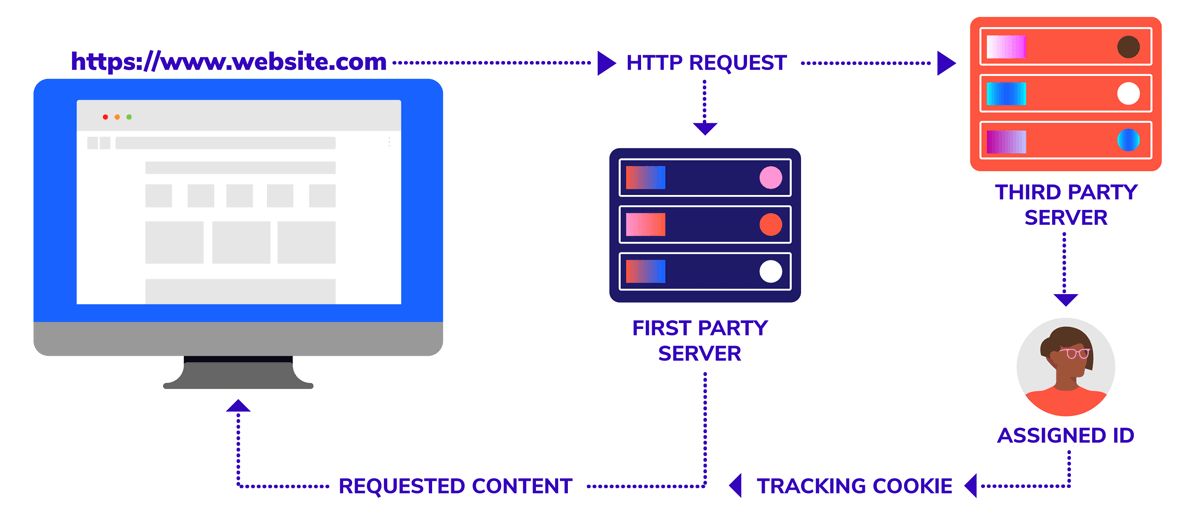
External scripts, such as those from analytics tools, social media platforms, and advertising networks, can significantly impact your website’s load time. Minimizing the use of these scripts is crucial for enhancing site performance and scalability. By reducing reliance on external resources, you ensure a smoother and more controlled user experience.
- Evaluate the necessity of each external script on your website.
- Where possible, replace external scripts with native functionality.
- Host third-party scripts locally to reduce external HTTP requests.
- Prioritize loading essential scripts and defer others.
By streamlining the number of external scripts, you not only improve website load times but also gain better control over the content and functionality of your site. This proactive approach is part of a broader strategy to optimize website performance for scalability.
Remember, every millisecond counts when it comes to website performance. A leaner site with fewer external dependencies is more resilient to traffic spikes and scales more effectively as your business grows.
Enhancing User Experience Through Speed and Security

The Impact of Website Speed on User Engagement
The speed of your website is a pivotal factor in determining user engagement and satisfaction. A swift website enhances the user experience, leading to longer browsing sessions, increased conversions, and customer retention. It’s a domino effect; slow speed leads to high bounce rates, which in turn affects conversions, SEO rankings, and even your brand’s reputation. Go ahead and prioritize performance to see tangible improvements in user engagement.
Website performance optimization is not just about improving loading times; it’s about creating a positive, seamless user experience that encourages visitors to stay and interact with your content.
Consider the following statistics that highlight the critical nature of website speed:
- 47% of consumers expect a web page to load in 2 seconds or less.
- A 1-second delay in page response can result in a 7% reduction in conversions.
- If an e-commerce site is making $100,000 per day, a 1-second page delay could potentially cost $2.5 million in lost sales every year.
These figures underscore the importance of optimizing website speed to maintain a competitive edge and ensure user engagement.
Ensuring Robust Security Measures
In the digital age, website security is paramount for safeguarding sensitive data and maintaining customer trust. A multi-layered approach to security, including the use of SSL certificates and HTTPS, is essential for protecting against cyber threats. Regular updates and patches are also critical to address vulnerabilities and prevent unauthorized access.
A robust security strategy not only protects against immediate threats but also contributes to the long-term reliability and credibility of your business online.
To ensure comprehensive protection, consider the following security measures:
- Choose Secure Frameworks: Opt for frameworks with a strong security track record and active community support.
- Regularly update server software and apply security patches.
- Implement automated security checks to keep the site malware-free.
- Utilize backup services to safeguard against data loss.
By prioritizing these security practices, businesses can create a secure foundation for their website, ready to scale alongside their growth.
Regular Performance and Security Audits
Conducting regular performance and security audits is a critical step in maintaining the integrity and efficiency of your website. These audits help in pinpointing areas that need enhancement and ensuring that your web application remains optimized for success.
Regular audits can lead to significant improvements in website performance, which in turn, can have a profound impact on user engagement and enterprise success.
A comprehensive audit typically includes checks for security vulnerabilities, performance bottlenecks, and outdated software or plugins. It’s essential to keep your website’s environment up to date with the latest patches and updates to minimize risks and protect against cyber threats. Here’s a brief overview of what a typical audit process might involve:
- SSL Certificates and HTTPS verification
- Regular updates and patches
- Backup services
- Server security measures
By implementing a consistent audit schedule, businesses can ensure that their website remains secure, fast, and reliable—three key factors that contribute to a positive user experience and customer trust.
Post-Launch Monitoring and Optimization
After the excitement of launching a website, it’s crucial to shift focus to post-launch monitoring and optimization. This phase is essential for maintaining the site’s performance, security, and user experience. Regularly scheduled performance scans and security audits are a cornerstone of this process, ensuring that the website operates smoothly and without vulnerabilities.
By continuously analyzing user feedback and website analytics, businesses can make informed decisions to enhance the user experience and maintain customer trust.
To systematically approach post-launch activities, consider the following checklist:
- Uptime monitoring to detect and resolve site disruptions promptly
- Daily security checks to keep the site malware-free
- Frequent updates of WordPress core and plugins to mitigate security risks
- Performance checks to ensure optimal loading times
- SEO monitoring to track ranking changes and identify improvement areas
- Automated backups for quick recovery in case of data loss
These proactive measures not only safeguard the website but also contribute to a positive brand image and customer loyalty.
Strategies for WordPress Website Optimization

Custom Theme Development for Performance
Custom theme development is a cornerstone of WordPress performance optimization. Tailoring a theme to the specific needs of your business not only ensures a unique look but also eliminates unnecessary bloat that can slow down your site. A custom theme is streamlined for speed, making it an ideal choice for businesses aiming for rapid scalability.
- Analyze the current design and performance needs.
- Optimize the theme for speed and efficiency.
- Grow your online presence with a theme that scales with your business.
By focusing on performance from the ground up, custom WordPress themes provide a solid foundation for future growth.
Choosing the right development partner is crucial. Look for teams that offer a blend of design expertise, coding standards adherence, and a commitment to performance optimization. This approach not only enhances user experience but also contributes to better SEO rankings and increased conversions.
Leveraging WordPress Support and Maintenance Services
For growing businesses, the continuous evolution of WordPress means that keeping your website up-to-date, stable, and secure is not just a one-time task—it’s an ongoing commitment. Regular maintenance is crucial to prevent security breaches and performance issues that could harm your conversions and reputation. Our full-service WordPress support and maintenance packages are designed to give you peace of mind, allowing you to focus on your core business while we ensure your website operates optimally at all times.
With our comprehensive support services, you can expect frequent updates, security checks, and performance optimizations. These proactive measures are essential for maintaining a high-performing WordPress site that meets the demands of a growing business.
Our services include, but are not limited to:
- Uptime monitoring with automated alerts
- Daily automated security checks
- Frequent updates to WordPress core and plugins
- Performance checks to ensure fast loading times
- SEO monitoring to track rankings and identify improvements
By entrusting your website’s maintenance to experts, you’re investing in its longevity and scalability. As your business expands, our scalable solutions will adapt, providing the necessary support to accommodate increased traffic and evolving market demands.
Conducting Comprehensive Website Health Audits
A comprehensive website health audit is essential for identifying both the strengths and weaknesses of your online presence. This gives you a clear picture of your site’s technical strengths and areas that need improvement. Regular audits can uncover issues affecting site performance, security, and SEO, which might otherwise go unnoticed until they cause significant problems.
Conducting an audit involves a systematic review of various components of your website. This includes checking for outdated plugins, ensuring that SSL certificates are up to date, and verifying that your site is optimized for search engines. It’s not just about finding problems; it’s about providing actionable solutions to enhance your website’s overall health.
The audit process typically covers several key areas:
- Performance: Measuring website speed and identifying bottlenecks.
- Security: Checking for vulnerabilities and ensuring data protection.
- SEO: Analyzing on-site optimization and keyword effectiveness.
- Usability: Assessing the user experience and ease of navigation.
By addressing these areas, you can improve user engagement, boost your search engine rankings, and provide a secure environment for your visitors. Remember, a healthy website is a performant one, and regular health checks are a proactive step towards maintaining an optimal online presence.
Optimizing for Search Engines and Conversions
Optimizing your WordPress website for search engines and conversions is a multifaceted approach that involves various strategies. Ensuring that your site is easily discoverable by search engines and appealing to users is crucial for business growth. A key aspect of this is the implementation of SEO best practices, which includes optimizing site speed, enhancing user experience, and maintaining robust security measures.
By focusing on both SEO and conversion optimization, businesses can drive more traffic and improve their online performance.
To achieve this, consider the following steps:
- Utilize SEO plugins like SEOPress to streamline on-site SEO efforts.
- Regularly perform website health audits to identify and rectify issues.
- Implement advanced user tracking to gain insights into visitor behavior.
- Optimize images and minimize scripts to improve site speed, a known ranking factor.
- Stay updated with the latest WordPress features and security improvements to maintain site integrity.
Remember, a well-optimized website not only ranks higher in search engines but also provides a better user experience, leading to increased customer satisfaction and higher conversion rates.
Scalability Considerations for Growing Businesses

Planning for Traffic Surges and Growth
For growing businesses, planning for traffic surges is a critical aspect of maintaining a robust online presence. A scalable web hosting solution is essential to accommodate sudden spikes in traffic, ensuring that your website remains accessible and performs well during peak times. This not only provides a positive user experience but also prevents potential revenue loss due to downtime or slow loading pages.
Scalability is not just about handling current traffic levels; it’s about anticipating future growth and being prepared for it. By choosing a hosting provider with scalable options, businesses can seamlessly upgrade their hosting package or resources as their needs evolve.
Additionally, it’s important to have a strategy in place for monitoring key performance indicators (KPIs) and ensuring that the chosen website platform can support increased user interactions and content volume. Regularly reviewing and adjusting your scalability plan will help you stay ahead of demand and maintain optimal website performance.
Selecting Scalable Web Hosting Solutions
When it comes to choosing a web host that scales with your business, it’s crucial to consider not only your website’s current traffic but also its potential growth. Scalable web hosting solutions provide the flexibility to accommodate increasing traffic and resource demands without compromising performance.
Scalability in web hosting is about ensuring that your website can grow seamlessly with your business. It involves having the ability to upgrade your hosting package, add more resources, or migrate to a more powerful server as needed.
Selecting a provider with a range of scalable plans is essential. For instance, starting with a basic package and having the option to move to more advanced solutions like VPS or dedicated hosting can make the transition smoother as your needs evolve. Here are some key considerations:
- Room for Growth: Ensure the provider offers plans that can scale with your business.
- 24/7 Support and Assistance: Reliable customer support is vital for addressing issues promptly.
- Performance Checks: Regular monitoring to maintain optimal website speed and performance.
- Security Checks: Daily security scans to keep your site safe from threats.
- Automated Backups: Frequent backups to safeguard your data.
By prioritizing these factors, you can establish a robust foundation for your website’s long-term success.
The Role of Customer Support in Scalability
As businesses grow, the demand for efficient customer support becomes critical. Scalable customer support ensures that as the customer base expands, the quality of service remains consistent. This involves not only increasing the number of support agents but also improving their training and resources.
A robust customer support system is pivotal in managing increased interactions without compromising service quality.
Here are key elements to consider for scaling customer support effectively:
- Positive customer experiences are paramount; they foster loyalty and encourage repeat business.
- Implementing automated systems can help manage routine inquiries, allowing human agents to focus on complex issues.
- Regularly updating knowledge bases and FAQs can empower customers to find solutions independently.
- Investing in customer relationship management (CRM) software can streamline support processes and provide valuable insights into customer needs and behaviors.
Scalable WordPress Plans to Meet Business Demands
As businesses grow, the demand for a website that can scale with them becomes crucial. Choosing the right WordPress plan is essential for ensuring that your website can handle increased traffic and content without compromising on performance. Our scalable WordPress plans are designed to meet the needs of businesses at every stage of growth.
- The Light package is perfect for those needing a quick launch, with readiness in just 24 hours.
- For businesses looking for more customization, the Enterprise plan offers advanced features like self-deployment and headless technology.
With the flexibility to upgrade as your business evolves, our WordPress solutions provide a solid foundation for growth and success.
Moreover, our plans come with comprehensive support and maintenance services, ensuring your website remains fast, secure, and up-to-date. Embrace the power of scalability with a WordPress plan that aligns with your business objectives and growth trajectory.
Future-Proofing Your Website for Continued Expansion

Embracing Cloud Infrastructure for Flexibility
The adoption of cloud infrastructure is a pivotal step for businesses aiming to scale. It offers the flexibility to adapt to changing demands without the need for significant upfront investment in physical hardware. Cloud services provide a range of scalable options that can be tailored to the specific needs of a growing business.
By leveraging cloud technology, companies can ensure that their website infrastructure is as agile and responsive as their market strategies. This agility is crucial for maintaining a competitive edge and accommodating growth.
Cloud solutions often come with built-in redundancy and disaster recovery capabilities, which are essential for maintaining high availability and business continuity. Here’s a brief overview of the benefits:
- Scalability: Easily adjust resources to handle varying traffic loads.
- Cost-Effectiveness: Pay only for the resources you use, reducing wasted capacity.
- Agility: Quickly deploy new services or applications to respond to business needs.
- Disaster Recovery: Benefit from automatic data backup and recovery systems.
Embrace flexibility, agility, and scalability for website sustainability. Decentralize decision-making, streamline processes, and adopt scalable solutions. Continuous scalability process with load balancing, caching, database optimization, CDNs, code reviews, and automated scaling.
Investing in Scalable E-commerce Solutions
For growing businesses, investing in scalable e-commerce solutions is a pivotal step towards ensuring that the digital storefront can accommodate an increasing number of products, categories, and customer transactions. Scalability in e-commerce platforms allows for the expansion of product lines and the ability to target different customer segments without compromising on performance or user experience.
With a flexible infrastructure, businesses can launch new storefronts and adapt to market demands swiftly, ensuring that the growth of their online presence aligns with their revenue growth.
Choosing the right e-commerce platform is crucial, as it should provide the ability to scale seamlessly alongside your business. Here are some key features to look for:
- Flexibility: The platform should allow for easy addition of new products and categories.
- Customization: It should support custom designs and functionalities that reflect your brand.
- Performance: Optimal loading times and smooth checkout processes are essential for user retention.
- Security: Robust security measures protect both the business and its customers.
- Support: Reliable customer support ensures any issues are promptly addressed.
By prioritizing these features, businesses can create a robust foundation for growth, enabling them to focus on their core operations while their e-commerce platform handles the increasing load efficiently.
Continuous Improvement and Feature Updates
In the digital age, continuous improvement and feature updates are essential for maintaining a competitive edge. Businesses must embrace a culture of perpetual evolution, ensuring their websites are not only up-to-date but also ahead of the curve. Regular enhancements and the addition of new features keep a website dynamic and engaging for users, which is critical for retention and conversion rates.
Scalable design is crucial for businesses to thrive online, requiring customizable systems, regular assessments, and future growth planning for efficiency and success.
A strategic approach to continuous improvement involves analyzing user feedback, monitoring performance metrics, and staying informed about the latest web technologies. This proactive stance enables businesses to anticipate user needs and market trends, leading to informed decisions about which new features to implement and which existing ones to refine.
To illustrate the importance of ongoing updates, consider the following benefits:
- Enhanced User Experience: Regular updates can improve navigation, speed, and overall usability.
- Increased Security: Keeping software up-to-date is vital for protecting against the latest security threats.
- Better SEO Performance: Search engines favor websites that are frequently updated with fresh content and features.
- Higher Conversion Rates: A website that continually improves is more likely to convert visitors into customers.
By committing to continuous improvement, businesses can ensure that their website remains an effective tool for growth and customer engagement.
Staying Ahead with Technology and Market Trends
In the rapidly evolving digital landscape, businesses must continuously adapt to stay competitive. Leveraging technology for scalable growth is not just about adopting new tools, but also about understanding and anticipating market trends. This scalability allows businesses to adapt quickly to changing market conditions, seize growth opportunities, and stay ahead of the competition.
Embracing advancements in technology and staying informed on market trends are crucial for businesses aiming to maintain their edge. Regularly reviewing and updating your tech stack can lead to significant improvements in performance and customer satisfaction.
To ensure your business remains at the forefront, consider the following steps:
- Regularly assess and update your technology stack to match current standards.
- Stay informed with cutting-edge industry insights through blogs, ebooks, and case studies.
- Implement a strategy for continuous learning and innovation within your organization.
- Monitor your website’s performance post-launch to quickly identify and address any issues.
By staying proactive and informed, businesses can not only keep pace but also set the trends that shape the future of their industry.
In a digital era where change is the only constant, ensuring your website can adapt and grow is crucial. At [Your Company], we specialize in creating custom web solutions that not only meet your current needs but are also designed for future scalability. Whether you’re looking to optimize your WordPress site, develop a robust eCommerce platform, or simply require a comprehensive website health audit, our team is ready to elevate your online presence. Don’t let your website fall behind – visit us now to learn how we can support your expansion and keep you ahead of the curve.
Conclusion: Future-Proofing Your Business with Scalable Websites
In the fast-paced digital landscape, scalability is not just a buzzword but a critical component for the success of growing businesses. As we’ve explored throughout this article, ensuring your website can handle increased traffic, adapt to evolving market demands, and maintain optimal performance is essential. From optimizing images and implementing caching to minifying scripts and streamlining external scripts, the strategies discussed provide a roadmap for creating a robust online presence. Remember, a scalable website is more than a technical achievement; it’s a strategic asset that can lead to enhanced customer satisfaction, improved search engine rankings, and ultimately, increased revenue. As your business continues to grow, investing in a scalable website infrastructure will position you to capitalize on opportunities and navigate challenges with confidence.
Frequently Asked Questions
What are the best practices for optimizing website images for performance?
Optimizing website images involves compressing and reducing their file size without significantly affecting the image quality. Utilizing tools and plugins that automate image compression can significantly enhance loading times and improve overall website performance.
How does implementing caching improve website scalability?
Caching reduces the load on the server by storing copies of files and data temporarily. This means that when a user visits your website, the server can quickly deliver the cached content without regenerating it, thus improving website speed and handling more visitors efficiently.
Why is it important to minify CSS and JavaScript files?
Minifying CSS and JavaScript files removes unnecessary characters and whitespace, reducing file size. This leads to faster loading times as the amount of data the server needs to send to the browser is decreased, which is crucial for scalability and user experience.
How does reducing external script dependencies enhance website performance?
External scripts can slow down your website because they require additional HTTP requests to third-party servers. Reducing these dependencies minimizes the number of requests, which can significantly improve page load times and overall website performance.
What role does website security play in user engagement?
Website security is vital for user engagement as it builds trust with visitors. A secure website protects users’ data and prevents malicious activities, which can otherwise lead to a loss of customer trust and negatively impact user engagement and business reputation.
Why is regular performance and security auditing necessary for a scalable website?
Regular auditing helps identify and fix performance bottlenecks and security vulnerabilities. This proactive approach ensures that the website can handle increased traffic and maintain high performance, which is essential for scalability and user retention.