Ensuring Website Scalability for Growing Businesses

In today’s fast-paced digital landscape, the scalability of a website is crucial for growing businesses. A scalable website can handle increased traffic and expanding content without compromising on performance or user experience. This article explores the key strategies and practices to ensure website scalability, covering aspects such as performance optimization, security, traffic management, and continuous improvement. Whether you’re a small startup or an expanding enterprise, these insights will help you build a robust online presence that grows with your business.
Key Takeaways
- Optimizing images and minimizing scripts are essential for improving website load times and enhancing user experience.
- Implementing effective caching strategies can significantly reduce server resource load and improve website performance.
- Regular security audits, updates, and performance monitoring are vital for maintaining a secure and efficient website.
- Load balancing and scalable hosting solutions are key to managing increased traffic and ensuring consistent website availability.
- A continuous improvement approach, including regular website health audits and adapting to technological advances, is crucial for long-term scalability.
Optimizing Website Performance for Scalability

The Importance of Image Optimization
Image optimization is a cornerstone of website performance and scalability. Properly optimized images lead to faster page load times, which is crucial for maintaining a smooth user experience across all devices. This not only enhances accessibility but also contributes to better SEO rankings as search engines favor quick-loading sites.
Effective image optimization involves several key practices:
- Compressing images to reduce file size without compromising quality.
- Choosing the right file format (e.g., JPEG for photographs, PNG for graphics with transparency).
- Implementing responsive images that adapt to different screen sizes.
- Utilizing lazy loading to defer offscreen images until needed.
By focusing on these optimization techniques, businesses can ensure that their websites remain fast and responsive, even as traffic grows.
AM2 Studio’s approach to website development emphasizes the importance of strategic planning and the use of cutting-edge technology to maintain excellence. This philosophy extends to image optimization, where a methodical yet flexible approach can significantly improve website performance.
Implementing Effective Caching Strategies
Caching is a pivotal strategy for enhancing website performance and scalability. Implementing effective caching strategies can significantly reduce the load on your servers and speed up content delivery to your users. There are various types of caching mechanisms that can be employed, each serving different needs and scenarios.
- Browser caching stores static resources on the user’s device, reducing the number of requests to the server.
- Server-side caching can include page caching, object caching, and database query results caching, which help in serving dynamic content more efficiently.
- Distributed caching involves a network of cache servers that can greatly improve load times for users across different geographical locations.
Combining these strategies can lead to a more resilient and responsive website. It’s important to regularly review and update your caching strategies to align with your website’s evolving content and traffic patterns.
By optimizing caching, you not only enhance user experience but also prepare your infrastructure to handle spikes in traffic without compromising on performance.
Regular security audits complement caching strategies by ensuring that the cached data remains secure and that your website’s integrity is not compromised. Managed IT services can provide the expertise needed to implement these strategies effectively, adapting to your business’s growth and maintaining a fast, secure, and reliable online presence.
Minimizing Scripts for Faster Load Times
In the quest for a scalable website, minimizing the number and size of scripts is crucial. Scripts, such as JavaScript and CSS, can significantly impact load times, which in turn affects user experience and SEO rankings. By reducing the number of CSS and JavaScript HTTP requests and optimizing file sizes, we can enhance site speed and user engagement.
A streamlined website with optimized scripts ensures a swift, seamless user experience, encouraging longer visits and potentially higher conversion rates.
Here are some steps to consider for script optimization:
- Evaluate and remove any non-essential scripts.
- Use script minification tools to reduce file size without losing functionality.
- Implement asynchronous or deferred loading of scripts to minimize render-blocking.
- Regularly audit scripts for performance and remove outdated or unused code.
By applying these techniques, businesses can ensure their websites remain fast and responsive, even as traffic grows. Remember, a faster website not only retains users but also contributes to a stronger online presence.
Enhancing Website Security and Maintenance
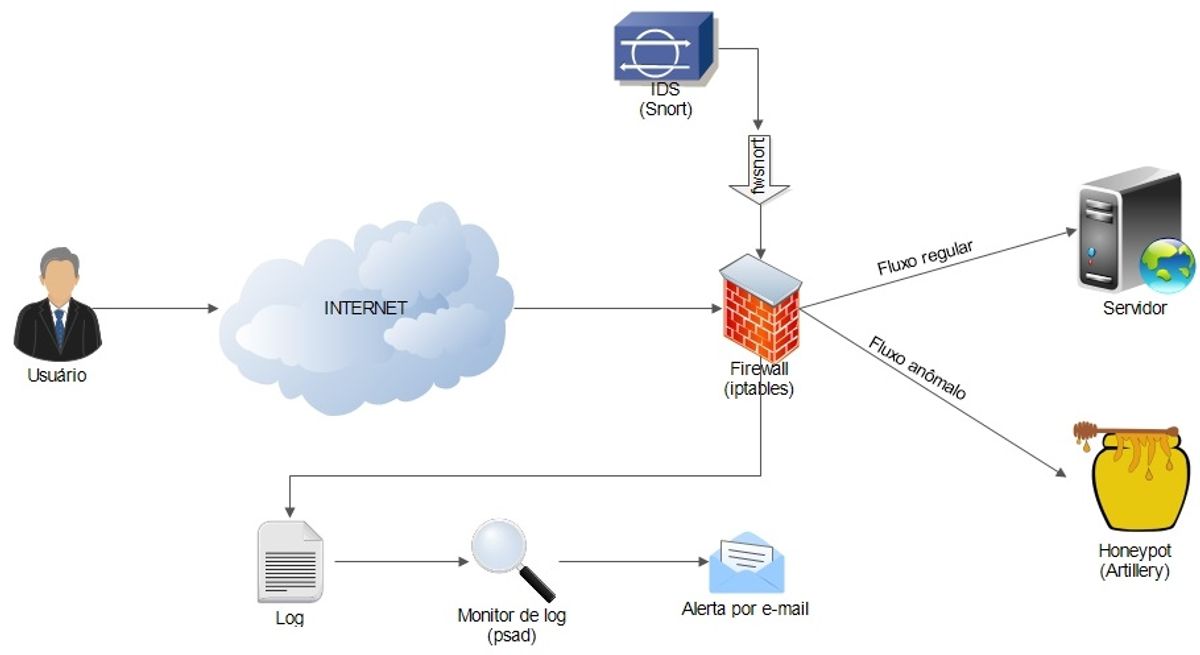
Regular Security Audits and Updates
Regular security audits and updates are a cornerstone of maintaining a secure and scalable website. Conducting thorough vulnerability assessments and penetration tests, as highlighted by the use of the AWS Well-Architected Framework, is crucial for identifying and mitigating potential security risks. Adhering to this framework ensures that your website’s infrastructure is resilient and adheres to industry best practices.
By implementing a routine of security checks, including malware scans and frequent updates to core and plugins, businesses can safeguard against unauthorized access and data breaches. This proactive approach not only protects customer data but also maintains the integrity and trustworthiness of the website.
To effectively manage these security measures, consider the following steps:
- Perform daily automated security checks to ensure your website is malware-free.
- Keep your website’s core and plugins up to date to protect against vulnerabilities.
- Conduct regular pen-testing using established frameworks to evaluate your security posture.
- Implement automated backups to quickly restore your website in case of an emergency.
Maintaining a secure website is an ongoing process that requires vigilance and regular attention. By staying on top of security audits and updates, businesses can ensure that their website remains a reliable and secure platform for growth.
Performance Monitoring and Optimization
To ensure scalability, performance monitoring and optimization are indispensable. Utilizing Application Performance Management (APM) tools provides valuable insights into the health of a website, allowing for the identification and rectification of issues that could impede performance.
By conducting daily performance checks, businesses can guarantee that their websites are operating at peak efficiency, which is crucial for maintaining a positive user experience and high search engine rankings.
In addition to APM, regular security audits and updates contribute to a robust online presence. Automated security checks and frequent updates of core systems and plugins safeguard against vulnerabilities, ensuring the website remains secure and trustworthy.
Here’s a quick checklist for maintaining optimal performance:
- Uptime monitoring with automated alerts
- Daily automated security checks
- Regular updates to core and plugins
- Performance checks to optimize loading times
- SEO monitoring for improved rankings
These practices not only prevent potential downtimes but also foster a seamless user experience, which is vital for growing businesses.
The Role of Support and Maintenance in Scalability
Effective support and maintenance are pivotal in ensuring that a growing business’s website remains scalable and reliable. Regular maintenance schedules are crucial for uptime monitoring, security scans, updates, performance assessments, SEO monitoring, and backups. These activities not only help in maintaining the health of the website but also in planning for growth by monitoring key performance indicators (KPIs) and optimizing performance.
A proactive approach to support and maintenance can significantly reduce the risk of downtime and security breaches, which are critical for maintaining user trust and business continuity.
To stay ahead, businesses must implement a structured maintenance plan that includes:
- Uptime monitoring to ensure availability
- Security checks to prevent breaches
- Frequent updates to core systems and plugins
- Performance optimization to maintain speed
- SEO monitoring to sustain visibility
- Regular backups to safeguard data
By adhering to these practices, businesses can ensure that their website infrastructure is robust enough to handle increased traffic and the evolving demands of the market.
Strategies for Handling Increased Traffic

Load Balancing Techniques
Load balancing is a critical component in ensuring website scalability and maintaining performance during traffic spikes. It involves distributing incoming network traffic across multiple servers to prevent any single server from becoming overwhelmed. This not only enhances user experience by reducing load times but also provides fault tolerance and high availability.
- Horizontal scaling, adding more servers to the pool, is preferred for its flexibility and ease of scaling.
- Vertical scaling, upgrading the existing servers, can be a quick fix but is often limited by hardware constraints.
- Dynamic scaling, adjusting resources automatically in response to traffic, ensures optimal resource utilization.
Implementing load balancing and horizontal scaling improves website performance, fault tolerance, and scalability. Monitoring and security measures are crucial for maintaining a robust online presence.
Choosing the right load balancing technique depends on the specific needs and architecture of your website. It’s essential to consider the types of loads your site experiences and the nature of your hosted applications. Regularly reviewing and updating your load balancing strategies can help you stay ahead of the curve as your business grows.
Scalable Hosting Solutions
For growing businesses, selecting the right hosting solution is a critical decision that can greatly affect scalability and performance. Cloud-based services offer the flexibility to scale up or down as needed, ensuring that your website can handle increased traffic without a hitch. Services like AWS’s Elastic Container Service (ECS) provide auto-scaling capabilities that automatically adjust to traffic surges, making them ideal for businesses experiencing rapid growth or fluctuating demand.
When considering hosting options, it’s important to understand the types of scalability available. Horizontal scalability, or scaling out, involves adding more machines to handle load, while vertical scalability, or scaling up, increases the capacity of existing hardware. Each has its merits, and the choice often depends on the specific needs of your website and business.
Scalability testing is essential to ensure that your website remains responsive and efficient under varying loads. It involves setting realistic target loads and employing appropriate tools to measure performance.
Finally, a well-planned hosting strategy should anticipate future trends to maintain flexibility and competitiveness. This includes regular performance checks and updates to stay ahead of the curve. By doing so, you can ensure that your website remains fast, secure, and capable of growing alongside your business.
Planning for Geographic Distribution
As businesses expand, planning for geographic distribution becomes crucial to handle the surge in traffic from various locations. This involves setting up multiple data centers or using cloud services with a global presence to ensure users experience low latency and high availability.
By strategically placing your infrastructure across different regions, you can provide a seamless experience to a global audience, which is essential for maintaining performance and user experience as traffic grows.
Here are some steps to consider for effective geographic distribution:
- Evaluate the requirements for growth and manage expectations realistically.
- Start with a pilot program in new markets to gather insights before a broader rollout.
- Utilize social media analytics to identify and target new demographic groups.
- Focus on tech-driven business expansion, leveraging tools that support scalability.
Remember, website growth strategies include monitoring KPIs, adjusting infrastructure, and choosing a scalable platform. These steps help in maintaining performance and user experience amidst increased traffic and user interactions.
Leveraging External Scripts and Services
Optimizing the Use of External Scripts
External scripts, such as analytics, social media widgets, and advertising pixels, can significantly impact website performance. Minimizing the number and impact of these scripts is crucial for maintaining fast load times and ensuring a smooth user experience. To achieve this, consider the following steps:
- Prioritize essential scripts by determining which ones directly contribute to your business goals.
- Asynchronously load scripts to prevent them from blocking the rendering of your page.
- Use a tag manager to consolidate and manage script loading more efficiently.
- Regularly audit external scripts for relevance and performance impact, removing or replacing those that are no longer necessary.
By keeping external scripts to a minimum and optimizing their loading, you can reduce unnecessary requests to third-party tools and enhance your website’s overall performance.
Remember, more features in a theme or plugin don’t always mean better performance. It’s about finding the right balance between functionality and speed. Apply these techniques judiciously to meet user expectations and boost your website’s performance.
Integrating Third-Party Tools Without Compromising Performance
Integrating third-party tools into your website can enhance functionality and user experience, but it’s crucial to do so without compromising performance. Careful selection and management of these tools are essential to maintain a swift and responsive site. Here are some steps to ensure that third-party integrations do not slow down your website:
- Evaluate the necessity of each tool. Only use tools that provide significant value to your website and its users.
- Monitor the performance impact of each tool. Use performance metrics to assess how they affect load times and user experience.
- Keep third-party scripts up to date and remove any that are no longer needed to reduce security risks and performance issues.
By prioritizing performance while integrating third-party tools, you can provide a seamless experience for your users without unnecessary bloat.
Remember, third-party code can seriously hurt your site’s performance. Tools like NitroPack can help reduce the impact of third-party code on your site, with or without plugins. It’s important to regularly review and optimize the use of external scripts to maintain optimal website performance.
Monitoring and Managing External Dependencies
As businesses grow, the use of external scripts and services often increases. While these can add valuable functionality, they also introduce potential points of failure and performance bottlenecks. Regular monitoring and management of these dependencies are essential to maintain a scalable website.
To minimize external script dependencies, consider the following steps:
- Embrace modular development to reduce reliance on bulky third-party libraries.
- Prioritize native functionality over external scripts when feasible.
- Conduct regular audits of external scripts to ensure they are necessary and up-to-date.
- Implement lazy loading for scripts that are not critical to the initial page load.
By proactively managing external dependencies, businesses can avoid unnecessary complexity and maintain optimal website performance even as traffic scales.
Additionally, it’s important to have a strategy in place for dealing with potential security vulnerabilities that external scripts may introduce. Regular security audits and updates can help safeguard your website against cyber threats, ensuring that scalability does not come at the cost of security.
Continuous Improvement and Scalability

Conducting Regular Website Health Audits
Regular website health audits are essential for maintaining the performance, security, and overall user experience of your site. Conducting these audits allows businesses to identify and address issues proactively, ensuring that the website can handle increased traffic and activity as the business grows. A comprehensive audit typically includes checks for SEO optimization, page speed, mobile responsiveness, and security vulnerabilities.
A well-executed website health audit provides a roadmap for improvements and optimizations that can significantly enhance the site’s effectiveness and user satisfaction.
To systematically approach a website health audit, consider the following steps:
- Gather user feedback: Utilize surveys and analytics to understand the user experience.
- Benchmark against competitors: Analyze how your site stacks up against others in your industry.
- Review technical SEO: Ensure that your site is following best practices for search engine visibility.
- Assess website performance: Check load times and optimize for speed.
- Evaluate security measures: Regularly update security protocols to protect against threats.
- Monitor for broken links: Keep the site navigation flawless by fixing or removing dead links.
By regularly scheduling these audits, businesses can stay ahead of potential problems and keep their website in top condition, ready to scale alongside their growth.
Adapting to Technological Advances and Market Trends
In the dynamic landscape of the digital world, businesses must remain agile and forward-thinking to ensure their websites can scale effectively. Adapting to technological advances and market trends is not just about keeping up; it’s about staying ahead of the curve. For instance, the rise of voice search and AI-driven SEO strategies are reshaping how we approach content creation and search engine optimization.
Embracing new technologies and market insights can lead to tech-driven business expansion and enhanced market reach. It’s crucial to analyze and optimize your web presence in light of these changes to grow sustainably.
Understanding and implementing the latest SEO trends, such as those highlighted by Backlinko, can significantly impact your website’s visibility and user engagement. Here’s a brief list of actions to consider:
- Conduct a code and UX audit to ensure your website is up to date with the latest standards.
- Utilize marketing technologies (Martech) to better understand and reach your audience.
- Develop a go-to-market strategy that incorporates the latest digital marketing techniques.
By continuously monitoring and adapting to new developments, businesses can build a robust web application that not only meets current demands but is also prepared for future growth.
Building a Scalable Web Architecture from the Ground Up
Building a scalable web architecture is not just about handling the current user load but also about anticipating future growth and being prepared for it. Prioritize scalability in web development by choosing a modular architecture and scalable technologies that can grow with your business. This approach aligns development with business objectives, ensuring long-term success.
Incorporating scalability from the outset of web development is crucial for long-term viability. Agile methodologies foster an environment of flexibility and adaptability, which is essential for continuous improvement and responsiveness to changing market demands.
By focusing on scalability from the beginning, businesses can avoid costly overhauls and ensure a robust foundation for their online presence.
Consider the following points when building a scalable web architecture:
- Use a modular design that allows for easy expansion and integration.
- Select technologies known for their scalability, such as cloud services and containerization.
- Implement automated testing and deployment to streamline updates and scaling efforts.
- Plan for geographic distribution if you expect a global user base, to reduce latency and improve user experience.
At the heart of every successful business is the commitment to continuous improvement and scalability. Our custom web design and development solutions are tailored to help your business grow and adapt in the ever-evolving digital landscape. Whether you need WordPress development, eCommerce solutions, or a comprehensive website health audit, we have the expertise to elevate your online presence. Don’t let your business stagnate; visit our website today to learn how we can partner with you for a brighter digital future.
Conclusion
In conclusion, ensuring website scalability is a multifaceted endeavor that requires attention to various technical and strategic elements. From optimizing images and implementing caching to minifying scripts and managing external scripts, businesses must adopt a proactive approach to maintain a fast, secure, and reliable online presence. Regular reviews using a comprehensive checklist, performance optimization, and staying updated with WordPress developments are crucial for a scalable website. Moreover, partnering with experts who can transform designs into optimized web solutions, conduct thorough website health audits, and provide continuous support and maintenance can significantly contribute to a website’s scalability. As businesses grow, their websites should evolve to handle increased traffic and maintain user satisfaction, ultimately leading to higher conversion rates and sustained success.
Frequently Asked Questions
What is website scalability and why is it important?
Website scalability refers to a website’s ability to handle increased traffic and workload without compromising performance. It’s important because it ensures that as a business grows, the website can accommodate more visitors, transactions, and data efficiently.
How does image optimization contribute to website performance?
Image optimization involves compressing and resizing images without losing quality. This reduces file sizes, leading to faster page load times, decreased server load, and improved user experience.
What are effective caching strategies for a website?
Effective caching strategies include browser caching, server-side caching, and using content delivery networks (CDNs). These methods store frequently accessed data to reduce load times and server resource usage.
Why is it important to minimize scripts on a website?
Minimizing scripts reduces the number of HTTP requests and optimizes file sizes, which can significantly improve website loading times and overall performance, leading to a better user experience.
How can regular security audits and updates enhance website scalability?
Regular security audits and updates protect against vulnerabilities that could compromise website functionality. A secure website maintains user trust and avoids potential downtime due to security breaches.
What role does geographic distribution play in handling increased traffic?
Geographic distribution involves hosting website data in multiple locations to reduce latency, improve load times, and ensure reliability for users from different regions, thus enhancing scalability.