Implementing Robust Development Practices for Future-Proof Websites
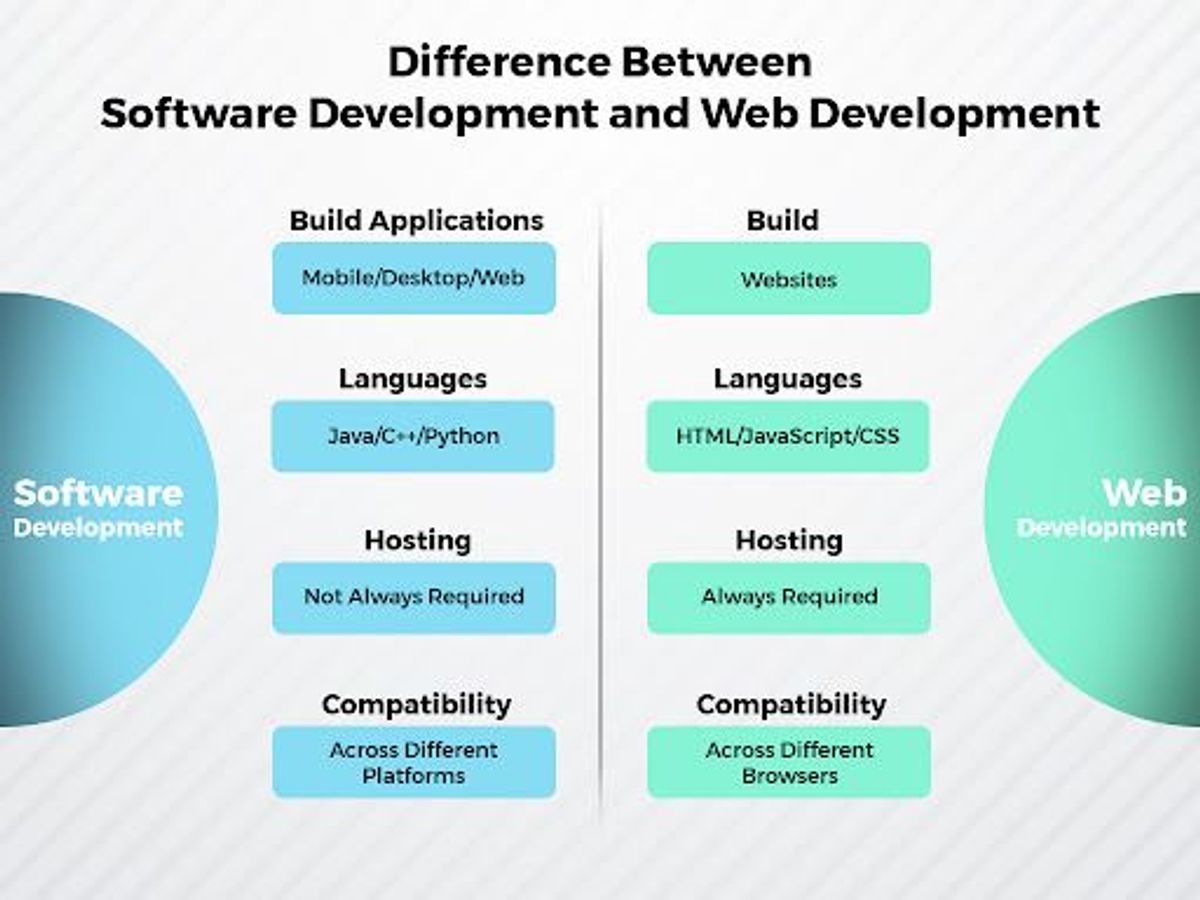
In the dynamic realm of web development, creating websites that stand the test of time requires a strategic approach that encompasses not only current best practices but also anticipates future trends and technological advancements. Implementing robust development practices is essential to ensure that websites remain functional, secure, and relevant as user expectations and digital landscapes evolve. This article delves into the core strategies and methodologies that can help developers future-proof their websites, ensuring they continue to deliver value and a superior user experience in the years to come.
Key Takeaways
- Adopt Agile methodologies to enable flexibility and continuous improvement in web development projects.
- Embrace progressive enhancement to ensure basic functionality across all browsers while providing advanced features for capable devices.
- Prioritize performance optimization and user-centered design principles to enhance user experience and engagement.
- Conduct regular security audits, implement automated backups, and stay updated with the latest web standards to maintain website health and security.
- Incorporate continuous integration, deployment, and post-launch monitoring to quickly address issues and adapt to user feedback.
Strategies for Future-Proof Web Development

Adopting Agile Methodologies
In the realm of web development, adopting Agile methodologies is crucial for ensuring that teams can respond to the ever-changing demands of the market and user expectations. Agile is a structured and iterative approach to project management and product development, fostering flexibility and rapid response to change. This approach aligns with the needs of businesses focusing on areas such as WordPress and eCommerce development, where staying ahead of trends is vital.
By integrating Agile practices, development teams can break down projects into manageable units, allowing for continuous evaluation and adaptation at each stage. This ensures that the final product is not only functional but also aligns with the user-centric design and quality assurance standards necessary for future-proof websites.
The benefits of Agile methodologies can be summarized in the following list:
- Improved team collaboration and communication
- Enhanced project transparency and stakeholder engagement
- Faster turnaround times with iterative releases
- Higher product quality through regular feedback loops
Embracing Agile practices is not just about adopting a new set of processes; it’s about cultivating a mindset that values collaboration, customer feedback, and the willingness to adapt. This cultural shift can lead to more innovative and resilient web solutions that stand the test of time.
Embracing Progressive Enhancement
Progressive Enhancement is a strategy for web development that emphasizes accessibility and user experience by starting with a solid foundation of HTML content, then layering on CSS for styling, and finally adding JavaScript for enhanced interactivity. This approach ensures that your website is usable on any device, regardless of its capabilities or the browser used to access it. It’s about building a core experience that works for everyone and then enhancing it for those with more advanced browsers or greater bandwidth.
Progressive Enhancement isn’t just another web jargon; it’s a guiding principle shaping modern web development.
By adopting this methodology, developers can create sites that are not only more accessible but also more resilient to the rapid pace of technological change. Here are some key aspects to consider:
- Start with semantic HTML to ensure content structure and accessibility.
- Use CSS to progressively enhance the visual experience.
- Layer JavaScript to add advanced functionality without compromising the base experience.
- Test across a range of devices to ensure compatibility.
- Continuously iterate based on user feedback and evolving web standards.
Ensuring Cross-Browser Compatibility
Ensuring that your website functions correctly across different browsers is a critical aspect of web development. Establish a testing environment that mirrors your production setting to facilitate comprehensive testing. This approach helps in identifying discrepancies and issues that could affect user experience on various browsers.
Embracing a mobile-first design is also crucial, as a significant number of users now access the internet via mobile devices. It’s not just about adjusting layouts, but about providing a consistent and intuitive experience across all screen sizes.
To achieve cross-browser compatibility, consider the following steps:
- Conduct thorough testing on multiple browsers and devices.
- Use responsive design techniques to ensure proper display on all screens.
- Employ fallbacks for CSS features not supported by older browsers.
- Validate your code with tools like W3C Validator to ensure standards compliance.
- Keep abreast of browser updates and test regularly to maintain compatibility.
Designing for Performance and User Experience
Optimizing Page Load Times
In the pursuit of enhancing user experience, optimizing page load times is a critical step. A website’s performance is often the first impression a user gets, and slow loading can deter potential customers. To address this, start by compressing and optimizing images without sacrificing quality, as images can be one of the largest contributors to page size.
Implementing caching can significantly reduce load times by storing frequently accessed resources locally. This not only improves the user experience but also conserves server resources. Additionally, minifying scripts by removing unnecessary characters from HTML, CSS, and JavaScript can streamline code and reduce file sizes, leading to quicker load times.
It’s essential to regularly review and update your website’s performance optimization strategies. This includes keeping an eye on external scripts and plugins, which should be kept to a minimum to avoid slowing down the site.
Lastly, consider the impact of third-party scripts and pixels. While they can add functionality, they can also introduce additional load times. Optimize the use of external scripts to ensure they don’t hinder performance. By following these steps, you can create a more responsive and engaging website that meets the expectations of today’s fast-paced digital world.
Responsive and Adaptive Design
In the realm of web development, responsive and adaptive design are crucial for ensuring that websites deliver a consistent user experience across a multitude of devices. Responsive design fluidly changes and responds to fit any screen or device size, making it a go-to choice for a broad audience reach. On the other hand, adaptive design involves creating fixed layouts that cater to specific screen sizes.
Embracing both responsive and adaptive strategies is key to addressing the diverse needs of web users. While responsive design offers flexibility and ease of maintenance, adaptive design allows for tailored experiences on distinct devices.
Understanding the differences and applications of each approach can significantly impact user satisfaction and engagement. The internet is full of responsive design tips and adaptive design tips, guiding developers to optimize their websites effectively. Prioritizing mobile responsiveness is essential, as the majority of internet users now access content through smartphones and tablets.
User-Centered Design Principles
In the realm of web development, user-centered design principles are paramount for creating websites that not only look good but also function seamlessly across various devices and platforms. These principles are grounded in the understanding of user needs and behaviors, ensuring that the end product is intuitive and accessible to all.
By focusing on simplicity and usability, developers can craft experiences that are both engaging and efficient, leading to higher user satisfaction and retention.
Key aspects of user-centered design include layout and navigation that guide users effortlessly, interactive elements that enhance engagement, and visual design that is both appealing and functional. Embracing these principles leads to a memorable user experience, which is crucial for brand loyalty and advocacy.
To ensure that these design principles are effectively implemented, it is essential to conduct cross-platform usability testing. This allows for the identification of potential issues and the opportunity to refine the design before it reaches the wider audience. Moreover, actively seeking user feedback and incorporating their suggestions can lead to continuous improvement and adaptation to emerging user needs.
Maintaining Website Health and Security

Regular Security Audits
Conducting regular security audits is a critical step in safeguarding your website against emerging threats and vulnerabilities. These audits help identify potential security issues before they can be exploited by attackers. A comprehensive security audit covers various aspects of your website, including but not limited to SSL certificates, plugin vulnerabilities, and outdated software.
A proactive approach to security not only protects your website but also preserves the trust of your users.
To streamline the audit process, consider using tools like Mozilla’s Observatory, which offers a free online security audit. Simply input your domain name and initiate a scan. Below is a list of key areas to focus on during an audit:
- SSL/TLS certificate validity
- Software and plugin updates
- Password strength and policies
- Firewall and intrusion detection systems
- Backup and recovery procedures
Regularly updating and maintaining your website plays a pivotal role in its overall health and security. It’s essential to keep all components up to date to prevent security breaches that could compromise user data and tarnish your reputation.
Implementing Automated Backups
Automated backups are a critical component of website maintenance, providing a safety net against data loss and ensuring business continuity. Regularly scheduled backups protect your website’s data from unforeseen events such as server failures, hacking, or accidental deletions. It’s essential to choose a backup frequency that aligns with your website’s update cycle and the value of the data being protected.
By implementing automated backups, you can rest assured that your website’s data is securely stored and can be easily restored in case of emergency.
Here’s a simple checklist to ensure your backup strategy is effective:
- Perform the backup: Implement backups according to the method chosen. For automated systems, scheduling will be key.
- Verify backups: Regularly check that your backups are complete and can be restored.
- Secure storage: Store backups in a secure, off-site location to prevent data loss from physical damage to your server.
- Test restores: Periodically test backup restores to ensure data integrity and the effectiveness of the backup process.
Staying Updated with Latest Web Standards
To ensure the longevity and relevance of your website, it’s crucial to stay abreast of the latest web standards. This involves a proactive approach to learning and implementing new technologies and coding practices as they emerge.
By regularly updating your knowledge base and skill set, you can adopt secure coding standards and optimize your website’s performance, which are essential for maintaining a competitive edge.
Here are some steps to help you stay updated:
- Subscribe to industry newsletters and blogs.
- Attend web development conferences and workshops.
- Participate in online communities and forums.
- Conduct periodic reviews of your website to identify areas for improvement.
Staying informed not only helps in enhancing user experience but also plays a significant role in SEO analyses and following professional processes. It’s a continuous effort that pays dividends in the form of a robust, future-proof website.
Quality Assurance and Testing

Developing a Comprehensive Test Plan
A comprehensive test plan is the backbone of any robust development process. It outlines the specific tests to be performed, the methodologies to be used, and the metrics for success. This plan should be detailed and cover all aspects of the website, from functionality and usability to performance and security.
By establishing clear objectives and procedures, a test plan ensures that every feature and function of the website is scrutinized and validated before going live.
To ensure thorough coverage, the test plan should include a variety of tests, such as unit tests, integration tests, system tests, and acceptance tests. Here’s a brief overview of each:
- Unit Tests: Validate the smallest parts of the application, such as functions or methods.
- Integration Tests: Ensure that different parts of the application work together as expected.
- System Tests: Evaluate the complete and integrated software to check if it meets the requirements.
- Acceptance Tests: Confirm that the solution works for the user and meets their expectations.
Remember, mobile optimization is crucial for scalable websites, focusing on responsive design, load times, touch interactions, and local resources. Additionally, regular security audits are essential for preventing vulnerabilities and improving website security.
Leveraging Automated Testing Tools
In the realm of web development, automated testing tools are indispensable for ensuring consistent quality and reliability. These tools facilitate the execution of repetitive tasks, checking for errors and inconsistencies without the need for manual intervention. By incorporating automated testing into the development cycle, teams can detect issues early and reduce the time to market.
Automated testing is not just about finding bugs; it’s about ensuring a seamless user experience and maintaining high performance standards.
A variety of automated testing tools are available, each with its own strengths. For instance, Katalon Studio offers an all-in-one solution for web, mobile, API, and desktop test automation. It’s crucial to select tools that align with the project’s needs and integrate smoothly into the existing workflow. Below is a list of considerations when choosing an automated testing tool:
- Compatibility with your tech stack
- Ease of use and learning curve
- Support for various testing types (unit, integration, system, etc.)
- Community and vendor support
- Scalability and performance
Ultimately, the goal is to build a robust testing framework that can grow with the project, ensuring that future enhancements do not compromise existing functionality.
Continuous Integration and Deployment
The adoption of Continuous Integration (CI) and Continuous Deployment (CD) is a game-changer in web development. By integrating QA early in the development process, teams can detect issues sooner, leading to more stable releases. CI/CD pipelines automate the testing and deployment phases, ensuring that new code changes are reliably tested and deployed to production with minimal manual intervention.
Embracing CI/CD not only streamlines workflows but also fosters a culture of continuous improvement. It allows developers to balance speed with quality, making it possible to deliver updates to users more frequently and with greater confidence.
Here’s a brief overview of the CI/CD process:
- Developers commit code to a shared repository.
- Automated tests are run to validate code changes.
- If tests pass, the code is automatically deployed to a staging environment for further testing.
- Once verified, the code is deployed to production.
This process underscores the importance of maintaining a robust testing suite and encourages regular feedback from users to refine and enhance the website’s functionality.
Post-Launch Monitoring and Optimization

Real-Time Performance Monitoring
Real-time performance monitoring is essential for maintaining the health and efficiency of a website. Regularly tracking key performance indicators (KPIs) ensures that any potential issues can be identified and addressed promptly, minimizing downtime and maintaining a seamless user experience. By implementing a robust monitoring system, website administrators can react quickly to performance dips and optimize the site for both speed and reliability.
Real-time insights allow for immediate action, which is crucial in a digital landscape where user expectations for speed and accessibility are higher than ever.
Effective monitoring involves a variety of metrics, such as page load times, server response times, and uptime percentages. Here’s a simplified view of what a performance dashboard might track:
- Uptime Percentage
- Average Page Load Time
- Peak Load Time
- Server Response Time
- Number of Concurrent Users
- Error Rates
These metrics provide a comprehensive overview of a website’s performance, enabling developers and stakeholders to make data-driven decisions. It’s not just about keeping the site running; it’s about optimizing website performance and security for a reliable online presence that meets the evolving demands of users and search engines alike.
User Feedback and Iterative Improvements
After launching a website, the journey towards improvement does not end. Collecting user feedback is a cornerstone of enhancing the customer experience and ensuring that the website evolves to meet user expectations. Tools like OptiMonk and Hotjar offer structured ways to gather actionable insights, allowing developers and designers to make data-driven decisions for iterative improvements.
By establishing a feedback loop, you can prioritize updates based on user needs and preferences, fostering a sense of community and ownership among your audience.
Incorporating user feedback effectively requires a systematic approach:
- Identify key areas of your website where feedback can be most beneficial.
- Utilize website feedback tools to capture user opinions and suggestions.
- Analyze the feedback to discern patterns and common issues.
- Develop a plan to implement changes that address the feedback.
- Monitor the impact of these changes on user experience and satisfaction.
Regularly engaging with your users and adapting to their feedback not only improves the website but also builds trust and loyalty, which are invaluable for long-term success.
Search Engine Optimization Strategies
In the digital age, search engine optimization (SEO) is a cornerstone of online success. It’s not just about having a website; it’s about making it visible to the right audience. SEO strategies involve a multifaceted approach, including keyword research, website optimization, and building quality backlinks. These elements work together to improve your site’s ranking on search engines, making it more discoverable to potential visitors.
By integrating SEO with compelling storytelling, you create a powerful synergy that enhances both visibility and engagement. This combination ensures that your content resonates with your audience and is easily found online.
Analytics tools play a crucial role in refining SEO strategies. They provide valuable insights into user behavior, allowing for data-driven decisions that can further optimize content and improve user experience. Regular updates and security checks, informed by user feedback, contribute to the continuous improvement of your website, ensuring it remains relevant and secure in the ever-evolving digital landscape.
Ensuring the success of your website doesn’t end at launch. With our comprehensive Post-Launch Monitoring and Optimization services, we keep a vigilant eye on your site’s performance and continually refine it for peak efficiency. Don’t let your digital presence stagnate; visit our website to learn more about our WordPress Development and eCommerce solutions, and let’s work together to keep your site at the forefront of innovation. Ready to optimize your online success? [Contact us] today!
Conclusion
In the ever-evolving landscape of web development, implementing robust practices is not just a necessity but a commitment to future-proofing your digital presence. Throughout this article, we’ve explored the importance of maintaining a forward-thinking mindset, from the strategic planning stages to post-launch monitoring. By embracing a comprehensive approach that includes regular updates, performance optimization, and a focus on user experience, you can ensure that your website remains relevant, secure, and efficient. Remember, the goal is not only to impress and engage your audience today but to build a resilient platform that can adapt to the technological advancements of tomorrow. As we continue to witness rapid changes in the digital world, staying informed and proactive in your development practices will be the key to enduring success.
Frequently Asked Questions
What are agile methodologies in web development?
Agile methodologies involve iterative development, where requirements and solutions evolve through collaborative effort. It emphasizes flexibility, continuous improvement, and customer feedback, allowing teams to respond quickly to changes and deliver high-quality websites.
How does progressive enhancement benefit web development?
Progressive enhancement is a strategy for web design that starts with a basic, functional website and progressively adds enhancements for browsers with greater capabilities. This ensures all users have access to the core content and functionality, while also providing an improved experience for those with modern browsers.
Why is cross-browser compatibility important?
Cross-browser compatibility ensures that a website functions correctly across different web browsers. It’s important because it provides all users with a consistent experience regardless of their choice of browser, which can affect the site’s reach and user satisfaction.
What role does quality assurance play in web development?
Quality assurance (QA) in web development involves systematic monitoring and evaluation of the various aspects of a project to ensure that standards of quality are being met. QA helps identify bugs and issues before the website goes live, ensuring a smooth and reliable user experience.
How can regular security audits improve website health?
Regular security audits help identify vulnerabilities in a website that could be exploited by attackers. By addressing these issues proactively, website owners can protect sensitive data, maintain user trust, and avoid potential legal and financial repercussions.
What is the importance of post-launch monitoring in web development?
Post-launch monitoring involves tracking the performance and functionality of a website after it goes live. It’s crucial for quickly identifying and fixing any issues that arise, ensuring the website remains healthy, secure, and provides a good user experience.