Leveraging Advanced Technology for Optimized Website Functionality

In today’s digital age, creating a website that stands out requires more than just a sleek design; it necessitates the integration of advanced technology to optimize functionality. This article delves into various strategies for enhancing website performance, security, and user experience through the use of cutting-edge tools and techniques. From image optimization and caching to AI-powered content strategies, we explore how to leverage technology to ensure your website not only attracts but also retains users by delivering a seamless and secure online experience.
Key Takeaways
- Optimizing images and scripts, and implementing effective caching strategies can significantly improve website performance and loading times.
- Regular maintenance, secure plugin management, and vigilant security monitoring are crucial for safeguarding WordPress websites against threats.
- Minimizing the use of external scripts and third-party dependencies can enhance website speed and reduce performance bottlenecks.
- Responsive design, user feedback, and usability testing are key to creating a user experience that maximizes engagement and conversion rates.
- Leveraging AI for content strategy and SEO can lead to more personalized user experiences and predictive strategies for improved website visibility.
Optimizing Website Performance

The Importance of Image Optimization
Optimizing images is a critical step in enhancing website performance. Websites with optimized images load much faster, which can significantly improve user engagement and retention. By reducing file sizes without compromising quality, you ensure that your site remains visually appealing while minimizing load times.
Effective image optimization involves several key practices:
- Choosing the right file format (JPEG, PNG, WebP)
- Compressing images to reduce file size
- Using responsive images that adapt to different devices
- Implementing lazy loading to defer offscreen images
By prioritizing image optimization, you not only enhance the user experience but also contribute to better SEO rankings, as search engines favor fast-loading websites.
Remember, a website that loads quickly is more likely to keep visitors engaged, leading to lower bounce rates and higher conversion rates. Utilize tools and techniques to streamline your images, and watch your website’s performance soar.
Implementing Effective Caching Strategies
Caching is a critical component in website optimization, serving as a means to store frequently accessed data points, thereby reducing server load and improving site speed. Effective caching strategies can significantly enhance user experience and SEO rankings.
When implementing caching, it’s important to consider the different types of caching mechanisms available:
- Browser caching: Stores website resources on the user’s local computer.
- Server-side caching: Involves storing data on the server to prevent repeated processing.
- Content Delivery Network (CDN) caching: Utilizes a network of servers to deliver cached content from the closest server to the user.
Each method has its own set of advantages and should be tailored to the specific needs of your website. For instance, browser caching is excellent for static resources like images and CSS files, while CDN caching can greatly benefit websites with a global audience.
By strategically implementing these caching techniques, businesses can ensure that their websites remain fast and responsive, which is essential in today’s fast-paced digital landscape.
It’s also crucial to regularly monitor and update your caching setup to adapt to new content and changes in web traffic patterns. This proactive approach will help maintain optimal performance levels and keep your website running smoothly.
Minifying Scripts for Faster Load Times
To optimize website performance, minification of scripts is a crucial step. This process involves the removal of unnecessary characters from code—such as whitespace, comments, and block delimiters—without changing its functionality. By minifying JavaScript and CSS files, we can reduce their size, leading to faster transmission over the network and quicker parsing by the browser.
Minification is not just about reducing file size; it’s about enhancing the end-user’s experience by decreasing the time it takes for a website to become interactive.
In addition to minification, it’s beneficial to combine files where possible. This reduces the number of HTTP requests that a browser needs to make, further improving load times. Here’s a simple checklist to ensure your scripts are optimized:
- Remove all comments and unnecessary whitespace.
- Shorten variable and function names.
- Combine multiple scripts into a single file.
- Use tools or services that automate the minification process.
Remember, while minification is a powerful technique, it should be part of a broader strategy that includes effective caching and managing external scripts strategically. These combined efforts lead to a more seamless user experience and contribute to the overall success of your website.
Enhancing Website Security

Regular Maintenance for WordPress Websites
Securing WordPress websites for enhanced performance involves regular updates, maintenance, and implementing security best practices. Regular maintenance is not just about updates; it’s about ensuring the longevity and reliability of your website. A well-maintained WordPress site is less vulnerable to attacks and functions more efficiently, providing a better user experience.
By adhering to a consistent maintenance schedule, you can prevent a multitude of potential issues that could disrupt your website’s functionality and compromise user data.
Here are some key maintenance tasks to keep your WordPress site secure and performing at its best:
- Perform regular backups of your website data
- Update WordPress core, themes, and plugins to their latest versions
- Run security scans to detect and fix vulnerabilities
- Optimize your database to prevent bloat and maintain speed
- Check and repair broken links to improve SEO and user experience
Remember, neglecting website maintenance can lead to decreased performance, security breaches, and a poor user experience, ultimately affecting your site’s reputation and success.
Strategies for Secure Plugin Management
In the realm of WordPress websites, plugins are a double-edged sword. While they extend functionality, they can also introduce vulnerabilities if not managed properly. Regular updates and maintenance are crucial for keeping plugins secure. AM2 Studio emphasizes the importance of proactive maintenance to mitigate security risks and enhance performance.
- Regular Updates: Keep plugins up-to-date to patch security flaws.
- Vetted Sources: Only install plugins from reputable sources.
- Minimal Use: Use the least number of plugins necessary for functionality.
- Security Audits: Perform regular security checks to detect malware or suspicious activity.
By adopting a strategic approach to plugin management, you can significantly reduce the risk of security breaches. This involves a careful selection of plugins, regular updates, and thorough security audits to ensure that your website remains secure and efficient.
Choosing the right partner for website maintenance and support is essential. Services like automated security checks, performance optimization, and regular backups can keep your website in top condition, as offered by AM2 Studio. Their comprehensive approach to website health includes frequent core and plugin updates, ensuring that your digital presence is both robust and reliable.
Monitoring and Responding to Security Threats
In the digital age, vigilant monitoring and rapid response to security threats are crucial for maintaining the integrity of any website. Implementing a robust security monitoring system can be the difference between a minor inconvenience and a catastrophic breach. Continuous Security Monitoring (CSM) tools are essential in this regard, as they enable developers to detect and respond to threats in real-time, focusing on system and network monitoring to safeguard assets.
Proactive security measures and regular assessments are key to ensuring that threats are identified and mitigated before they can cause harm.
A comprehensive security strategy should include regular updates and patches to close vulnerabilities, as well as daily automated security checks to keep the site malware-free. Additionally, it’s important to have a plan in place for frequent core and plugin updates, which are often the target of attackers. Below is a list of critical actions that should be part of any security protocol:
- Real-time engagement monitoring to adjust security measures
- AI-powered analytics to predict and prevent security incidents
- Regular security audits to identify and address potential weaknesses
- Automated backups for quick recovery in case of an attack
By staying ahead of security threats with these practices, businesses can protect their online presence and maintain customer trust.
Streamlining External Script Usage

Balancing Functionality with Performance
In the quest for an optimal web presence, balancing the functionality of a website with its performance is crucial. Websites are often laden with features that, while useful, can bog down load times and hamper user experience. To address this, web developers must prioritize performance optimization techniques and reduce third-party dependencies.
- Prioritize performance optimization techniques: Focus on streamlining code, leveraging browser caching, and optimizing server response times.
- Reduce third-party dependencies: Evaluate the necessity of each external script and plugin, considering the impact on performance.
By meticulously analyzing the balance between features and speed, websites can deliver the functionality users need without compromising on the swift performance they expect.
Ultimately, the goal is to provide a seamless experience where the website functions as intended without users noticing any lag. This often involves making tough decisions about which features to include and how they are implemented. The key is to ensure that every element serves a purpose and contributes positively to the overall user experience.
Minimizing Third-Party Dependencies
Reducing reliance on third-party scripts is crucial for maintaining a lean and efficient website. External scripts can significantly slow down page load times, impacting user experience and SEO rankings. To combat this, it’s essential to audit your website’s script usage regularly. Identify scripts that are non-essential or can be replaced with lighter alternatives. Here’s a step-by-step approach to minimize third-party dependencies:
- Evaluate the necessity of each script.
- Search for native functionality or lighter script alternatives.
- Implement lazy loading for scripts that are not critical to initial page rendering.
- Regularly monitor script performance and impact on site speed.
By streamlining the number of external scripts, you not only improve website performance but also enhance security by reducing potential attack vectors.
Remember to optimize external script usage by assessing impact, using performance testing tools, and efficient integration strategies. Regularly review and optimize scripts for improved website performance. This proactive approach ensures that your website remains fast, secure, and provides a seamless experience for your users.
Optimizing External Scripts for Speed
To achieve an efficient website, it’s crucial to optimize external scripts for speed. This involves a meticulous process of evaluating each script’s impact on performance and making informed decisions about which ones are truly necessary. Here are some steps to consider:
- Prioritize scripts based on their importance to the core functionality of the site.
- Implement lazy loading for scripts that are not required immediately, deferring their load until they are needed.
- Minimize the use of third-party scripts to reduce reliance on external sources, which can slow down your site.
By streamlining the scripts used on your website, you can significantly improve loading times, enhance user experience, and potentially boost your SEO rankings.
Remember, every millisecond counts when it comes to website performance. Regularly review and audit your script usage to ensure that only the most efficient and necessary scripts are running on your site.
Maximizing User Experience through Design

Responsive and Intuitive Design Principles
In the realm of web design, responsiveness and intuitiveness are paramount. A website must fluidly adapt to various screen sizes and devices, ensuring a consistent experience for all users. This adaptability not only caters to the user’s convenience but also contributes to the site’s search engine ranking, as mobile-friendliness is a significant factor in SEO.
Key elements of responsive design include flexible grid layouts, media queries, and scalable images. Together, they create a seamless transition across devices. Intuitive navigation, on the other hand, is achieved by understanding the user’s journey and anticipating their needs. Simplifying the path to information or actions they seek enhances satisfaction and reduces bounce rates.
By prioritizing user-centric design, we can significantly boost engagement and conversion rates. A well-structured website invites exploration and interaction, which are critical components of a successful online presence.
To illustrate the impact of these principles, consider the following statistics:
- Mobile devices account for approximately half of web traffic worldwide.
- 57% of internet users say they won’t recommend a business with a poorly designed mobile website.
- A single second delay in mobile load times can impact conversion rates by up to 20%.
These figures underscore the importance of a design approach that is both responsive and intuitive. As we continue to embrace a digital-first world, the value of such design principles will only grow, making them indispensable for any website looking to thrive in the competitive online landscape.
Usability Testing and User Feedback Integration
A seamless user journey is the cornerstone of a successful website, ensuring that visitors can navigate effortlessly from one point to another. Strategies for platform optimization, usability testing, and user feedback integration are crucial for enhancing user experience and ensuring accessibility compliance in website development.
Usability testing is not just a one-time event but an ongoing process that involves regular iterations and refinements based on user feedback. This approach helps in identifying pain points and areas for improvement, which can significantly enhance user experience, engagement, and conversion on websites.
By integrating user feedback into the development cycle, businesses can create a more intuitive and responsive design that caters to the needs and expectations of their audience.
To effectively integrate usability testing and user feedback, consider the following steps:
- Conduct usability testing at various stages of the design and development process.
- Gather feedback through surveys, user interviews, and analytics.
- Analyze the data to understand user behavior and preferences.
- Implement changes based on the insights gained to improve the user journey.
- Repeat the process to continually refine and optimize the user experience.
Creating a Seamless User Journey
A seamless user journey is pivotal for retaining visitors and converting them into loyal customers. Mapping out the user journey for different customer types allows for a tailored experience that meets their specific needs. This approach not only enhances user satisfaction but also bolsters the overall effectiveness of the website.
To ensure a smooth navigation experience, consider the following steps:
- Identify key touchpoints where users interact with your site.
- Analyze user behavior to understand their needs and preferences.
- Simplify the navigation structure to facilitate easy movement through the site.
- Implement intuitive design elements that guide users naturally to their desired content.
By focusing on these aspects, you can create a user journey that feels intuitive and effortless, encouraging users to engage more deeply with your content.
Personalization plays a crucial role in creating a seamless journey. Utilizing AI and machine learning algorithms can dynamically generate content that resonates with individual users, leading to increased engagement and satisfaction. Remember, a website that adapts to user behavior provides a more compelling and relevant experience.
Leveraging AI for Content Strategy and SEO
AI-Powered Analytics for Content Optimization
In the realm of digital marketing, AI-powered analytics are revolutionizing the way we approach content strategy and SEO. By harnessing the capabilities of AI-driven tools, businesses can optimize their content creation to better meet the needs of their audience, thus enhancing their online presence. These tools provide actionable insights by analyzing user interactions and predicting content performance, enabling marketers to refine their strategies for maximum user engagement.
The predictive nature of AI analytics allows for a proactive approach to content optimization, ensuring that resources are allocated efficiently and adjustments are made in real time for peak performance.
To effectively leverage AI in content optimization, consider the following steps:
- Leverage Predictive Analytics: Utilize AI tools to analyze historical data and predict future content performance trends.
- Monitor Real-Time Engagement: Track audience interactions and adjust strategies promptly for improved content optimization.
- Refine Target Keywords: Employ AI to research and target high-opportunity keywords for enhanced content performance.
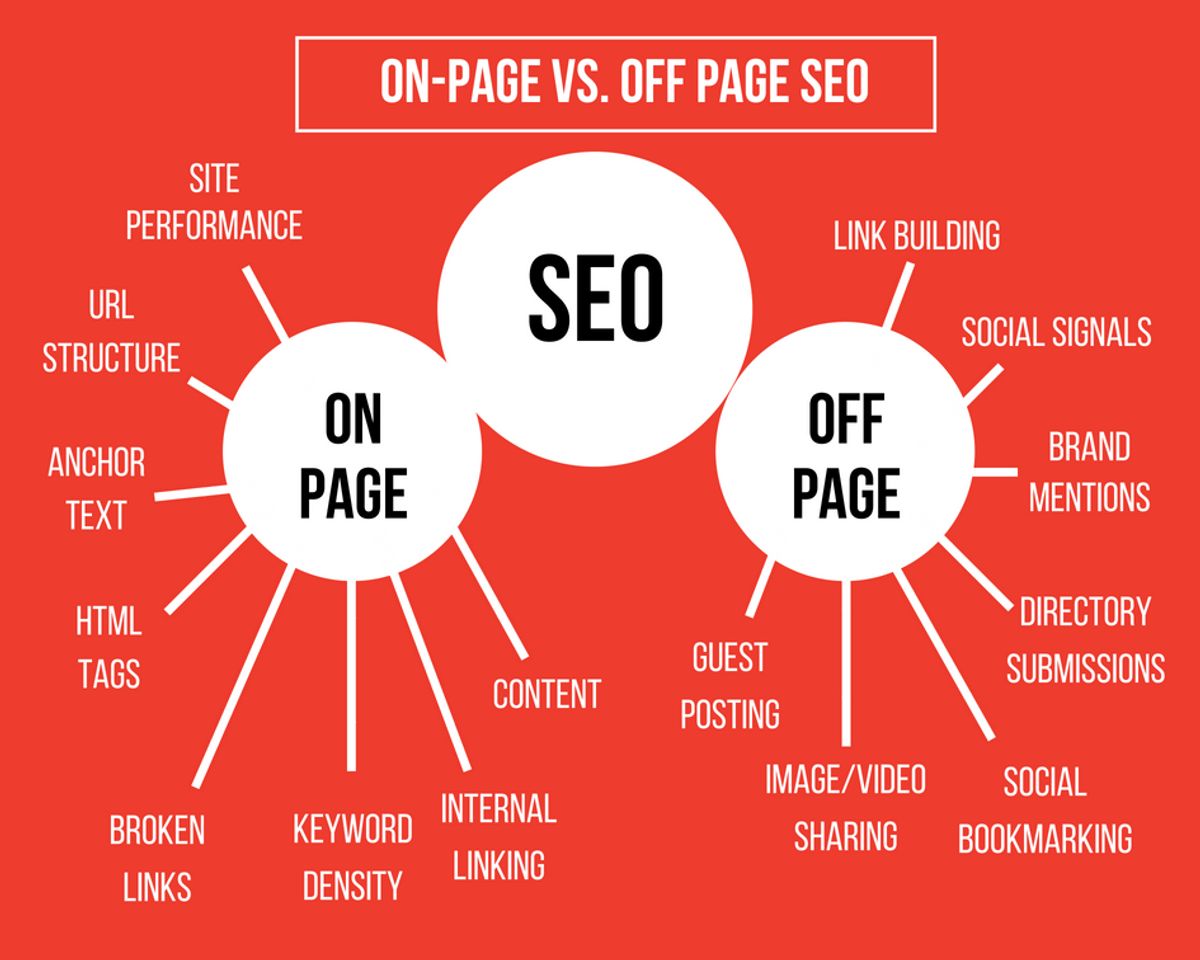
Technical SEO, a critical aspect of website optimization, also benefits from AI tools such as SEMrush and Surfer SEO. These platforms aid in refining SEO strategies to align with the evolving algorithms of search engines. As the digital landscape continues to shift, the importance of responsive design becomes ever more crucial, especially for mobile-friendly websites.
Personalized Content Experiences to Boost Engagement
In the digital age, personalized content experiences are pivotal for engaging users effectively. By leveraging AI, websites can tailor content to individual preferences, leading to increased user engagement and loyalty. AI-driven personalization considers user behavior, search trends, and social interactions to deliver content that feels bespoke and relevant.
- Identification of Audience Preferences: AI analyzes user data to uncover content that resonates, enhancing engagement.
- Content Relevance and Personalization: Utilizing user feedback and search data, AI crafts personalized content, boosting satisfaction and repeat visits.
- Gap Analysis: AI tools identify content opportunities, ensuring coverage of topics users are seeking.
Embracing AI for content strategy not only keeps your website’s content fresh but also fosters a more customized user experience. This can lead to improved engagement metrics such as time on site, conversion rates, and customer retention.
AI-driven design not only enhances the user experience through intelligent optimization but also supports the maintenance of secure, high-performing WordPress websites. It’s a comprehensive approach that touches on various aspects of website functionality, from image and video optimization to advanced caching and script minification.
Predictive Strategies for Improved SEO Performance
In the rapidly evolving digital landscape, predictive strategies are becoming indispensable for staying ahead in SEO performance. By harnessing AI-powered analytics, businesses can forecast search trends and refine their content to align with future user interests. This proactive approach not only enhances relevance but also positions websites to capitalize on emerging opportunities.
Predictive analytics enable the anticipation of user behavior, guiding the creation of content that resonates with audiences before they even begin their search.
A key component of predictive SEO is the utilization of machine learning algorithms to analyze large datasets, identifying patterns that can inform content strategy. This data-driven method allows for the optimization of content for online success, ensuring that SEO best practices are met and analytics are effectively leveraged for targeted content refinement.
To illustrate the impact of predictive strategies, consider the following benefits:
- Increased visibility: By predicting and targeting upcoming trends, your content is more likely to rank higher on search engine results pages.
- Enhanced user engagement: Content that anticipates user needs and interests fosters greater interaction and time spent on your site.
- Improved conversion rates: Relevant and timely content can lead to more effective calls-to-action and higher conversion rates.
In today’s digital landscape, leveraging AI for your content strategy and SEO is not just an advantage—it’s a necessity. Our team at AM2 specializes in creating custom web solutions that grow your business and ensure your online presence is optimized for success. From WordPress development to eCommerce solutions, we have the expertise to elevate your brand. Ready to transform your digital strategy? Visit our website and discover how we can help you achieve remarkable results.
Conclusion
In the digital age, optimizing website functionality is not just a luxury, it’s a necessity for staying competitive. Throughout this article, we’ve explored various advanced technologies and strategies that can significantly enhance website performance. From optimizing images and implementing caching to minifying scripts and judiciously using external scripts, these techniques collectively contribute to faster loading times, improved user experience, and heightened security. Moreover, the integration of AI-powered tools for real-time content optimization and SEO strategies promises to revolutionize how we engage with our audience and track content performance. As we continue to embrace these innovative solutions, it’s clear that the potential for growth and improved customer satisfaction is boundless. By regularly reviewing and updating our practices with the latest advancements, we can ensure that our websites not only meet but exceed the expectations of the modern user.
Frequently Asked Questions
How does image optimization enhance website performance?
Image optimization involves compressing and adjusting the quality of images to reduce file size without compromising visual clarity. This reduces the amount of data that needs to be transferred when a page loads, leading to faster website performance and improved user experience.
What are the benefits of implementing effective caching strategies?
Caching saves data from previous website visits, which allows for quicker load times on subsequent visits. This not only reduces server load but also enhances the user experience by delivering content faster.
Why is it important to minify scripts on a website?
Minifying scripts reduces the size of CSS and JavaScript files by removing unnecessary characters. This leads to fewer HTTP requests and faster page loading times, which can improve overall website performance and customer satisfaction.
How can external script usage be optimized for better website performance?
Optimizing external script usage involves minimizing the number of third-party scripts and ensuring they are loaded efficiently. This can reduce unnecessary requests and improve page load times, balancing functionality with performance.
What role does AI play in content strategy and SEO?
AI can analyze user engagement and search trends to optimize content in real-time, predict the success of content strategies, and provide insights for SEO optimization. This leads to more targeted and effective content that can improve website visibility and engagement.
How does regular maintenance contribute to website security?
Regular maintenance, including updates and security scans, helps protect a website from vulnerabilities and malware. Keeping software up to date and monitoring for threats is crucial for maintaining a secure online presence.