Leveraging Advanced Technology for Optimized Website Functionality

In today’s digital landscape, a website’s functionality is not just about its aesthetic appeal, but also its performance and user experience. Advanced technology plays a pivotal role in optimizing these aspects to ensure that a website not only attracts visitors but also retains them with fast loading times, seamless navigation, and robust security. This article explores the various strategies and tools that can be leveraged to enhance website functionality, improve user engagement, and ultimately drive business success.
Key Takeaways
- Optimizing images and minifying scripts are essential for accelerating page load times and enhancing user experience.
- Implementing effective caching strategies and streamlining the use of external scripts can significantly improve website performance.
- Responsive design and regular performance audits are crucial for ensuring optimal functionality across all devices.
- Regular updates, security monitoring, and automated backups are key for maintaining website integrity and user trust.
- Advanced SEO techniques and continuous user feedback integration are vital for improving search rankings and conversion rates.
Streamlining Website Performance

The Importance of Image Optimization
Optimizing images is a critical step in enhancing website performance. Images can significantly impact loading times, and with the majority of internet users expecting a swift response, it’s essential to ensure that your visuals are not only striking but also efficiently loaded. Here are some key practices for image optimization:
- Use the correct image format (JPEG for photos, PNG for graphics, and SVG for logos).
- Compress images to reduce file size without losing quality, utilizing tools like Photoshop or TinyPNG.
- Specify image dimensions to prevent layout shifts during loading.
- Consider adopting WebP format for its balance of quality and compression.
By methodically optimizing images, websites can enjoy faster loading times, which contributes to a better user experience and improved SEO rankings.
It’s not just about the initial setup; ongoing monitoring is crucial. Regularly reviewing image optimization practices as part of website maintenance can lead to sustained performance improvements. AM2 Studio’s approach to web development encompasses these optimization strategies, ensuring that websites not only launch with excellence but continue to deliver outstanding digital experiences post-launch.
Implementing Effective Caching Strategies
Effective caching strategies are a cornerstone of website performance optimization. By storing frequently accessed data in a temporary storage area, websites can reduce server load and speed up content delivery, leading to a more responsive user experience. Browser caching, for example, allows static resources like CSS, JavaScript, and images to be stored locally on a user’s device, which means that on subsequent visits, these files load much faster, creating a smoother experience for the visitor.
Content Delivery Networks (CDNs) further enhance caching by distributing website assets across multiple servers around the world. This not only reduces latency but also ensures that users receive content from the nearest server. Here’s a quick overview of how these strategies contribute to performance:
- Browser Caching: Set expiry dates for static resources to leverage the local cache.
- CDNs: Use multiple data centers to serve content, reducing latency.
- Server-Level Caching: Optimize database and remove unnecessary plugins to reduce server response time.
- Lazy Loading: Defer loading of non-critical resources to speed up initial page load.
By implementing a combination of these caching strategies, websites can significantly improve load times and overall performance, which is not only beneficial for user satisfaction but also for SEO rankings.
Remember, the goal is to balance the caching mechanisms in a way that maximizes performance without compromising the freshness of the content. Regularly reviewing and updating your caching strategies as part of your website’s maintenance routine is essential for sustained performance gains.
Minimizing Script Load for Faster Response Times
To optimize website performance, it’s crucial to minimize the load of scripts on your web pages. This involves a variety of techniques, including minifying scripts to remove unnecessary characters, prioritizing content that appears above the fold, and combining multiple files into one to reduce HTTP requests. Additionally, managing external scripts effectively can strike a balance between functionality and speed, ensuring a seamless user experience.
By reducing the number of CSS and JavaScript HTTP requests and optimizing file sizes, we can significantly improve website loading times, enhancing the customer experience.
Here are some actionable steps to minimize script load:
- Minify HTML, CSS, and JavaScript to eliminate whitespace and comments.
- Implement compression techniques like Gzip or Brotli to reduce file sizes.
- Use async and defer attributes for script tags to load them asynchronously.
- Prioritize above-the-fold content to speed up page rendering.
- Reduce server response time by choosing a reliable hosting provider and enabling server-level caching.
Remember, even a 100ms delay in page load time can lead to a 1% decrease in revenue. Streamlining scripts and external resources is not just a technical task; it’s a business imperative.
Enhancing User Experience through Design and Functionality
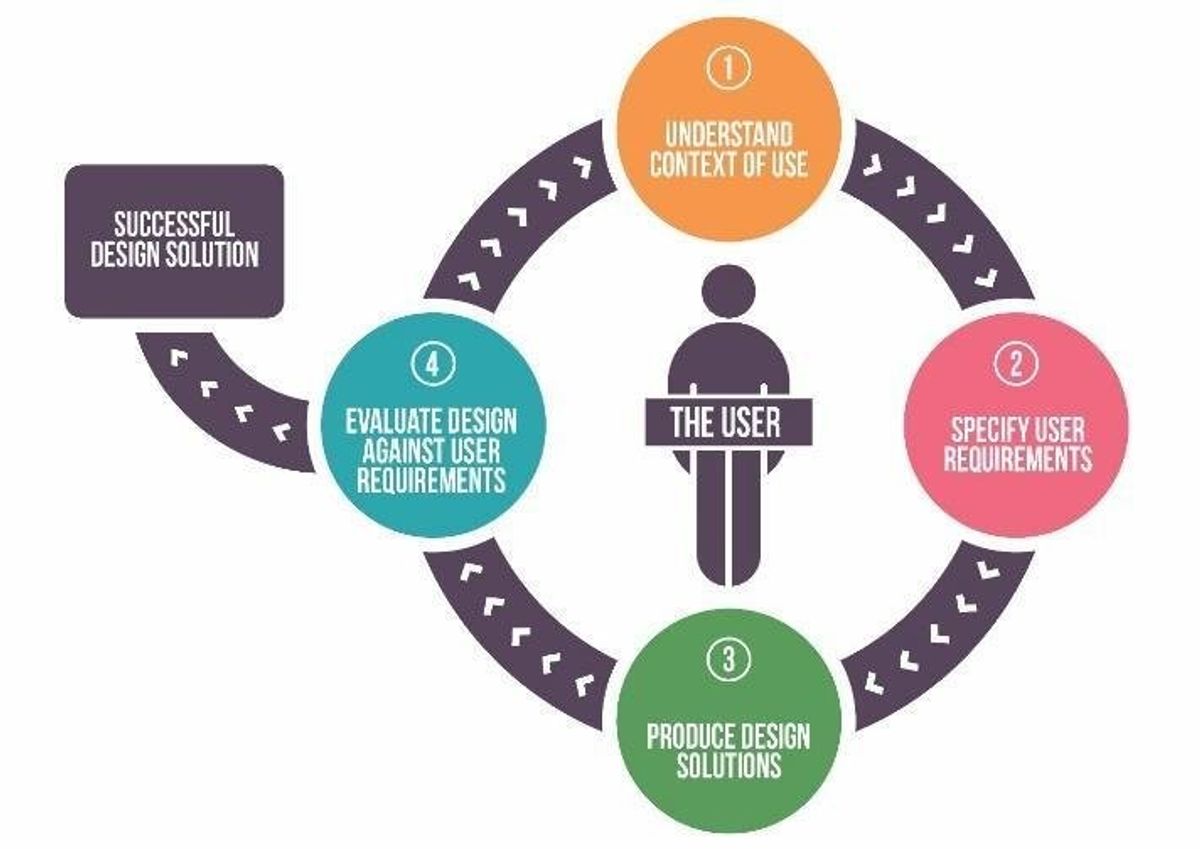
Responsive Design for Optimal Mobile Viewing
In today’s digital landscape, responsive design is not a luxury, but a fundamental requirement for any website. With a myriad of devices in use, from smartphones to tablets, ensuring your site is accessible and functional across all platforms is essential. Responsive design adapts to different screen sizes and orientations, providing a seamless experience for users, regardless of their device.
- Best Practices:
- Use CSS media queries to create flexible layouts.
- Adopt a mobile-first approach to prioritize mobile usability.
- Conduct testing on real devices to ensure proper functionality.
By focusing on mobile usability and performance, websites can offer an engaging and efficient user experience that meets the expectations of today’s users.
The goal is to deliver content effectively, without compromising on speed or aesthetics. A travel blog, for instance, with its easy navigation and readable content on both desktop and mobile, can significantly boost user engagement and satisfaction.
Balancing Aesthetics with Performance
In the quest for a visually compelling website, it’s essential to remember that aesthetic appeal should not come at the expense of performance. Users expect not only a beautiful interface but also a responsive and fast-loading experience. To achieve this balance, consider the following points:
-
User Perspective: A cluttered website can overwhelm users, while a streamlined interface enhances readability and focus. Apple’s product pages are a prime example of minimalistic design that allows users to concentrate on the product details.
-
Technical Perspective: Compress images without compromising on quality, and employ modern image formats like WebP. Implement lazy loading to delay the loading of non-critical images until they’re in view.
By understanding your audience’s needs and leveraging the right mix of automated tools and personal customization, you can ensure that your website is both attractive and performs well across all devices.
Remember, the goal is to create a digital product that combines elegance and accuracy, much like a great dance. It’s about finding the perfect harmony between good looks and practicality to provide an optimal user experience.
Utilizing User Feedback for Continuous Improvement
The iterative process of enhancing a website is crucial for staying ahead in the digital landscape. User feedback is the cornerstone of this evolution, providing actionable insights that drive continuous improvement. By establishing robust feedback mechanisms, businesses can tap into the valuable perspectives of their users, identifying areas that require attention and opportunities for innovation.
Embracing an iterative design process means regularly testing, learning, and refining based on user feedback. This approach not only improves the user experience but also contributes to the website’s overall performance.
To effectively harness user feedback, consider the following steps:
- Implement user surveys and feedback forms directly on the website.
- Conduct usability testing to evaluate new features and integrations.
- Analyze feedback data to discern patterns and prioritize changes.
- Iterate on design and functionality, then measure the impact of these changes.
By systematically applying these steps, businesses can optimize their website through caching, minification, and user feedback, leading to improved speed, reduced file sizes, and a platform that evolves with its user base.
Security and Maintenance for Website Integrity

Regular Updates and Security Monitoring
Ensuring the integrity and security of a website is a continuous process that demands regular attention. Website maintenance and support are crucial for longevity. Regular updates, security patches, performance monitoring, and optimization enhance security and user experience. By keeping all components up to date, you mitigate the risks associated with outdated software, which can be a gateway for security breaches.
It is essential to establish a routine for updating and monitoring your website’s security. This not only protects against threats but also ensures that the site remains compatible with new technologies and user expectations.
A comprehensive maintenance strategy includes several key activities:
- Frequent updates of the core platform and plugins to patch security vulnerabilities and improve functionality.
- Security checks to detect and remove malware and other malicious threats.
- Performance monitoring to ensure the site is operating at optimal speed and efficiency.
- Automated backups to safeguard data and facilitate quick recovery in the event of data loss or a breach.
By prioritizing these tasks, you can maintain a robust online presence that instills confidence in your users and supports your business objectives.
Automated Backups and Recovery Plans
In the digital age, automated backups and recovery plans are non-negotiable for maintaining website integrity. Frequent incremental backups ensure that website files and databases are not only stored securely but can also be restored swiftly in case of an emergency. This proactive approach is essential for safeguarding against data loss due to unforeseen events such as natural disasters, cyberattacks, or hardware failures.
A robust backup strategy is the safety net that allows businesses to recover from disruptions with minimal downtime. It’s critical that organizations have a plan to protect both their records and data.
Choosing the right backup frequency and storage solutions is crucial. Here’s a simplified breakdown of a typical backup service package:
- Standard Package: Weekly automated backups, regular updates, 24/7 uptime monitoring, daily security checks, and monthly reports.
- Advanced Package: Includes all Standard features plus daily backups, site health audits, SEO monitoring, and direct support access.
Ultimately, the goal is to strike a balance between comprehensive protection and cost-effectiveness. Regular performance audits and health checks complement these efforts, ensuring that backup systems are functioning optimally and align with the evolving needs of the website.
Performance Audits and Health Checks
Regular performance audits and health checks are essential for maintaining an optimized website. Conducting thorough audits allows for the identification of bottlenecks and areas for improvement, ensuring that your website remains efficient and competitive. A comprehensive health check includes reviewing site speed, usability, and SEO practices to guarantee that your website is not only functioning well but also ranking high in search engine results.
By implementing a routine schedule for performance audits, you can proactively address issues before they impact user experience or SEO rankings.
To effectively manage this process, consider the following steps:
- Evaluate current website performance metrics.
- Identify and prioritize areas for optimization.
- Implement changes and monitor their impact.
- Repeat the process regularly to maintain peak performance.
Remember, a healthy website is a performant one, and regular checks are the key to a sustained online presence.
Optimizing External Scripts and Third-Party Integrations

Reducing Reliance on External Resources
To enhance website speed and user experience, it’s essential to minimize the number of external scripts and resources. This not only reduces the number of HTTP requests but also decreases the likelihood of loading delays due to third-party dependencies. A strategic approach involves assessing the impact of each external resource, prioritizing essential ones, and implementing lazy loading techniques for non-critical resources.
By securely integrating external resources and employing strategies such as asynchronous loading, version control, and local hosting, websites can maintain high performance while ensuring user engagement.
Here are some practical steps to reduce reliance on external resources:
- Audit current external scripts to evaluate necessity and performance impact.
- Load critical scripts asynchronously to prevent render-blocking.
- Host commonly used libraries locally to reduce external requests.
- Minimize third-party dependencies to streamline performance.
Balancing functionality with performance is a continuous process that requires regular monitoring and optimization of third-party script usage. This balance is not only crucial for maintaining user engagement but also for improving SEO.
Streamlining Third-Party Tools for Better Performance
In the quest for optimal website performance, reducing the impact of third-party tools is a critical step. These tools, while often essential for functionality or analytics, can inadvertently slow down your site. To mitigate this, start by assessing the impact of each tool. Use performance testing tools like Pingdom, GTmetrix, or Chrome DevTools to analyze load times and identify scripts that are dragging down speed.
Once you’ve pinpointed the culprits, consider the following strategies:
-
Prioritize and eliminate: Not all tools are created equal. Determine which ones are essential and which can be removed or replaced with more efficient alternatives.
-
Lazy loading: Implement lazy loading for scripts that aren’t required immediately, allowing the page to become interactive faster.
-
Combine and minify: Where possible, combine multiple scripts into a single file and minify to reduce file size and HTTP requests.
By streamlining the integration of third-party tools, you not only enhance site performance but also improve the overall user experience.
Remember, the goal is to balance functionality with speed. Regularly review and optimize the use of external scripts to maintain this equilibrium. As a best practice, keep the usage of external scripts to a minimum to reduce unnecessary requests to third-party services.
Balancing Functionality with Speed
In the quest for an optimal web presence, the balance between functionality and speed is paramount. Website speed is a critical factor that influences user experience, SEO rankings, and ultimately, the success of a website. A slow-loading site can lead to high bounce rates and lost revenue, as users expect quick and responsive online interactions.
To achieve this balance, consider the following steps:
- Optimize Images: Compress and optimize images while maintaining quality to reduce load times.
- Implement Caching: Utilize caching to save server resources and enhance user experience.
- Minify Scripts: Reduce the number of HTTP requests by minifying CSS and JavaScript files.
- External Scripts: Limit the use of external scripts to minimize third-party requests and improve performance.
By focusing on these areas, you can ensure that your website remains both feature-rich and agile, providing a seamless experience for your visitors.
It’s important to regularly review and adjust your website’s performance optimization strategies. Utilizing tools and conducting audits can help identify areas for improvement. Remember, even a 100ms delay in page load time can significantly affect customer satisfaction and conversions.
Advanced Techniques for SEO and Conversion Rate Optimization

Leveraging SEO Best Practices for Higher Rankings
To ensure that your website garners the visibility it deserves, implementing SEO best practices is crucial. These practices not only enhance the user experience but also signal to search engines that your content is valuable, thereby improving your rankings. A well-structured approach to SEO involves a series of steps that can be outlined as follows:
- Conducting thorough keyword research to understand what your audience is searching for.
- Crafting high-quality, relevant content that addresses those search queries.
- Optimizing meta tags and descriptions to improve click-through rates from search engine results pages (SERPs).
- Ensuring your website’s architecture supports easy navigation and indexing by search engines.
- Building a robust backlink profile to establish authority and trustworthiness.
The iterative process of feedback collection, analysis, implementation, and measurement ensures website alignment with user expectations and business goals. SEO strategies for increased visibility and engagement through content optimization and URL structures.
Remember, SEO is not a one-time task but an ongoing effort that adapts to changing algorithms and market trends. Regular analysis and updates to your SEO strategy will keep your website competitive and at the forefront of search results.
Improving Site Speed to Enhance User Engagement
In the digital age, website speed is a critical factor for user engagement and satisfaction. A swift website not only retains users but also improves overall conversion rates. To achieve this, a multi-pronged approach is necessary, focusing on various aspects of website optimization.
- Code Optimization: Streamlining code, removing unnecessary characters, and consolidating files can significantly reduce load times.
- Caching: Implementing browser and server-side caching stores frequently accessed resources, making subsequent visits faster.
- Image Optimization: Compressing images without sacrificing quality ensures they load quickly, enhancing the visual experience without the wait.
- Minimizing External Scripts: Reducing reliance on third-party scripts can prevent delays caused by loading resources from external servers.
By prioritizing these strategies, businesses can create a seamless online experience that encourages users to stay longer and engage more deeply with the content.
It’s also essential to track data to understand user behavior and make informed decisions. Simple and short surveys can provide valuable feedback without overwhelming the visitors. Remember, a faster website not only pleases users but also boosts your site’s visibility in search engine rankings.
A/B Testing and Analytics for Data-Driven Decisions
In the realm of website optimization, A/B testing stands as a cornerstone, allowing for meticulous experimentation with various elements of a website to enhance user engagement and conversion rates. By comparing different versions of a page, businesses can pinpoint which elements resonate most with their audience.
The integration of analytics tools within the dashboard offers actionable insights, which are instrumental in enhancing the performance of online stores.
Best practices in A/B testing involve a series of steps, starting with identifying the goal of the test, selecting the variable to change, and determining the success metrics. Here’s a simplified process:
- Define the objective of the A/B test.
- Choose the element(s) to test.
- Split your audience randomly to ensure unbiased results.
- Run the test for a statistically significant period.
- Analyze the results and implement the winning variation.
- Continuously iterate to refine and improve outcomes.
Customer analytics is pivotal in this process, providing a deep dive into user behavior and preferences. This data-driven approach not only optimizes the user experience but also bolsters the bottom line by turning insights into actionable strategies.
Unlock the full potential of your online presence with our expert WordPress Development and eCommerce solutions. Elevate your website’s design, performance, and user experience to drive more traffic and increase conversions. Don’t settle for mediocrity; choose excellence and watch your business thrive. Visit our website now to explore our services and take the first step towards digital success.
Conclusion
In the digital age, a website’s functionality is paramount to its success. Throughout this article, we’ve explored the myriad of ways advanced technology can be leveraged to optimize a website’s performance. From image optimization and caching to script minification and judicious use of external scripts, each strategy plays a crucial role in enhancing user experience and boosting site speed. As we’ve seen, these improvements not only contribute to a more engaging user interface but also bolster search engine rankings and conversion rates. It’s clear that regular maintenance, security checks, and performance monitoring are essential components of a robust online presence. By embracing these technological advancements and continuously refining your website, you can ensure that it remains fast, secure, and ahead of the curve in an ever-evolving digital landscape.
Frequently Asked Questions
How does image optimization affect website performance?
Image optimization involves compressing and adjusting the quality of images to reduce file size without compromising visual clarity. This reduces the amount of data that needs to be loaded, resulting in faster page load times and improved website performance.
What are the benefits of implementing effective caching strategies?
Caching temporarily stores copies of website content to reduce server load and speed up page delivery to the user. This leads to quicker load times, a better user experience, and can even reduce hosting costs by minimizing server resource usage.
Why is minimizing script load important for a website?
Minimizing script load by reducing the number and size of CSS and JavaScript files reduces the number of HTTP requests needed to render a page. This speeds up response times and enhances the user experience by allowing pages to load faster.
How can regular updates and security monitoring protect my website?
Regular updates ensure that your website has the latest features and security patches, reducing vulnerability to attacks. Security monitoring detects potential threats and breaches, helping to maintain the integrity and trustworthiness of your website.
What is the impact of performance optimization on SEO and conversion rates?
Performance optimization improves site speed and user experience, which can lead to higher search engine rankings and increased user engagement. Faster websites are more likely to retain visitors, reduce bounce rates, and ultimately lead to higher conversion rates.
How can I balance the use of external scripts and third-party tools with website speed?
To balance external scripts with speed, limit their use to essential features, combine multiple scripts when possible, and load them asynchronously to prevent them from blocking page rendering. Regularly audit third-party tools to ensure they don’t negatively impact performance.