Optimizing Website Performance for Faster Load Times

In today’s digital age, website performance is crucial for maintaining user engagement and achieving business success. Slow loading times can lead to increased bounce rates, decreased customer satisfaction, and lower search engine rankings. This article provides a comprehensive guide to optimizing website performance for faster load times, focusing on actionable strategies such as image optimization, caching, code minification, external script management, and regular maintenance. By implementing these practices, website owners can enhance user experience and improve their online presence.
Key Takeaways
- Optimizing images by compressing and resizing them is essential for improving website load times without sacrificing quality.
- Implementing various caching techniques, such as browser and server-side caching, can significantly boost website performance and user experience.
- Minification of CSS and JavaScript files reduces unnecessary data, which can speed up website responsiveness and efficiency.
- Assessing and minimizing the use of external scripts can reduce load times and prevent potential performance bottlenecks.
- Conducting regular website maintenance and performance audits ensures the site remains secure, up-to-date, and operates at peak efficiency.
Understanding the Essentials of Image Optimization

The Importance of Image Compression
Image compression is a critical step in optimizing website performance. Reducing the file size of images can significantly decrease page load times, enhancing the user experience. When images are compressed, they require less bandwidth to download, which is especially important for users on mobile devices or with limited data plans.
- Use image compression tools or plugins to reduce file sizes without sacrificing quality.
- Resize images to fit the dimensions required by your site’s design.
- Choose the appropriate file format (e.g., JPEG, PNG, WebP) for each image type.
By methodically compressing and resizing images, websites can maintain visual quality while improving speed. This balance is essential for keeping visitors engaged and reducing bounce rates.
It’s not just about the initial setup; regular maintenance ensures images remain optimized over time. As AM2 Studio emphasizes, a flexible approach to website development and continuous improvement is key to delivering standout digital experiences.
Resizing Images for Web Use
Resizing images to the appropriate dimensions for your website is a critical step in optimizing performance. Images that are larger than necessary take longer to load, impacting user experience and potentially increasing bounce rates. To address this, follow a simple process:
- Determine the maximum display size needed for your website’s layout.
- Use image editing software or online tools to resize your images accordingly.
- Test the resized images to ensure they maintain visual quality on different devices.
By resizing images before uploading them to your site, you can significantly reduce the overall page size and improve loading times.
Remember, the goal is to strike a balance between image quality and file size. Tools like GIMP, Adobe Photoshop, or online services can help you resize images efficiently. For instance, to optimize images using GIMP, you can start by resizing the image file using the fixed width and height method.
Balancing Quality and Performance
Achieving the perfect equilibrium between image quality and website performance is a pivotal aspect of web optimization. The primary goal is to minimize file size while maintaining an acceptable level of quality. This balance is not a one-size-fits-all solution; it requires a tailored approach for each image based on its use-case and the overall design of the website.
- Compression: Reducing file size without significantly impacting visual quality.
- Format selection: Choosing the right image format (e.g., JPEG, PNG, WebP) for the best balance of quality and file size.
- Responsive images: Serving different image sizes for various devices and screen resolutions.
- Lazy loading: Deferring the loading of images until they are needed, which can improve page load times.
It’s essential to continuously test and tweak your image optimization strategies to adapt to user expectations and technological advancements. Regular performance evaluations help ensure that your website remains fast and responsive, providing a seamless user experience.
Leveraging Caching for Enhanced Performance

Types of Caching Techniques
Caching is a cornerstone of website performance optimization, with various techniques available to suit different needs. Browser caching stores website resources on the user’s device, reducing the need to fetch the same files on subsequent visits. On the other hand, server-side caching retains a copy of the generated page on the server, speeding up the response time for future requests.
- Browser Caching: Stores static files like CSS, JavaScript, and images locally.
- Server-Side Caching: Includes page caching, database query caching, and object caching.
- CDN Caching: Utilizes a network of servers to deliver content more efficiently.
- Application Caching: Specific to web applications, storing data in memory for quick access.
Caching techniques like browser and server-side caching improve website performance by storing content for faster access, enhancing user experience and scalability.
Each technique has its place, and often, a combination of these methods yields the best results. By strategically implementing caching, websites can achieve significant performance gains, leading to a smoother and more enjoyable user experience.
Setting Up Browser Caching
Browser caching is a powerful tool for reducing the load time of web pages by storing frequently accessed resources, such as images, CSS, and JavaScript files, on the user’s device. By doing so, subsequent visits to your site can load much faster since the browser can retrieve these resources from the local cache instead of downloading them again from the server.
To set up browser caching effectively, you should configure your web server to send HTTP headers that instruct the browser on how long to store the cached resources. Here’s a basic guideline:
- Determine which resources are static and can be cached.
- Set
Expiresheaders to give a specific time frame for caching. - Use
Cache-Controlheaders for more granular control over caching policies. - Implement
ETagheaders to manage revalidation of modified resources.
Remember, the goal is to strike a balance between minimizing load times and ensuring that users receive the most up-to-date content. Properly setting up browser caching can lead to significant improvements in site performance and user experience.
While browser caching is a key aspect of performance optimization, it’s also important to monitor and adjust your caching strategy regularly. This ensures that your website remains efficient as content updates and user behavior evolve.
Server-Side Caching Solutions
Server-side caching is a powerful method to enhance your website’s performance. By storing frequently accessed data on the server, subsequent requests for that data can be served more quickly, reducing the load on the server and speeding up response times. Implementing server-side caching can significantly decrease page load times for returning visitors, as the server does not have to process the same requests repeatedly.
Effective server-side caching involves a variety of strategies, each tailored to different types of content and usage patterns. For instance, full-page caching stores the entire output of a page, while object caching saves database query results. It’s crucial to configure these mechanisms correctly to ensure they serve their intended purpose without causing stale content to be delivered.
Caching mechanisms save server resources and improve customer experience.
Below is a list of popular server-side caching solutions:
- Varnish Cache: A reverse proxy caching solution that can speed up dynamic websites.
- Redis: An in-memory data structure store used as a database and cache.
- Memcached: A distributed memory object caching system for speeding up dynamic web applications.
- Nginx Cache: Uses the Nginx web server as a reverse proxy and cache for static and dynamic content.
To maximize the benefits of server-side caching, it’s important to monitor cache hit rates and adjust configurations to minimize cache misses. Strategies such as adjusting cache-control headers and utilizing edge computing can help in overcoming cache misses and maintaining optimal performance.
Streamlining Website Code with Minification

The Role of Minification in Speed Optimization
Minification is a fundamental technique in web performance optimization. It involves the removal of unnecessary characters from code—such as comments, whitespace, and line breaks—without changing its functionality. By shrinking the size of code files, minification reduces the amount of data that needs to be transferred over the network, enhancing the speed at which a website loads.
- CSS and JavaScript files are often targeted for minification due to their role in website functionality and presentation.
- Automated tools can be used to minify these resources, streamlining the process and ensuring consistency.
- WordPress users can leverage plugins to handle minification, integrating it seamlessly into their website maintenance routine.
Minification is not just about reducing file size; it’s also about improving the user experience by decreasing load times and conserving bandwidth. This optimization step is crucial for maintaining a competitive edge in today’s fast-paced online environment.
Tools for Minifying CSS and JavaScript
Minification is a critical step in optimizing your website’s performance. By removing unnecessary characters from CSS and JavaScript files, such as comments, whitespace, and line breaks, you can significantly reduce their size. This leads to faster load times and a more efficient delivery of content to your users.
There are numerous tools available for minifying these files, each with its own set of features. Below is a list of some popular minification tools:
- Minify CSS Online Tool
- Minify JavaScript Online Tool
- Minify HTML Online Tool
For those looking for a comprehensive solution, NitroPack offers a suite of tools that not only minify CSS and JavaScript but also HTML. It’s a convenient option for those who want to streamline their optimization process.
While minification is automated with these tools, it’s important to ensure that the minified files are thoroughly tested. This ensures that functionality and design remain intact post-minification.
Automating Minification in WordPress
Automating the minification process in WordPress can significantly streamline your workflow and ensure that your site’s performance is consistently optimized. Plugins like WP-Optimize or WP-Sweep can be set up to automatically minify CSS and JavaScript files, removing unnecessary characters and reducing file sizes. This not only improves load times but also enhances the user experience.
By leveraging tools that integrate seamlessly with WordPress, you can maintain a lean and efficient site without the need for manual intervention.
Here are some steps to automate minification in WordPress:
- Choose a reliable minification plugin compatible with your WordPress version.
- Install and activate the plugin through your WordPress dashboard.
- Configure the plugin settings to target CSS, JavaScript, and HTML files.
- Enable automatic updates to keep the minification process up to date.
- Monitor your site’s performance regularly to ensure the minification is effective.
Remember, a well-maintained WordPress site is key to achieving optimal performance. Regularly updating your themes and plugins, along with automating tasks like minification, can help reduce load times and improve overall site health.
Optimizing External Script Usage
Assessing the Impact of Third-Party Scripts
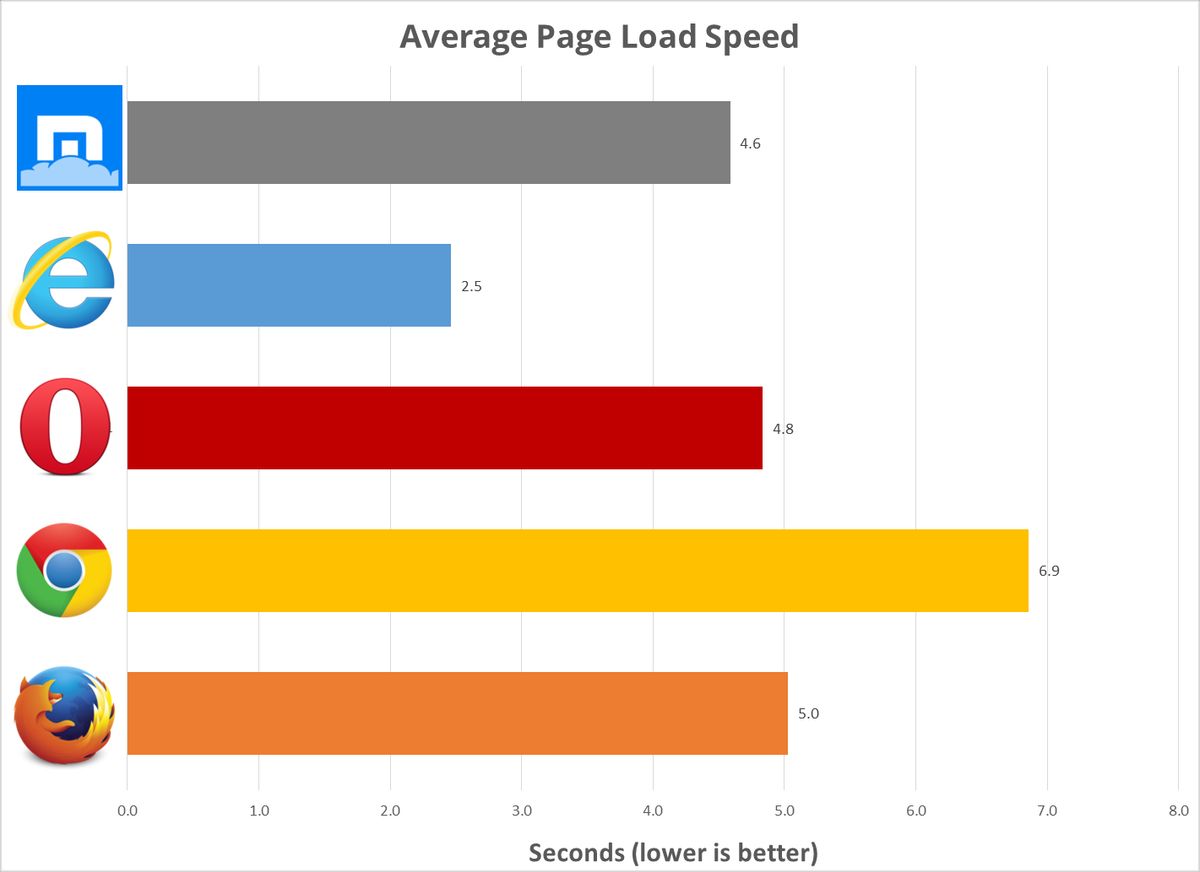
Third-party scripts can significantly affect your website’s load time and overall performance. Assessing their impact is a critical step in optimizing your site. Start by identifying all the scripts that run on your site and categorize them by function and importance. Use performance testing tools to measure the impact of each script on metrics like load time, rendering, and user interaction.
To minimize the impact, prioritize loading essential scripts and defer or asynchronously load others. Regularly review and update your scripts to ensure they are necessary and efficient.
- Audit your tag manager to remove any unused or low-value tags.
- Minimize the number of requests by combining scripts where possible.
- Prioritize loading of scripts that affect critical site functionality.
- Regularly review script performance and remove or replace inefficient ones.
Strategies for Reducing External Script Load
External scripts can significantly affect website performance. Identifying third-party scripts and assessing their impact is crucial for optimization. Use tools like web.dev to analyze script performance and make informed decisions about which to keep, update, or remove.
- Prioritize essential scripts and defer non-critical ones to load after the main content.
- Employ asynchronous loading for scripts that do not affect the initial page rendering.
- Bundle multiple scripts together to reduce the number of HTTP requests.
- Audit your tag manager to remove any unused or low-value tags.
By streamlining the use of external scripts, you can enhance site speed and user experience without compromising functionality.
Regularly monitor and update external integrations to ensure they are not causing performance losses. Keeping external scripts to a minimum reduces unnecessary requests to third-party tools, optimizing overall performance.
Monitoring and Updating External Integrations
Keeping third-party scripts and integrations up-to-date is crucial for maintaining website performance and security. Regularly monitor and update external integrations to ensure they are functioning correctly and not slowing down your site. Use website monitoring tools to track performance impacts and make informed decisions about which scripts to keep, update, or remove.
It’s essential to balance the benefits of external scripts with their impact on load times and overall user experience.
Here’s a simple checklist for maintaining your external integrations:
- Schedule regular audits of third-party scripts.
- Assess the necessity and performance impact of each script.
- Update integrations to their latest versions.
- Remove outdated or unnecessary scripts.
- Test website performance after each update.
By proactively managing your external scripts, you can prevent potential issues that could compromise your website’s performance or security.
Regular Maintenance and Performance Audits
Conducting Website Health Checks
Regular health checks are crucial for maintaining the performance and security of your WordPress website. Utilizing tools like Google PageSpeed Insights or GTmetrix can provide actionable insights into how to improve your site’s load times and overall user experience. These checks should include monitoring page load times, server response times, and resource utilization.
By conducting thorough website health checks, you can identify potential issues before they impact your visitors, ensuring a seamless experience.
Here’s a simple checklist to get you started on your website health checks:
- Run an SEO audit to assess technical strengths and areas for improvement.
- Check for outdated plugins and themes that may pose security risks.
- Monitor uptime and set up alerts for any downtime.
- Perform regular backups to safeguard against data loss.
- Review website analytics to understand user behavior and traffic patterns.
Remember, a well-maintained website is more likely to engage and retain visitors, leading to better conversion rates and customer satisfaction.
Implementing a Performance Optimization Checklist
A performance optimization checklist is a systematic approach to ensuring your website operates at peak efficiency. Regularly updating and refining this checklist is crucial to maintaining optimal site performance. The checklist should cover various aspects of your site, from image optimization to script minification, and include both automated and manual checks.
- Performance Metrics: Track page load times, server response times, and resource utilization.
- SEO: Ensure on-site SEO elements are properly configured.
- Security: Regularly scan for vulnerabilities and update security measures.
- User Experience: Check for responsive design and ease of navigation.
- Content Diversification: Review content for relevance and engagement.
By adhering to a comprehensive performance optimization checklist, you can systematically address potential issues before they impact your users. This proactive approach can lead to improved site performance, better user experience, and higher search engine rankings.
It’s also important to leverage tools like Google PageSpeed Insights or GTmetrix for an objective analysis of your site’s performance. These tools can help pinpoint specific areas for improvement and track your progress over time. Remember, a well-maintained website is an investment that pays dividends in the form of increased user satisfaction and conversion rates.
Staying Updated with WordPress Best Practices
Keeping your WordPress site current is crucial for maintaining speed, security, and functionality. Regular updates to the WordPress core, themes, and plugins are essential for ensuring your site benefits from the latest performance enhancements and security patches. It’s advisable to configure automatic updates where possible and to perform regular checks for any manual updates that might be required.
By streamlining your update process, you can significantly reduce the risk of security vulnerabilities and ensure that your site continues to run smoothly.
Additionally, it’s important to stay informed about the latest WordPress developments and best practices. This includes participating in the WordPress community, attending webinars, and reading up on the latest tips from experts. Here’s a quick checklist to help you stay on top of WordPress updates and best practices:
- Subscribe to WordPress news and update services.
- Regularly review and clean up your WordPress database.
- Utilize performance analysis tools like Google PageSpeed Insights to monitor your site’s speed.
- Implement a regular site audit to identify and address any issues.
- Engage with the WordPress community for insights and support.
Ensuring your website runs smoothly is crucial for your business’s online presence. Regular maintenance and performance audits are key to keeping your site fast, secure, and engaging for your visitors. Don’t let potential customers slip away due to a sluggish or compromised website. Visit our [Website Health Audit] page to learn how our expert team can help you optimize your website’s performance. Stay ahead of the competition and make your digital world better with our comprehensive support and maintenance services.
Conclusion
In the fast-paced digital world, optimizing website performance is not just a luxury, it’s a necessity. Throughout this article, we’ve explored a multitude of strategies to enhance your website’s loading times, from image optimization and caching implementation to script minification and judicious use of external scripts. Remember, a faster website not only provides a better user experience but also improves search engine rankings and conversion rates. Regularly employing a comprehensive checklist, like our 15-point review, ensures that your website remains at the forefront of performance excellence. As we’ve seen, the impact of website speed on customer satisfaction and business success cannot be overstated. So take action, implement these tips, and watch as your website’s performance soars, leading to increased customer satisfaction and business growth.
Frequently Asked Questions
How does image optimization affect website performance?
Image optimization, including compression and resizing for web use, significantly reduces file sizes, leading to faster page load times and improved overall website performance without sacrificing image quality.
What are the benefits of implementing caching on my website?
Caching reduces server load and speeds up page delivery by storing copies of files and web pages. It enhances user experience with faster load times and can lead to better SEO rankings due to improved website performance.
Why is minification important for website speed?
Minification reduces the size of CSS and JavaScript files by removing unnecessary characters. This leads to fewer and smaller HTTP requests, which can significantly improve website loading times and performance.
How can I manage the impact of external scripts on my website’s speed?
Minimize the use of external scripts, prioritize loading essential scripts first, and asynchronously load others to reduce their impact. Regularly monitor and update integrations to maintain optimal performance.
What should be included in a regular website maintenance routine?
Regular maintenance should include performance audits, security updates, checking for broken links, updating content and plugins, and ensuring that all website features function correctly for optimal performance.
How do I keep my WordPress website secure and performing well?
Keep your WordPress site secure by regularly updating the core, themes, and plugins, implementing strong passwords, and using security plugins. For performance, optimize images, use caching, minify scripts, and perform regular speed audits.