User-Centric Website Design Approach for Engaging User Experience
In the digital age, a user-centric website design approach is essential for crafting engaging user experiences that not only attract visitors but also convert them into loyal customers. This article delves into the principles of user-centric design, optimization strategies for user experience, the incorporation of user feedback and analytics, the importance of accessibility and inclusivity, and the balance between user experience and privacy. By focusing on these areas, designers and businesses can create websites that resonate with users and drive success.
Key Takeaways
- User-centric design prioritizes the needs and preferences of users, leading to higher satisfaction and retention.
- Analyzing user behavior and leveraging user feedback are critical for iterative design and UX optimization.
- Accessibility and inclusivity in design ensure that websites cater to a diverse range of user needs and abilities.
- Maintaining a balance between a seamless user experience and user privacy is crucial for building trust and credibility.
- Regularly incorporating analytics and A/B testing into the design process can significantly improve conversion rates.
Understanding User-Centric Design Principles
Defining User-Centric Design
At the heart of user-centric design is the philosophy that the user’s needs, preferences, and limitations should guide the development of interactive systems. This approach is not just about aesthetics; it’s about creating products that are accessible, intuitive, and satisfying to use.
User-centric design involves a deep understanding of the target audience. It’s a process that begins with user research and continues through the entire design and development cycle, ensuring that user feedback is integrated at every stage. The goal is to deliver an experience that feels tailor-made for the user, which in turn can lead to increased engagement and loyalty.
By prioritizing the user at every decision point, designers can craft experiences that resonate more deeply with the audience.
Key elements of user-centric design include:
- Empathy for the user
- Inclusivity and accessibility
- Usability testing and refinement
- Iterative design based on user feedback
Ultimately, user-centric design is about building a bridge between the user and the technology, ensuring that the end product not only meets functional requirements but also enriches the user’s interaction with the digital world.
The Role of User Research in Design
User research is the cornerstone of a user-centric design approach. It involves a variety of methods such as surveys, interviews, and usability testing to gather insights about the users’ needs, behaviors, and pain points. This data is crucial for creating a design that is not only aesthetically pleasing but also functional and intuitive for the target audience.
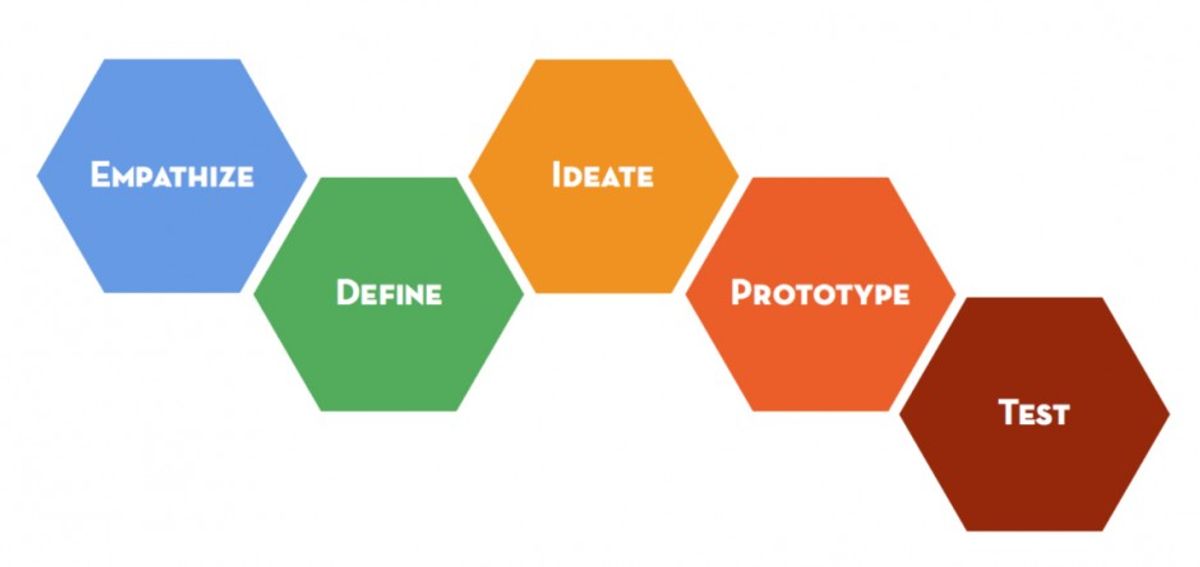
- Empathize & Research: Begin by putting yourself in the users’ shoes to understand their world.
- Define the User Journey: Map out the user’s path to satisfaction, identifying key interactions along the way.
- Test, Iterate, and Refine: Use feedback to continuously improve the design.
By focusing on the users’ perspectives, designers can create interfaces that are more engaging, leading to higher satisfaction and retention. User research ensures that the final product resonates with the audience and meets their expectations, making it an indispensable part of the design process.
Principles of Intuitive Navigation and Interaction
Intuitive navigation and interaction are the cornerstones of a user-centric website design. Users should effortlessly find what they need, akin to navigating a well-organized library. This ease of use is achieved through clear labeling and logical structuring of content and functionality.
Embracing information architecture is essential for clarity. Prioritize usability to make interactions not just possible but enjoyable. This means focusing on intuitive features, clear calls to action, and ensuring responsiveness across devices. Remember, a beautiful interface must also be functional; aesthetics should enhance, not hinder, the user experience.
Testing, iterating, and refining are ongoing processes in UX design. The journey to perfection never ends, as user needs and technologies evolve.
Finally, visual design with purpose ties everything together. Select visuals that align with your branding while maintaining clarity and accessibility. Color schemes, typography, and imagery should all contribute to a user-friendly experience.
Optimizing User Experience for Conversion

Analyzing User Behavior for Improved UX
To enhance user experience, it’s crucial to analyze user behavior on your website. This involves tracking how users interact with your site, identifying patterns, and understanding their needs. Tools like Google Analytics can provide insights into which pages have the highest exit rates, indicating potential issues with content or navigation.
By examining user behavior, we can pinpoint areas for improvement and optimize the user journey for better engagement and satisfaction.
A structured approach to analyzing user behavior might include:
- Reviewing the most and least visited pages
- Monitoring the time spent on each page
- Tracking the paths users take through your site
- Identifying common exit points
These metrics can reveal a lot about user preferences and pain points, allowing for data-driven design decisions that enhance the overall user experience.
Design Strategies to Enhance User Engagement
To captivate and maintain user interest, implementing effective design strategies is crucial. These strategies should focus on creating a seamless and enjoyable user experience that encourages interaction and engagement. One approach is to optimize resource allocation and ensure statelessness to enhance website performance, which is fundamental for user retention. Additionally, responsive design adapts to various devices, providing a consistent experience across all platforms.
User-centric navigation guides users effortlessly through the website, increasing the likelihood of conversion. Here’s a list of actionable strategies to increase website engagement:
- Prioritize user needs and preferences
- Conduct thorough user research
- Implement intuitive navigation elements
- Optimize website speed and performance
- Utilize A/B testing to refine design choices
- Personalize user experiences
- Encourage user feedback and participation
By focusing on these strategies, businesses can create digital experiences that not only function flawlessly but also captivate and delight users, leading to increased engagement and improved conversion rates.
Remember, a focus on user engagement isn’t just good for aesthetics; it’s good for business. Analyzing user behavior and applying these insights to design can significantly impact your website’s success.
Conversion Rate Optimization through UX Design
Optimizing the user experience (UX) is a powerful strategy to boost conversion rates on a website. By focusing on usability analysis, microinteractions, and user feedback, designers can create a more engaging and intuitive interface. This focus on clarity and engagement helps to reduce errors and friction points, leading to improved conversion rates.
Strategies for user engagement and conversion optimization include social proof, UX testing, navigation simplification, and visual engagement. Balancing user privacy with personalized experiences in UX design is crucial for enhancing engagement and conversion rates.
To illustrate the impact of UX on conversion rates, consider the following metrics that a UX design company might improve:
- Click-through rate (CTR)
- Conversion rate
- Bounce rate
Each of these metrics reflects a different aspect of user behavior and satisfaction. A well-designed UX can positively influence these metrics, leading to a more successful website overall.
Incorporating Feedback and Analytics in Design
Leveraging User Feedback for Iterative Design
In the realm of user-centric design, user feedback is the cornerstone of iterative development. By actively soliciting and analyzing feedback, designers can pinpoint areas that need refinement. A feedback review team is essential for sifting through user comments and identifying actionable insights. This team’s role is to ensure that the feedback loop is continuous and productive, leading to successive improvements in the product’s UI/UX design.
Iteration is not merely a phase but a design philosophy. Embracing this approach means that a product is never truly ‘finished’ but is always evolving to better meet user needs.
To effectively leverage user feedback, it’s crucial to establish a structured process. This might include regular review meetings, prioritization of feedback, and clear documentation of changes made. Below is a simplified workflow to illustrate the iterative design process:
- Collect user feedback through various channels.
- Convene the feedback review team to analyze and categorize feedback.
- Prioritize feedback based on impact and feasibility.
- Implement changes in the design.
- Validate changes with users to ensure they address the feedback.
- Repeat the cycle to refine and enhance the user experience.
Using Analytics to Inform Design Decisions
In the realm of user experience, analytics play a pivotal role in shaping design decisions. By examining user behavior through data, designers can identify patterns and areas for improvement. For instance, Google Analytics can reveal which content garners the most engagement, serving as a benchmark for future strategies.
Analytics and testing are key in understanding user behavior and refining user experience. By utilizing data-driven approaches and adapting to feedback, websites can enhance engagement and satisfaction.
Setting clear goals and Key Performance Indicators (KPIs) is crucial before implementing a content strategy. Consider the objective of increasing newsletter signups; tracking the views versus completed signups on a form can provide actionable insights. Here’s an example of how key metrics might be structured:
| Goal | Metric | Data Collected |
|---|---|---|
| Increase Newsletter Signups | Form Views vs. Signups | Number of views, Number of signups |
By leveraging such analytics, designers can make informed decisions that not only improve the user experience but also drive conversions and fulfill business objectives.
The Importance of A/B Testing in UX
A/B testing is a pivotal method for optimizing user experience (UX) and enhancing website performance. By comparing two versions of a web page or feature, designers can determine which one performs better with the target audience. This data-driven approach helps in making informed decisions that align with user preferences and behaviors.
A/B testing plays a crucial role in understanding user behavior and meeting the needs of the target audience.
The process involves exposing a segment of users to version A and another to version B, then analyzing metrics such as conversion rates, click-through rates, and time on page. The results can reveal user preferences and guide the refinement of design elements. For instance, a simple change in button color or placement could significantly impact user engagement.
To ensure a successful A/B testing campaign, follow these steps:
- Define clear objectives for what you want to test.
- Select a statistically significant sample size.
- Run the test for an adequate duration to collect enough data.
- Analyze the results and implement the winning variation.
- Continuously iterate based on feedback and further testing.
Remember, the goal of A/B testing is not just to improve a single metric but to provide a more engaging and intuitive experience for all users.
Ensuring Accessibility and Inclusivity

Designing for Diverse User Needs
Creating a user-centric website means ensuring that the design is accessible and inclusive to a wide range of users with diverse needs. Designing for diversity involves understanding and addressing the unique challenges that different users may face when interacting with your website. This includes optimizing for various devices and screen sizes, as well as considering the different ways people perceive and process information.
By integrating user feedback and monitoring behavior, websites can be refined for a better user experience. It’s essential to focus on usability, accessibility, consistency, and predictability to create an inclusive and successful design.
To achieve this, a few practical steps can be taken:
- Conducting thorough user research to identify the needs of different user groups.
- Implementing responsive design techniques to ensure usability across all devices.
- Adhering to accessibility guidelines to cater to users with disabilities.
- Providing clear and consistent navigation to enhance predictability for users.
Balancing aesthetics with functionality is a common challenge, but it is crucial for application-specific UX design. By tailoring the interface and interactions to the context of the application, designers can significantly improve the intuitiveness and satisfaction of the user experience.
Accessibility Guidelines and Best Practices
Ensuring that a website is accessible to all users, including those with disabilities, is a fundamental aspect of user-centric design. Adhering to accessibility guidelines is not only a legal requirement in many cases but also an ethical commitment to inclusivity. A set of best practices can guide designers in creating experiences that are usable by everyone, regardless of their abilities or circumstances.
- Understand and implement WCAG: The Web Content Accessibility Guidelines (WCAG) provide a framework for making web content more accessible. Following these guidelines is crucial for compliance and inclusivity.
- Design for keyboard navigation: Ensure that all interactive elements are operable through keyboard inputs, which is essential for users who cannot use a mouse.
- Provide alternative text for images: This allows screen readers to describe images to users who are visually impaired.
- Ensure sufficient color contrast: Users with color vision deficiencies must be able to perceive content clearly.
- Create transcripts for audio and video: Transcripts and captions ensure that users who are deaf or hard of hearing can access multimedia content.
By focusing on these best practices, designers can create a digital environment that accommodates a wide range of users, fostering an inclusive community and enhancing the overall user experience.
It is important to remember that accessibility should be considered at every stage of the design process. From the initial wireframes to the final quality assurance tests, each step offers an opportunity to evaluate and improve the accessibility of a website. Balancing aesthetics with usability, and designing with empathy, ensures a user-centric and inclusive website experience.
Creating an Inclusive Digital Environment
In the pursuit of creating an inclusive digital environment, it’s essential to consider the diverse needs of all users. This involves designing with usability, accessibility, and inclusivity at the forefront, ensuring that everyone, regardless of their abilities or circumstances, can engage with your website effectively.
By prioritizing user objectives and streamlining design, we can build websites that are not only welcoming but also functional for a broad audience.
To achieve this, here are some best practices:
- Enhance your website’s accessibility by incorporating features such as keyboard navigation, screen reader compatibility, and alternative text for images.
- Consider your audience’s specific barriers to engagement, such as cognitive load or physical limitations, and address these in your design.
- Use inclusive language and storytelling to resonate with a wider user base and foster a sense of belonging.
- Regularly ask for feedback from your audience to ensure that your website remains accommodating and relevant to their needs.
Maintaining Privacy and Trust in UX
Balancing User Experience with Privacy Concerns
In the realm of user experience (UX) design, privacy concerns are not an afterthought but a fundamental consideration. Designers must navigate the delicate balance between creating a seamless user experience and implementing robust privacy measures. This balance is crucial for fostering trust and ensuring user retention.
- User feedback and testing inform design choices for trust and recognition.
- Privacy in UX design balances functionality with security measures for seamless and secure user experiences.
A user-centric approach to privacy involves transparent communication about data collection and usage. It also requires offering users control over their personal information, which can be achieved through clear consent mechanisms and easy-to-navigate privacy settings.
For instance, cookie consent forms are a common feature that must be designed to be both informative and unobtrusive. Below is a list of cookie categories typically found on websites, along with their descriptions and consent durations:
- Analytics: Cookies used to store user consent for tracking analytics.
- Functional: Cookies that record user consent for functional website features.
- Performance: Cookies that store consent for performance-related features.
- Necessary: Essential cookies that ensure basic functionalities and security features of the website, anonymously.
Each category plays a distinct role in the overall UX, and designers must ensure that users understand the purpose of each to make informed decisions.
Implementing Transparent Privacy Policies
In the realm of user-centric design, implementing transparent privacy policies is paramount. Users must be clearly informed about how their data is collected, used, and protected. The first step is to define the scope and purpose of the policy, ensuring users understand the extent of data collection and the reasons behind it.
Transparency, consent, and security are the cornerstones of any privacy policy. Users should be given control over their personal information, with straightforward options to provide or withdraw consent. A bulleted list can effectively outline the key elements of a transparent privacy policy:
- Clear definition of the types of data collected
- Explanation of how data is used
- Details on data protection measures
- Options for users to manage their consent
- Procedures for users to access, correct, or delete their data
By balancing personalization with data privacy, a secure and engaging user experience is fostered, building trust between the user and the platform.
Regular updates to privacy policies are necessary to adapt to new regulations and technologies. It is crucial to communicate these changes to users in an accessible manner, maintaining the trust that has been established.
Building Trust through Ethical Design Practices
In the realm of user experience, trust is a cornerstone that can significantly influence user retention and brand loyalty. Ethical design practices are not just a moral obligation but a strategic imperative for fostering long-term relationships with users. By authentically reflecting brand values and sharing personal stories, designers can create a connection that resonates on an emotional level with the audience.
Transparency in design decisions and privacy policies is essential. Users should feel in control of their data and understand how it is being used. This clarity can be achieved through straightforward language and accessible privacy settings.
To build trust, it is crucial to prioritize user connection through emotional design. Below is a list of actionable steps to integrate ethical practices into your design process:
- Ensure that user data is collected responsibly and with clear consent.
- Design with the user’s best interest in mind, avoiding dark patterns that can mislead or manipulate.
- Regularly update privacy policies to reflect current standards and regulations.
- Provide users with easy-to-use tools to manage their privacy settings.
By adhering to these practices, designers can create digital environments that are not only user-friendly but also secure and respectful of user privacy.
In today’s digital landscape, maintaining privacy and trust is paramount for a positive user experience. Our team at AM2 specializes in creating custom web solutions that prioritize these values. From WordPress Development to eCommerce optimization, we ensure your website not only looks great but also adheres to the highest standards of privacy and security. Ready to elevate your online presence while safeguarding user trust? Visit our website and discover how our expertise can benefit your business.
Conclusion
In conclusion, a user-centric website design approach is paramount for crafting engaging user experiences that captivate and retain audiences. Throughout this article, we’ve explored various strategies and practical aspects of UX design, emphasizing the importance of understanding user needs, prioritizing usability, and ensuring visual appeal aligns with functionality. By implementing these principles, designers can create digital products that are not only aesthetically pleasing but also intuitive and responsive, leading to increased user satisfaction and conversion rates. Remember, mastering UX design is an ongoing journey that requires continuous learning and adaptation to the evolving digital landscape. Embrace these strategies to build websites that impress and perform, ensuring a successful and thriving digital presence.
Frequently Asked Questions
What is user-centric website design?
User-centric website design is an approach that places the user’s needs, preferences, and behaviors at the center of the design process to create intuitive, engaging, and accessible digital experiences that meet their specific requirements effectively.
How does user research contribute to user-centric design?
User research helps designers understand the target audience’s motivations, behaviors, and pain points. This information is crucial for creating a design that resonates with users and addresses their needs, leading to a more satisfying user experience.
Why is intuitive navigation important in website design?
Intuitive navigation is essential because it allows users to find information quickly and easily without confusion. It contributes to a positive user experience, increases user satisfaction, and can lead to higher retention and conversion rates.
How can A/B testing improve user experience (UX)?
A/B testing involves comparing two versions of a webpage to see which performs better. It helps identify elements that resonate with users and optimize the design for better engagement, usability, and conversion rates.
What are the best practices for ensuring website accessibility?
Best practices for accessibility include following the Web Content Accessibility Guidelines (WCAG), ensuring content is perceivable, operable, understandable, and robust for all users, including those with disabilities.
How can website design balance user experience with privacy concerns?
Balancing UX with privacy involves designing transparent privacy policies, obtaining informed consent for data collection, and providing users with control over their personal information, all while maintaining a seamless user experience.