User-Centric Website Design Approach for Engaging User Experience
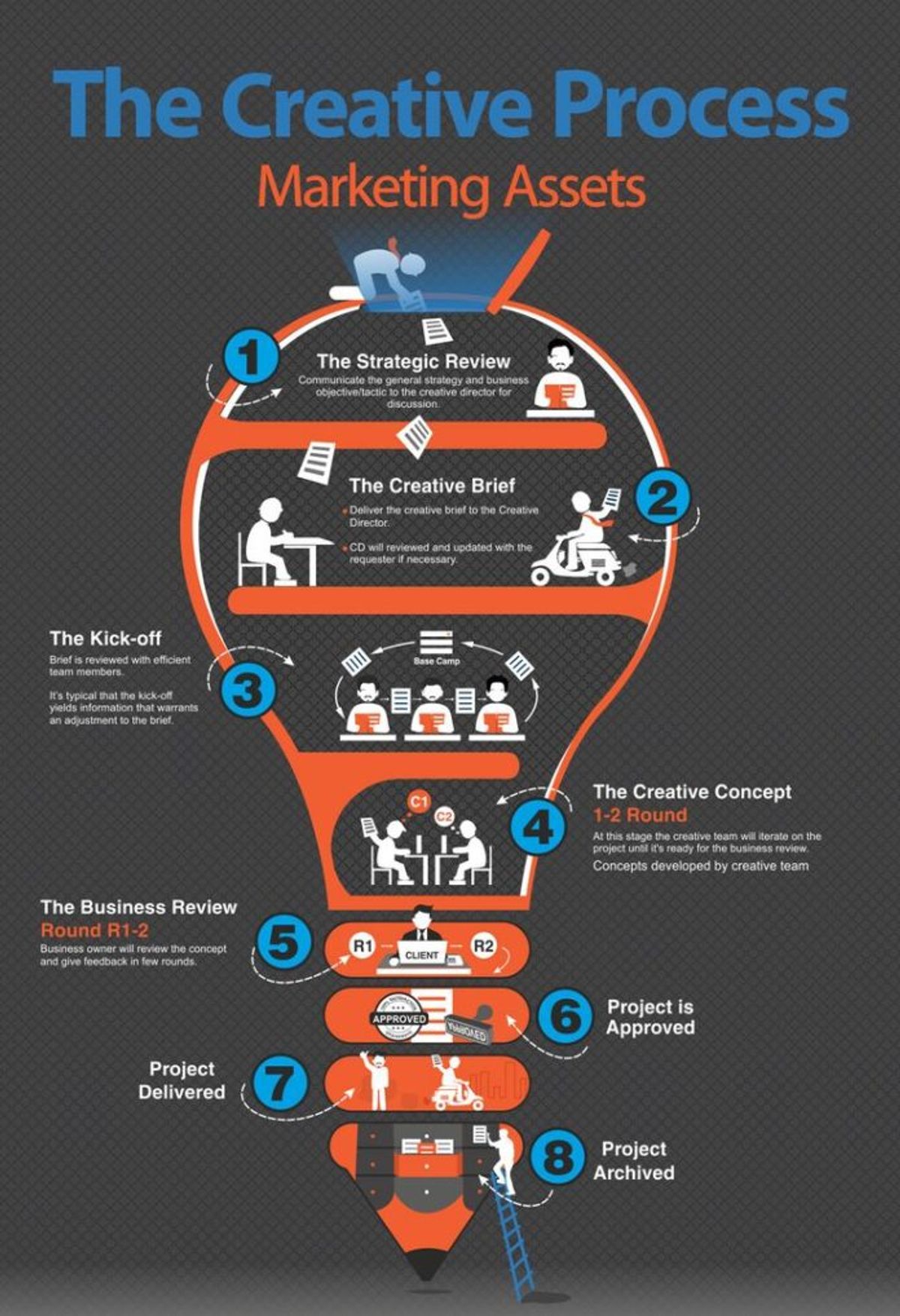
In the digital age, a user-centric website design approach is essential for creating an engaging user experience that not only meets but exceeds user expectations. This approach involves a deep understanding of user needs and preferences, designing for usability and accessibility, personalizing the user journey, streamlining the conversion process, and continuously evaluating and refining the design. By putting the user at the heart of every design decision, businesses can foster a positive relationship with their audience, encourage loyalty, and drive growth.
Key Takeaways
- Understanding user needs and preferences is foundational to creating a website that is both engaging and effective in achieving business goals.
- Usability and accessibility are critical components of user-centric design, ensuring that the website is easy to navigate and inclusive for all users.
- Personalization and interactive elements can significantly enhance user engagement, leading to a more memorable and satisfying user experience.
- A streamlined conversion process is essential for maximizing user actions and reducing friction, ultimately leading to higher conversion rates.
- Continuous evaluation and refinement of the website design based on user feedback and behavior insights are vital for maintaining relevance and effectiveness.
Understanding User Needs and Preferences
Conducting User Research
Conducting user research is a foundational step in a user-centric website design approach. It involves gathering and analyzing data about the users’ needs, goals, behaviors, and preferences. This process can be executed through various methods such as interviews, surveys, observations, and analytics. By engaging with a diverse range of users, including end-users, stakeholders, and domain experts, designers can gain a holistic view of the problem space and develop empathy for the users they are designing for.
User research is not just about collecting data; it’s about understanding the human behind the screen, their challenges, and how they interact with technology.
Effective user research leads to insights that inform design decisions, ensuring that the final product resonates with its intended audience. It is crucial to involve users throughout the design process, from initial concept to post-launch, to create a truly user-centric experience. User testing and feedback are integral to this process, allowing for the identification and resolution of usability issues.
Here are some common user research methods:
- Interviews
- Surveys
- Usability testing
- Observations
- Analytics review
Creating User Personas
Creating user personas is a foundational step in a user-centric design approach. Personas are fictional characters that embody the characteristics of your key audience segments. They are crafted from data and insights gathered during user research, ensuring that design decisions are aligned with user needs. For example, an e-commerce website might define personas such as ‘Busy Professional’, ‘Deal Seeker’, or ‘Tech-Savvy Shopper’, each with unique goals and pain points.
By focusing on these detailed profiles, designers can tailor the user experience to be more engaging and effective.
A well-defined persona includes demographics, behaviors, motivations, and goals. Here’s a simplified example of what a persona profile might look like:
- Name: Emily, the Busy Professional
- Age: 30-45
- Occupation: Corporate Lawyer
- Goals: Time-efficient shopping, high-quality products
- Pain Points: Limited browsing time, overwhelming choices
Creating multiple personas allows for a nuanced understanding of the user base, which is crucial for designing a website that appeals to a diverse audience.
Analyzing User Feedback and Behavior
To create a user-centric website, it’s crucial to analyze user feedback and behavior. This involves examining the data collected from various sources such as surveys, reviews, and analytics tools. For example, app analytics can reveal which features are most used, while user surveys can provide insights into what users would like to see improved.
One effective method is to look at exit rates on your website to identify potential problem areas. Pages with high exit rates may indicate where users are experiencing difficulties or losing interest. Tools like Google Analytics offer a clear view of such metrics under the section Behavior > Site Content > Exit Pages.
By continuously incorporating user feedback into the design process, we can make informed decisions that enhance the user experience.
It’s also beneficial to establish a feedback loop where users can easily share their thoughts and suggestions. This iterative approach ensures that the website evolves in alignment with user preferences and expectations.
Designing for Usability and Accessibility

Implementing Intuitive Navigation
To ensure a user-friendly experience, intuitive navigation is paramount. It involves creating clear, concise menus and a logical page hierarchy that guides users effortlessly to their desired content. Features like a sticky navigation bar or breadcrumb trails can significantly enhance navigation efficiency.
- Clear and concise menus allow for quick orientation.
- Logical page hierarchy ensures that users can predict where to find information.
- Search functionality should be prominent and effective.
- Sticky navigation and breadcrumb trails aid in maintaining context.
Intuitive navigation reduces the cognitive load on users, making their journey through the website seamless and more enjoyable.
Balanced navigation design not only improves user experience but also contributes to business success. Regular usability testing and iterative improvements are essential to keep navigation user-centric and effective.
Ensuring Responsive Design
In today’s digital landscape, responsive design is no longer optional; it’s a critical component for user-centric website design. A website that adapts seamlessly to various screen sizes and resolutions provides an optimal viewing experience across all devices, from desktops to smartphones. This adaptability not only enhances user satisfaction but also supports better engagement and conversion rates.
Responsive design involves a fluid grid system, flexible images, and media queries to ensure content looks great on any device. Here’s a simple checklist to help you get started:
- Use a fluid grid layout that adapts to the screen size
- Implement flexible images and media that resize within their containers
- Employ media queries to apply different styles for different devices
- Test on a variety of devices to ensure compatibility and performance
By prioritizing responsive design, you’re committing to a user experience that is accessible and enjoyable for all, regardless of how they access your site.
Remember, a user-centric approach to design is about more than aesthetics; it’s about creating a functional and inclusive environment for all users. As you integrate responsive design into your website, consider the broader implications of UX design principles and best practices to boost overall engagement and conversion.
Adhering to Accessibility Standards
Ensuring that a website is accessible to all users, including those with disabilities, is not just a matter of legal compliance but also a reflection of a user-centric design philosophy. Incorporating accessibility features is a key step in creating an inclusive digital environment. For example, providing alternative text for images, enabling keyboard navigation, and ensuring proper color contrast are essential practices that benefit users with visual impairments or cognitive disabilities.
By prioritizing inclusivity, designers create a positive user experience for all, which can lead to increased user engagement and satisfaction.
To effectively adhere to accessibility standards, designers and developers should familiarize themselves with guidelines such as the Web Content Accessibility Guidelines (WCAG). These guidelines outline how to make web content more accessible to people with a wide range of disabilities. Below is a list of some fundamental accessibility considerations:
- Use of clear and concise language
- Alternative text for images
- Keyboard navigation options
- Color contrast options
- Adjustable font sizes
Adherence to these standards not only enhances the user experience for individuals with disabilities but also improves the overall usability of the website for all users.
Personalization and User Engagement
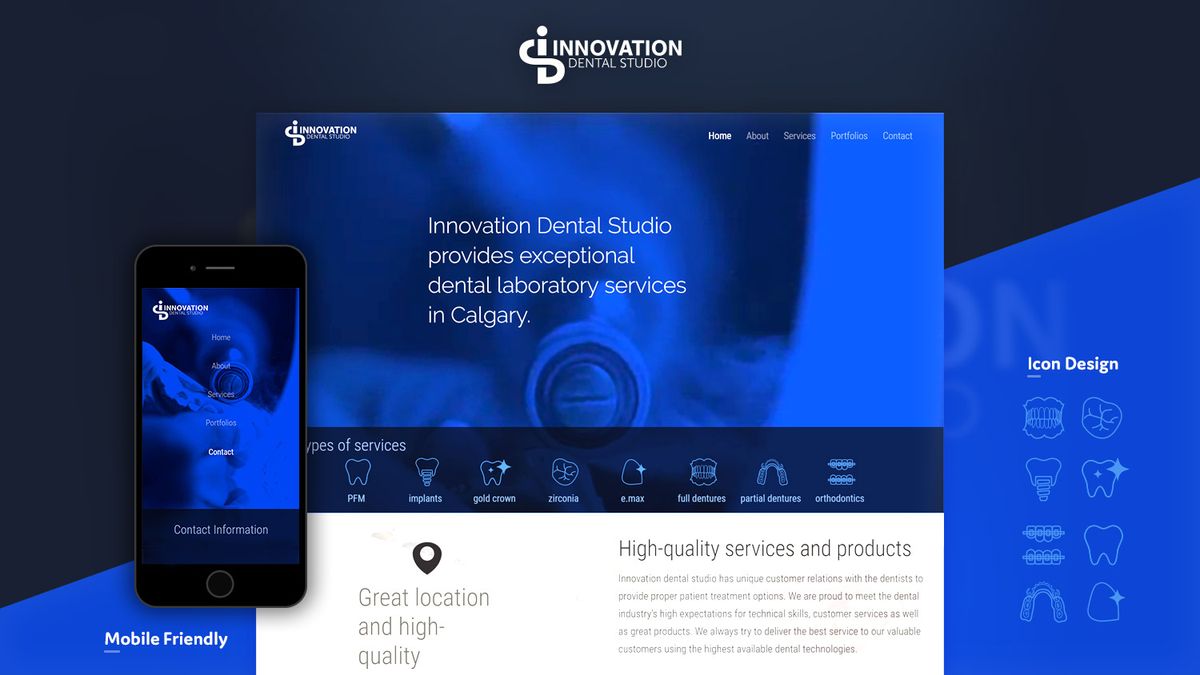
Customizing User Experiences
In the realm of user-centric design, personalization is a cornerstone for creating exceptional user experiences. By leveraging data and insights, designers can craft a website that not only meets the unique needs of each user but also enhances their overall satisfaction and engagement.
For instance, incorporating features such as personalized recommendations or customizable settings can make a significant difference. Users appreciate when a website adapts to their behavior and preferences, offering a tailored experience that feels both intuitive and rewarding.
Personalization should not be an afterthought; it is a critical component that can drive user engagement and business growth.
Moreover, the use of AI-driven personalization techniques can further refine the user experience, ensuring that the content and recommendations remain relevant over time. Here’s a simple list of personalization strategies to consider:
- Personalized content and recommendations
- Customizable user interface settings
- Adaptive navigation paths
- Targeted offers and promotions
By prioritizing user needs and preferences, websites can achieve increased user engagement, which is essential for business success.
Leveraging Interactive Elements
Engaging users goes beyond presenting static information. Incorporating interactive elements like sliders, quizzes, polls, and animations can captivate visitors and encourage them to interact with your content. This not only increases the time spent on your site but also enhances the user’s connection to your brand.
Interactive elements should be used judiciously to avoid overwhelming the user. They must add value and be relevant to the content.
For example, a well-placed quiz can serve as a fun way to educate users about your products or services, while polls can provide valuable insights into user preferences. Here’s a simple list of interactive elements that can be integrated into a website:
- Sliders to showcase products or services
- Quizzes for user engagement and learning
- Polls for collecting user opinions
- Animations to draw attention to key areas
Each of these elements should be designed with the user in mind, ensuring they are intuitive and enhance the overall user experience.
Building Community and Social Interaction
In the realm of user-centric website design, fostering community and social interaction is pivotal. By inviting users to participate in the design process, such as through co-creation workshops or design sprints, we can cultivate a sense of ownership and empowerment. This approach not only enriches the user experience but also encourages active engagement and loyalty.
Engaging users as co-creators not only shows respect for their insights but also builds trust and rapport, leading to a more vibrant and invested community.
For example, a fitness app that allows users to suggest workout routines and share success stories can transform passive users into active community members. Similarly, incorporating a feedback mechanism within a social media platform can help address issues like privacy and content moderation, while also providing valuable insights for future enhancements.
By prioritizing user experience and continuously iterating based on user feedback, we ensure that our solutions resonate with the community and lead to sustained engagement.
Streamlining the Conversion Process

Optimizing Call-to-Action Elements
The conversion process is pivotal in user-centric website design, and optimizing call-to-action (CTA) elements is a cornerstone of this process. A well-crafted CTA button not only stands out visually but also aligns with the user’s intent, encouraging them to take the next step. To achieve this, consider the following best practices:
- Use action-oriented language that prompts immediate response.
- Ensure the CTA button is prominently placed and easy to find.
- Choose contrasting colors that make the CTA button pop from the rest of the page.
- Test different shapes and sizes to determine what works best for your audience.
- Keep the message clear and concise, avoiding any ambiguity.
By streamlining the path to conversion, we not only enhance the user experience but also increase the likelihood of achieving our business goals. This involves a careful balance of design and psychology to create CTAs that resonate with users.
Remember, the goal is to guide users towards a desired action without overwhelming or confusing them. Regularly analyzing user feedback and behavior can provide insights into how effective your CTAs are and where there might be room for improvement.
Simplifying Forms and Checkouts
A user-centric design is pivotal in streamlining the conversion process. By reducing the number of steps in the checkout flow, users are more likely to complete their purchases. Simplifying forms and checkouts is not just about reducing the number of fields, but also about understanding the user’s journey and removing any unnecessary friction.
To enhance efficiency, consider the following:
Minimize required fields and remove optional ones.
Use intelligent defaults and autofill to save time.
Incorporate progress indicators to instill trust.
These steps can significantly improve the user experience, leading to increased conversion rates. Remember, every additional field or confusing step can be a potential reason for a user to abandon their cart. Therefore, it’s essential to simplify the journey for the user, making the process as intuitive and reassuring as possible.
Enhancing Trust and Security
In the realm of user-centric website design, trust and security are paramount. Users must feel confident that their personal information is safe and that their privacy is respected. To achieve this, transparency and consent are key. Users should be fully informed about how their data is collected, used, and protected, and they should have control over their personal information.
Ethical considerations play a crucial role in fostering trust. By adhering to privacy-by-design principles and ensuring robust data security measures, designers can demonstrate their commitment to user privacy. This includes implementing clear privacy policies and obtaining explicit consent before collecting user data.
Building trust with users is not just about adhering to technical standards; it’s about showing genuine respect for their privacy and autonomy.
Here are some practical steps to enhance trust and security on your website:
- Ensure that SSL certificates are up to date.
- Regularly update and patch security vulnerabilities.
- Provide clear and accessible privacy policies.
- Obtain explicit consent for data collection.
- Offer options for users to control their privacy settings.
Evaluating and Refining the Design

Conducting Usability Testing
Usability testing is a pivotal phase in the user-centric design process, where real users interact with the website to uncover any usability issues. This hands-on approach is essential for evaluating the practicality and user-friendliness of the site. By observing how users navigate the interface, designers can pinpoint obstacles and areas for enhancement.
The goal of usability testing is not just to identify problems but to understand the user’s experience deeply. It’s about making informed decisions that lead to a seamless and intuitive user journey.
A typical usability testing session may include tasks like finding a specific product, completing a purchase, or locating contact information. The outcomes of these sessions are often categorized into metrics such as success rate, error rate, and time to complete tasks. Here’s an example of how results might be presented:
| Task | Success Rate | Error Rate | Time to Complete |
|---|---|---|---|
| Find Product | 95% | 5% | 45s |
| Complete Purchase | 90% | 10% | 1m 30s |
| Locate Contact Info | 98% | 2% | 30s |
These metrics provide a quantitative measure of the website’s usability, guiding the design team in prioritizing improvements. Remember, consistency in design elements and standardized navigation are crucial for a positive user experience. Incorporating user feedback and iterative refinement are the cornerstones of enhancing usability and, ultimately, user satisfaction.
Gathering Post-Launch Feedback
Once a website is launched, the journey towards refining user experience doesn’t end. Gathering post-launch feedback is a pivotal step in understanding how real users interact with the site and what improvements can be made. This feedback can come from various sources, such as direct user comments, analytics data, and customer support interactions.
- Direct User Feedback: Encourage users to share their thoughts through surveys, contact forms, or feedback widgets.
- Analytics Data: Analyze user behavior through metrics like bounce rates, time on site, and conversion paths.
- Customer Support: Collect insights from issues and questions raised by users to customer support.
By continuously collecting and analyzing feedback, you can prioritize updates that will have the most significant impact on user satisfaction and business success. It’s not just about fixing what’s broken, but also about enhancing what works to provide a seamless user experience.
Remember, integrating user feedback in website design is crucial for user satisfaction and business success. Key steps include gathering feedback, prioritizing changes, and continuous iteration. Post-launch, monitoring is essential to maintain a seamless user experience.
Making Data-Driven Design Improvements
In the realm of user-centric website design, making data-driven decisions is crucial for continuous improvement. By analyzing user behavior and feedback, designers can pinpoint what works and what doesn’t, leading to more effective design iterations.
The key to successful design refinement lies in the interpretation and application of data to enhance user experience.
For instance, consider the following metrics that can guide design enhancements:
- User engagement rates
- Bounce rates
- Conversion rates
- Time on page
Each metric offers insights into different aspects of user interaction with the website. A high bounce rate might indicate confusing navigation, while low conversion rates could suggest issues with the call-to-action elements. Addressing these areas with targeted design changes can lead to significant improvements in user satisfaction and business outcomes.
In the realm of digital innovation, the journey from concept to reality is pivotal. At the heart of this process lies the critical phase of ‘Evaluating and Refining the Design’. It’s where ideas are scrutinized, and designs are polished to perfection. Our team at AM2 specializes in transforming your vision into a digital masterpiece. With over 700 successful projects, we have honed our skills in WordPress Development, eCommerce solutions, and custom web design to ensure your business stands out. Don’t settle for mediocrity; elevate your online presence with our expert services. Visit our website to explore our portfolio and start your project with a partner dedicated to excellence. Let’s create something remarkable together!
Conclusion
In conclusion, a user-centric website design approach is essential for crafting engaging user experiences that drive conversions and foster user satisfaction. Throughout this article, we’ve explored the importance of understanding user needs, implementing intuitive navigation, and ensuring responsive design. We’ve also highlighted the value of personalizing user experiences, optimizing visual elements, and conducting thorough usability testing. By adhering to these principles, designers and developers can create websites that not only meet but exceed user expectations, leading to improved engagement and business growth. Remember, at the heart of a successful website is a design that puts the user first, making their online journey seamless and enjoyable.
Frequently Asked Questions
What is user-centric website design?
User-centric website design is an approach that puts the user’s needs, goals, and preferences at the forefront of the design process. It involves understanding the target audience through research and feedback, and creating an experience that is intuitive, accessible, and engaging for them.
Why is usability important in website design?
Usability is crucial because it determines how easily users can navigate and interact with a website. Good usability improves the overall user experience, increases user satisfaction, and can lead to higher conversion rates and customer loyalty.
How does responsive design enhance user experience?
Responsive design ensures that a website provides an optimal viewing experience across a wide range of devices, from desktops to smartphones. It adapts the layout and content to fit different screen sizes, improving accessibility and usability for all users.
What role does personalization play in engaging users?
Personalization tailors the user experience to individual preferences and behaviors, making the website more relevant and engaging. It can lead to increased user satisfaction, longer visit durations, and higher likelihood of conversion.
How can website design influence conversion rates?
Website design can influence conversion rates by providing clear calls-to-action, simplifying the checkout process, and enhancing trust through security features. A well-designed website guides users smoothly towards the desired action, whether it’s making a purchase, signing up, or contacting the business.
What is the importance of conducting usability testing?
Usability testing allows designers to observe real users interacting with the website and identify any issues or areas for improvement. It is an essential step in refining the design to ensure it meets user expectations and provides a seamless experience.