User-Centric Website Design Approach for Engaging User Experience
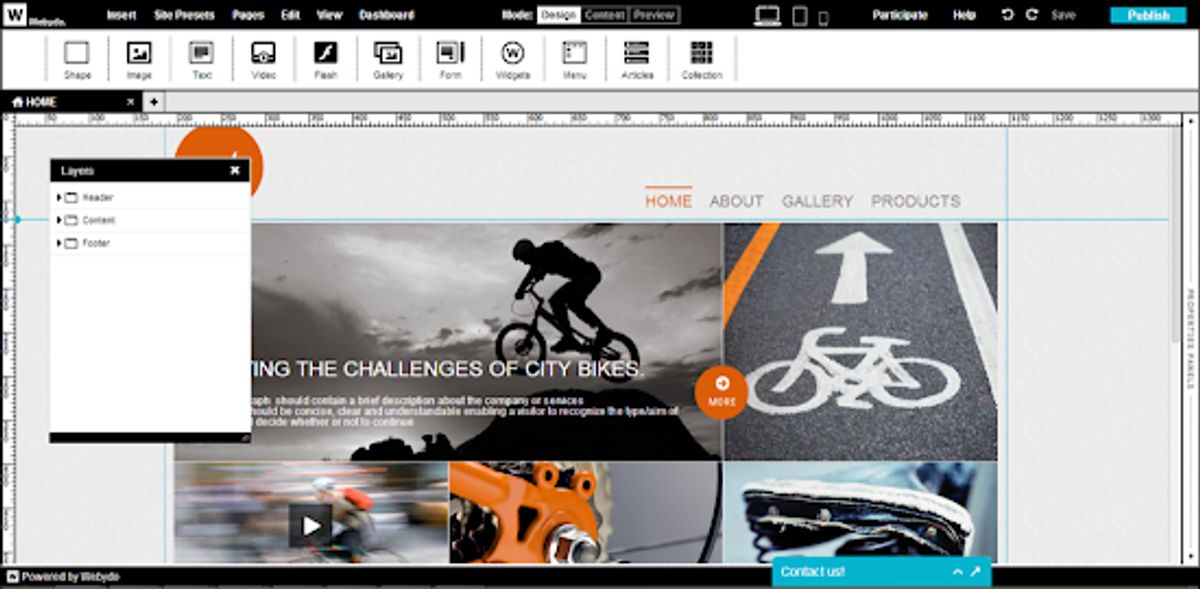
In the digital age, a user-centric website design is paramount for creating an engaging user experience. This approach focuses on the needs, preferences, and behaviors of users, ensuring that the website is intuitive, accessible, and enjoyable to interact with. By incorporating principles of empathy, collaboration, and iterative testing, designers can craft digital experiences that not only meet user expectations but also drive engagement and loyalty. This article delves into the core aspects of user-centric design, offering insights into optimizing user interfaces, maximizing usability through testing, and employing strategies for visitor engagement and retention.
Key Takeaways
- User-centric design prioritizes the user’s needs throughout the design process, enhancing usability and satisfaction.
- Empathy is crucial in design, allowing creators to understand and address the real-world needs and motivations of users.
- A collaborative approach to UX involves stakeholders and users in the design process, leading to more effective solutions.
- Iterative prototyping and usability testing are essential for refining user experience and ensuring intuitive interaction.
- Engaging content, multimedia elements, and personalization are key strategies for retaining and engaging website visitors.
Understanding User-Centric Design Principles

Defining User-Centric Design
At the heart of user-centric design is the commitment to deeply understanding and prioritizing the needs and behaviors of users. This design philosophy is not just about creating visually appealing websites; it’s about crafting experiences that are both intuitive and satisfying for the user. User-centric design involves a meticulous process of research, testing, and refinement to ensure that the end product truly resonates with its intended audience.
- Research: Gathering insights through user interviews, surveys, and analytics.
- Design: Creating wireframes, prototypes, and high-fidelity designs that focus on user needs.
- Testing: Conducting usability tests to gather feedback and identify areas for improvement.
- Refinement: Iterating on the design based on user feedback and test results.
By placing the user at the forefront of the design process, we can create websites that not only look great but also provide a seamless and engaging user experience. This approach aligns with the principles outlined in the title ‘Mastering User-Centric Web Design: 5 Key Principles for Success’, emphasizing that user-centric web design transcends mere aesthetics and focuses on engaging users.
The Importance of Empathy in Design
Empathy is the cornerstone of a user-centric design approach. By putting ourselves in the users’ shoes, we can understand their perspectives, challenges, and motivations. This understanding is crucial for creating solutions that not only solve practical problems but also resonate emotionally with users.
A design that empathizes with users goes beyond aesthetics; it’s about crafting experiences that feel intuitive and genuinely address user needs.
Incorporating empathy into the design process involves a series of steps:
- Conducting thorough user research to gather insights.
- Creating detailed user personas to represent the target audience.
- Developing user flows to identify pain points and optimize the user journey.
- Refining designs through user feedback and iterative testing.
By embracing these practices, designers can ensure that the final product truly aligns with what users want and need, leading to a more engaging and satisfying user experience. AM2 Studio’s strategic approach to web development exemplifies this, focusing on user-centric design and quality assurance to exceed client expectations. Similarly, empathic design, as highlighted in a UX design bootcamp, caters to real user needs, creating products that users feel connected to.
Collaborative Approach to User Experience
A collaborative approach to user experience is fundamental in user-centric website design. It involves fostering collaboration among designers, developers, stakeholders, and end users throughout the design and development process. This collaboration ensures that all aspects of the user experience are considered and integrated into your website.
By encouraging open communication and feedback sharing, a collaborative approach not only aligns the team’s vision but also uncovers insights that might otherwise be missed. It is a cross-functional teamwork effort that ensures a holistic and user-centric approach.
Effective UX design is not a one-time event but an iterative process that incorporates user feedback and testing. By conducting user research, creating user personas, and developing user flows, pain points are identified and the user journey is optimized. The table below outlines the key stages in a collaborative UX design process:
| Stage | Description |
|---|---|
| Discovery | Understanding user needs and business goals |
| Ideation | Brainstorming and conceptualizing solutions |
| Prototyping | Creating interactive models for testing |
| Testing | Gathering user feedback and refining the design |
| Implementation | Developing the final product |
| Monitoring | Post-launch analysis and ongoing refinement |
Remember, a user-centric website is not just about aesthetics; it’s about creating an impactful website that resonates with users on an emotional level and addresses their real-world needs.
Optimizing User Interface for Enhanced Interaction

Principles of Intuitive UI Design
Intuitive UI design is the cornerstone of a user-centric website. It ensures that users can navigate and interact with a site effortlessly. Key principles include clear visual cues, logical navigation paths, and interactive elements that respond predictably to user actions.
- Clear Visual Cues: Use design elements like color, contrast, and size to draw attention to important features.
- Logical Navigation Paths: Organize content in a way that reflects the user’s expectations and goals.
- Predictable Interactions: Design interactive elements to behave in ways users anticipate.
By focusing on these principles, designers can create an environment where users feel in control and are able to complete their tasks with ease.
User-centric design focuses on intuitive navigation, clear labeling, and responsive interfaces. Continuous testing and analysis of user behavior enhance UX for better engagement and satisfaction. These efforts culminate in a seamless experience that encourages users to return.
Visual Hierarchy and Navigation
Effective visual hierarchy is essential for guiding users through a website’s content, ensuring that the most important elements catch the user’s attention first. By strategically using size, color, and layout, designers can influence the order in which information is perceived and processed.
Navigation should be intuitive and consistent, allowing users to find information quickly and easily. This is not just about the design, but also about understanding the user’s journey and optimizing the navigation to fit their needs.
To achieve this, consider the following steps:
- Establish clear goals for each page and prioritize content accordingly.
- Utilize contrast and alignment to make key elements stand out.
- Ensure that navigation menus are logical and easy to use.
- Implement responsive design to accommodate various devices and screen sizes.
Remember, a well-organized interface promotes a seamless user experience and can significantly improve the overall effectiveness of a website.
Consistency and Accessibility in UI
Achieving a consistent user interface (UI) is crucial for a seamless user experience. Consistency in design fosters a sense of familiarity, enabling users to navigate through interfaces effortlessly. When elements maintain a uniform appearance, users don’t get lost in a maze of varying styles and behaviors. This principle is echoed in the sentiment that ‘Consistency is key, keeping things looking and behaving the same way throughout.’ It’s all about clarity and simplicity.
Accessibility should be prioritized alongside consistency. Designing for accessibility means ensuring that your website is usable by everyone, including those with disabilities. Adhering to Web Content Accessibility Guidelines (WCAG) standards is not just a legal requirement in many cases, but also a moral imperative. Considerations such as screen readers, keyboard navigation, color contrast, and alternative text for images are essential.
By optimizing usability and focusing on mobile responsiveness, we can create a user interface that is both consistent and accessible, leading to increased user satisfaction and engagement.
To encapsulate the importance of these principles, here’s a quick checklist:
- Create intuitive navigation structures
- Use consistent design elements across the website
- Ensure website accessibility by following WCAG standards
- Design and test for responsiveness on various devices
Remember, a well-designed UI enhances usability, clarity, and visual appeal, facilitating intuitive navigation and improving the overall user experience.
Maximizing User Experience through Usability Testing

The Role of Prototyping and Iteration
The iterative design process is a cornerstone of user-centric design, emphasizing the importance of continuous refinement based on user feedback. This approach involves a cycle of prototyping, testing, and modifying the design to better meet user needs. By adopting this method, designers can create more effective and engaging user experiences.
Prototyping is not just about creating a visual model of the design; it’s about bringing the concept to life and testing its viability. It allows for the identification of potential issues early on, saving time and resources in the long run.
Incorporating usability testing and user personas is crucial for enhancing user experience, engagement, and conversion. Design thinking in UX, with its focus on benefit-driven development, leads to optimized websites that resonate with users. The table below outlines key steps in the iterative design process:
| Step | Description |
|---|---|
| 1. Prototyping | Create a preliminary model to visualize the design concept. |
| 2. Testing | Evaluate the prototype with real users to gather feedback. |
| 3. Refinement | Make necessary adjustments based on user insights. |
| 4. Implementation | Integrate the refined design into the final product. |
By emphasizing feedback and iteration, designers can ensure that the final product truly reflects the needs and preferences of its users.
Incorporating User Feedback
Incorporating user feedback is a pivotal step in the iterative design process. Feedback mechanisms such as surveys, feedback forms, and analytics tools are essential for collecting valuable insights from users. These insights help identify areas for improvement and inform future iterations of the website design.
An effective feedback loop involves several key actions:
- Actively listening to user feedback
- Identifying common themes and areas for optimization
- Testing and evaluating changes based on feedback
- Iterating on the design to refine user experience
By emphasizing feedback and iteration, designers can create more engaging and user-friendly websites that resonate with their audience.
It’s important to balance the diverse perspectives of users with the technical and business constraints. Integrating user feedback effectively can be challenging, especially when opinions or preferences conflict. However, synthesizing and prioritizing this feedback is crucial for a design that meets user needs while achieving business goals.
Measuring and Improving User Satisfaction
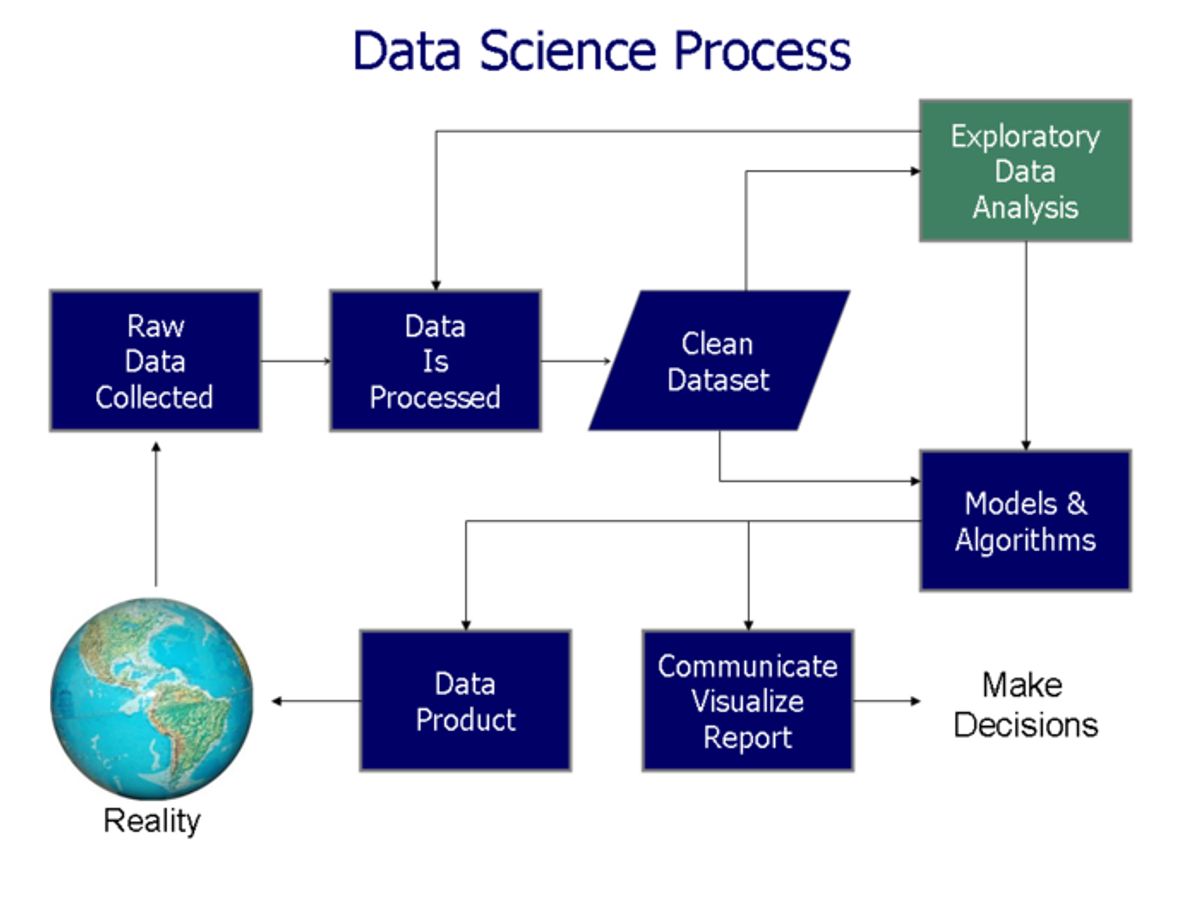
To ensure that a website meets the needs and expectations of its users, a data-driven approach to design improvements is essential. This involves an iterative process where key metrics are identified, data is analyzed, issues are prioritized, changes are tested, and results are analyzed to implement successful modifications. This cycle is crucial for enhancing user satisfaction and maintaining the quality of the user experience.
By continuously tracking user interactions and performance, we can pinpoint areas that require attention and optimize the platform accordingly. It’s not just about fixing what’s broken, but about finding opportunities to exceed user expectations.
Incorporating user feedback is a vital part of this process. Users often provide insights that cannot be captured through metrics alone. Their feedback can guide usability testing and help integrate strategies for platform optimization and accessibility compliance. Below is a list of steps to effectively measure and improve user satisfaction:
- Collect user feedback through surveys, analytics, and support channels.
- Conduct usability testing sessions with real users.
- Analyze user behavior and patterns to inform design decisions.
- Implement changes based on feedback and testing results.
- Measure the impact of these changes on user satisfaction and repeat the process.
Strategies for Engaging and Retaining Website Visitors

Creating Engaging Content Strategies
To captivate and maintain the interest of website visitors, it’s essential to develop a content strategy that resonates with user needs and goals. This involves crafting clear, concise, and engaging content that is not only easy to understand but also relevant to the target audience.
Incorporating interactive elements such as sliders, carousels, and tooltips can significantly enhance user engagement, providing a dynamic and interactive experience. It’s also crucial to use micro-interactions like button hover effects or form validations to offer immediate feedback and improve usability.
By focusing on a user-centric content and design approach, websites can create personalized experiences that foster deeper connections with their audience.
Conducting A/B testing is another vital step in refining content strategies. This method allows for comparing different design variations or content layouts to determine which performs better in terms of user engagement or conversions. Utilizing data-driven insights from these tests can lead to informed design decisions and optimizations.
Leveraging Multimedia and Interactive Elements
In the realm of user-centric website design, multimedia and interactive elements play a pivotal role in captivating user attention and enhancing engagement. Incorporating features such as videos, audio clips, and interactive infographics can significantly enrich the user experience.
Interactive elements such as sliders, carousels, and accordions not only provide a dynamic way to present information but also encourage users to interact with the content. Micro-interactions, like button hover effects or form validations, offer subtle yet powerful feedback that can improve usability and user satisfaction.
By thoughtfully integrating multimedia and interactive components, websites can offer more immersive experiences that resonate with users and support their journey through the site.
Adapting to user preferences and trends in web design is crucial for engaging user experience. Incorporate feedback, analytics, and multimedia responsibly to enhance user engagement and retention. It’s essential to balance the use of these elements to avoid overwhelming users and to ensure that the website remains accessible to all.
Personalization and User Engagement Techniques
In the realm of user engagement, personalization stands as a cornerstone for creating a memorable user experience. By tailoring content and functionality to individual preferences and behaviors, websites can foster a deeper connection with their audience. This approach not only enhances user satisfaction but also encourages repeat visits and interactions.
Effective personalization requires a deep understanding of your user base. Creating detailed user personas and mapping out user journeys are critical steps in this process. Below is a list of techniques to consider for personalizing the user experience:
- Utilize data analytics to segment users and deliver relevant content.
- Implement dynamic content that changes based on user behavior.
- Offer personalized recommendations similar to the user’s past interactions.
- Enable customization options that allow users to tailor their experience.
Personalization is not just about addressing the user by name; it’s about creating an experience that feels uniquely tailored to them, making each interaction more relevant and engaging.
Remember, the goal is to make users feel like the website was designed with them in mind, which can significantly boost engagement levels. By continuously analyzing user data and adapting to their evolving needs, you can maintain a fresh and engaging online presence.
Leveraging Analytics and User Data for Continuous Improvement
Analyzing User Behavior and Patterns
To create a user-centric website, it’s essential to analyze user behavior and patterns. This involves using various analytics tools to track how users interact with your site. By understanding the paths they take, the pages they linger on, and where they drop off, you can identify opportunities for improvement and make data-driven design decisions.
- Conduct User Research: Use surveys, interviews, and usability testing to gather insights.
- Create User Personas: Develop realistic representations based on research findings.
- User Journey Mapping: Map out the user journey to optimize the experience.
- User Testing and Validation: Validate design assumptions and identify issues.
By continuously monitoring user behavior, you can adapt your website to meet evolving user needs, ensuring a seamless and engaging experience.
Remember, the goal is not just to attract visitors but to provide an experience that encourages them to stay, explore, and ultimately convert. This requires a deep understanding of user interactions through analytics and testing, leading to enhanced usability and engagement.
Utilizing A/B Testing for Decision Making
A/B testing, or split testing, is a methodical process of comparing two versions of a web page or feature to determine which one performs better in terms of user engagement or conversions. By systematically testing variations, we can make data-driven decisions that enhance the user experience and increase conversion rates.
A/B testing is not just about choosing the winning variant; it’s about understanding user behavior and preferences to inform future design choices.
The process typically involves the following steps:
- Define the Objective: Establish clear goals for what you want to achieve with the test.
- Create Varied Versions: Develop alternative versions of the content or design element.
- Conduct the Test: Randomly serve the different versions to users and collect data on their interactions.
- Analyze Results: Evaluate the data to see which version met the objectives more effectively.
- Implement Findings: Apply the successful elements from the test to optimize the website.
Utilizing A/B testing is crucial for making informed decisions that resonate with users and lead to better performance outcomes.
Adapting to User Needs Over Time
Adapting to user needs over time is crucial for maintaining a relevant and engaging online presence. Websites must evolve alongside user expectations, technology advancements, and industry trends to stay competitive. Regularly scheduled reviews and updates can prevent your website from becoming outdated, which is essential since a design might only last between two and five years before needing a refresh.
By implementing a cycle of continuous improvement, websites can adapt to changing user behaviors and preferences, ensuring a dynamic and responsive user experience.
An effective strategy includes:
- Gathering user feedback through surveys, feedback forms, and analytics tools to identify areas for improvement.
- Adopting an iterative design approach to prototype, test, and refine solutions based on user feedback and data.
- Utilizing A/B testing to make informed decisions about design changes and feature implementations.
- Monitoring post-launch performance to quickly identify and rectify any issues that arise.
Ultimately, the goal is to create a seamless and enjoyable process that not only meets but anticipates user needs, leading to increased user satisfaction and engagement.
In today’s digital landscape, the power of analytics and user data cannot be overstated. By continuously analyzing this data, businesses can make informed decisions that drive improvement and growth. Our team at AM2 specializes in harnessing these insights to elevate your online presence. From custom WordPress development to eCommerce solutions, we tailor our services to meet your unique needs. Don’t let your website be static; let us help you make it dynamic and ever-evolving. Visit our website to learn more about our services and how we can partner with you for success. Take the first step towards a better digital future—reach out to us today!
Conclusion
In conclusion, a user-centric website design approach is not just a trend but a fundamental aspect of creating engaging and effective digital experiences. By prioritizing usability, incorporating user feedback, and employing iterative testing, businesses can ensure their websites meet the evolving needs of their audience. The principles of UX and UI design are integral to this process, guiding users through intuitive interfaces and seamless interactions. As we’ve seen through various projects, from NFT platforms to real estate websites, a focus on user experience leads to increased satisfaction, loyalty, and conversion rates. Embracing a user-centric mindset is essential for any organization looking to thrive in the digital landscape and foster meaningful connections with its users.
Frequently Asked Questions
What is user-centric website design?
User-centric website design is an approach that places the user’s needs, preferences, and behaviors at the forefront of the design process. It aims to create intuitive, efficient, and enjoyable digital experiences that cater to the target audience’s goals and pain points.
Why is empathy important in user-centric design?
Empathy is crucial in user-centric design as it allows designers to understand and share the feelings of the users. By empathizing with users, designers can create solutions that resonate emotionally and meet real-world needs, leading to more engaging and satisfactory experiences.
How does a collaborative approach enhance user experience?
A collaborative approach to user experience involves stakeholders, designers, and users working together. This synergy ensures diverse perspectives are considered, user feedback is integrated, and the final product aligns closely with user expectations and requirements.
What role does usability testing play in maximizing user experience?
Usability testing is essential for identifying usability issues, understanding user behavior, and gathering feedback. It involves iterative prototyping and testing with real users to refine the website’s design and functionality, leading to improved user satisfaction and engagement.
How can analytics and user data lead to continuous website improvement?
Analytics and user data provide insights into user behavior, preferences, and interaction patterns. By analyzing this data, designers can make informed decisions, conduct A/B testing, and adapt the website to meet evolving user needs, ensuring a constantly improving user experience.
What are the benefits of a user-centered design approach?
The benefits of a user-centered design approach include higher user satisfaction, increased engagement, improved accessibility, and enhanced usability. This leads to better conversion rates, customer loyalty, and a competitive advantage in the digital marketplace.