Enhancing User Experience with Seamless Website Navigation
In the digital age, a website’s navigation system is a critical component of its overall user experience. A seamless and intuitive navigation structure not only facilitates easy access to information but also significantly enhances user engagement and satisfaction. This article explores the foundational principles and advanced strategies for creating a navigation system that is both user-friendly and effective in guiding visitors towards desired actions, ultimately leading to increased conversions and business success.
Key Takeaways
- Intuitive website navigation is founded on understanding user behavior, ensuring discoverability, and implementing responsive menus.
- Optimized navigation can reduce bounce rates, improve user engagement, and accommodate complex site structures through the use of breadcrumbs and mega menus.
- A seamless navigation flow balances aesthetic appeal with functionality, prioritizes mobile design, and evolves through continuous user feedback.
- Strategic navigation design boosts conversions by creating a menu structure that encourages action and simplifies the checkout process.
- Post-launch, it is crucial to monitor and optimize navigation through regular audits, analysis of user patterns, and refinement based on analytics.
The Pillars of Intuitive Website Navigation

Understanding User Behavior
To create a website that resonates with users, it’s crucial to understand their behavior. This involves analyzing how users interact with your site, what motivates their actions, and what might deter them from achieving their goals. By delving into the psychology of your audience, you can tailor your navigation to meet their needs, making it intuitive and user-friendly.
A key aspect of user behavior is the journey they take through your website. Mapping this journey allows you to identify potential friction points and opportunities to enhance the navigation experience.
For instance, consider the following common user actions:
- Searching for specific information or products
- Browsing content categories
- Comparing options or features
- Completing a purchase or contact form
By optimizing your website’s navigation to streamline these actions, you can improve user satisfaction and increase the likelihood of conversion. Remember, a seamless navigation structure not only guides users effectively but also reflects the strategic planning and creative design of your website, contributing to a unique digital experience.
Designing for Discoverability
To enhance user experience, designing for discoverability is crucial. It involves creating a navigation structure that aligns with the users’ expectations, enabling them to find information quickly and efficiently. A key aspect is the use of clear labeling and logical information hierarchies, which guide users to the content they seek without confusion.
- Accessibility: Ensure that all users, including those with visual impairments, can navigate your site. This includes adding descriptions to images and using colors that work well together.
- Intuitive Design: Familiar design patterns, such as consistent placement of logos and search bars, aid in user orientation.
- Visual Hierarchy: Employ visual cues like size and color to establish clear hierarchies, directing users’ focus to important elements.
By focusing on discoverability, you can significantly improve the findability of your site, which is especially important for e-commerce platforms. Enhancing navigation, search functionality, and product categorization are effective strategies to boost user experience.
Regularly analyzing user behavior and adapting the design to meet their needs is essential for maintaining an intuitive navigation system. This ongoing process ensures that your website remains user-friendly and relevant, ultimately leading to increased user satisfaction and engagement.
Implementing Responsive Menus
In the mobile-first world we live in, responsive menus are a cornerstone of seamless website navigation. Users expect a fluid experience across all devices, which means that menus must adapt to various screen sizes without sacrificing accessibility or aesthetics. Techniques such as media queries, breakpoints, and collapsible menus are essential in achieving this adaptability.
To ensure that your website’s navigation is mobile-friendly, consider the following steps:
- Use media queries to apply different styles based on screen width.
- Define breakpoints where the layout changes to better fit the screen.
- Implement fluid grids for a flexible layout that adapts to the available space.
- Resize and crop images with flexible images to maintain visual integrity.
- Specify dimensions with relative units to maintain proportion across devices.
By prioritizing simplicity and clear labeling, and by analyzing user patterns, continuous improvement of the navigation experience can be achieved. Responsive design not only enhances user engagement but also positively impacts search engine rankings.
Optimizing Navigation for Enhanced User Engagement
Reducing Bounce Rates with Clear Paths
To effectively reduce bounce rates, it’s essential to provide users with clear and intuitive navigation paths. This not only enhances the user experience but also encourages deeper engagement with your website’s content. Here are some key strategies:
- Simplify the navigation structure: Avoid overwhelming users with too many options. A streamlined menu with clear categories helps users find what they need without confusion.
- Optimize page load speed: A slow website can frustrate users and increase bounce rates. Ensure your pages load quickly to maintain user interest.
- Use descriptive labels: Navigation menus should use language that is easy to understand and accurately describes the content.
- Highlight key content: Make important sections of your site stand out by using visual cues or positioning them prominently in the navigation.
By focusing on clarity and simplicity in your website’s navigation, you can create a more enjoyable and efficient experience for your visitors, leading to improved pass-through rates and user satisfaction.
Remember, effective navigation and performance optimization are crucial for user experience and SEO. Streamlined UI design and efficient web performance lead to better outcomes and user satisfaction.
Leveraging Breadcrumbs for Easy Tracking
Breadcrumbs serve as an essential tool for enhancing user experience by providing a clear and easy-to-follow trail of a user’s journey on a website. They allow users to keep track of their locations within a site’s hierarchy without losing context or feeling disoriented. This feature is particularly beneficial on websites with multiple levels of content organization, such as e-commerce sites with a variety of categories and subcategories.
By implementing breadcrumbs, websites can significantly improve navigability, which in turn, can reduce bounce rates. Users are more likely to engage with the content when they have a sense of direction and can easily backtrack if needed. Here’s how breadcrumbs can be optimized for better engagement:
- Ensure that breadcrumbs are consistently placed across all pages.
- Use arrows or chevrons (>) to indicate the hierarchy and flow.
- Make each step in the breadcrumb trail clickable for quick navigation.
- Keep the breadcrumb trail updated in real-time as users navigate.
Moreover, breadcrumbs also contribute to improved SEO as they facilitate search engines in understanding the structure of a website. This can lead to better indexing and, potentially, higher search rankings. It’s a win-win for both users and search engines.
Breadcrumbs are not just a navigational aid but a strategic component that can enhance both usability and SEO. Their role in a seamless navigation experience is undeniable and should be leveraged to its full potential.
Utilizing Mega Menus for Complex Sites
Mega Menus have become a staple in the design of complex websites, offering a comprehensive overview of available content without overwhelming the user. They allow for the display of multiple levels of navigation options, making it easier for users to find what they need in just a few clicks. This approach not only enhances discoverability but also contributes to a more organized and user-friendly experience.
When designing a mega menu, it’s crucial to maintain a clear and consistent structure. Categories should be logically grouped, and each section should be clearly labeled to guide users effectively. Here’s a simple list of best practices for mega menu design:
- Use descriptive labels for menu items
- Group related content to aid in quick navigation
- Ensure the menu is responsive and adapts to various screen sizes
- Prioritize accessibility to accommodate all users
By simplifying navigation with well-designed mega menus, websites can significantly improve user engagement and satisfaction.
Incorporating mega menus into your website requires careful planning and execution. It’s not just about the visual layout; performance optimization is also key. For instance, optimizing images and implementing caching can greatly enhance the speed at which your mega menu loads, providing a smoother experience for the user. Regular audits and updates are necessary to maintain the efficiency and security of the navigation structure.
Strategies for Seamless Navigation Flow
Balancing Aesthetic with Functionality
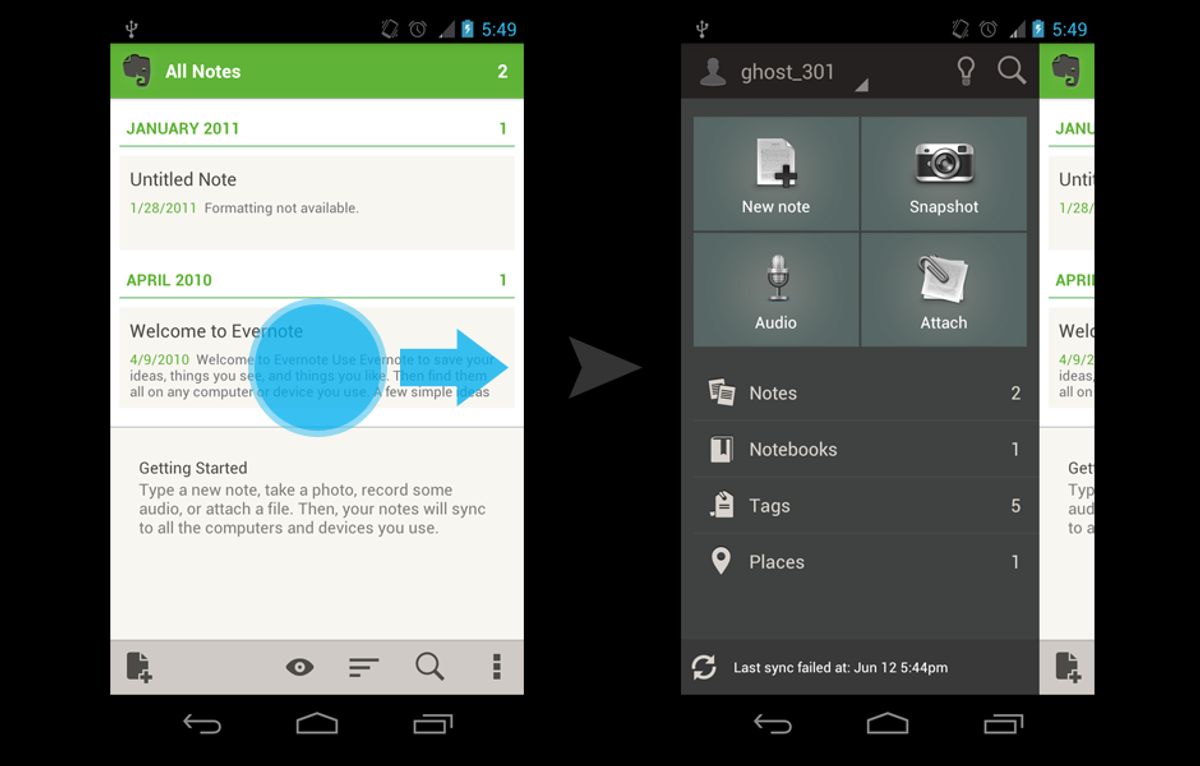
In the realm of web development, achieving a balance between aesthetic appeal and functional design is crucial for a successful user experience. Websites must not only captivate users with their visual design but also provide them with an intuitive and efficient way to navigate.
-
User Perspective: A cluttered interface can overwhelm users, while a streamlined design enhances readability and focus. High-quality images add to the visual appeal, but they must be optimized to avoid slowing down the site.
-
Technical Perspective: It’s essential to use whitespace effectively, organize content logically, and ensure that navigation elements like breadcrumbs and search functionality are well-implemented.
By prioritizing both aesthetics and functionality, designers can create websites that are not only visually engaging but also easy to use, leading to a more satisfying user experience.
For instance, Apple’s product pages exemplify a minimalistic approach that allows users to concentrate on the product details without unnecessary distractions. Similarly, Dropbox’s navigation menu exemplifies simplicity, enabling seamless file access and collaboration.
Prioritizing Mobile Navigation Design
In the era of smartphones, mobile navigation design is not just an option; it’s a necessity. Optimizing website navigation for mobile devices ensures that users have a seamless experience, regardless of the device they use. This is crucial for maintaining user engagement and minimizing frustration.
- Responsive Design: Employ CSS media queries to create flexible layouts that adapt to various screen sizes.
- Mobile-First Approach: Design with mobile users in mind from the outset.
- Touch-Friendly Interfaces: Ensure that all navigational elements are easily accessible and usable on touch screens.
By simplifying navigation and ensuring that it’s tailored for smaller screens, we can significantly enhance the user experience and keep visitors on the site longer.
It’s also important to test navigation on actual devices to capture the nuances of different user interactions. A travel blog that is easily navigable on both desktop and mobile not only retains readers but also encourages deeper exploration of content.
Incorporating User Feedback for Continuous Improvement
The journey towards perfecting website navigation is ongoing, and user feedback plays a pivotal role in this process. By establishing a feedback loop, businesses can gather insights directly from their users, analyze the data, and implement changes that enhance the navigation experience. This iterative approach ensures that the website evolves in alignment with user needs and preferences, leading to a more intuitive and satisfying experience.
To maintain effective navigation and accessibility, it’s essential to simplify the design, prioritize accessibility, and utilize user feedback for iterative improvements.
Regularly scheduled usability testing and A/B testing are practical methods for collecting user feedback. These tests can reveal pain points and areas for improvement that might not be immediately obvious. The insights gained from this testing can then inform the refinement of navigation elements, contributing to a seamless user journey.
- Gather user feedback through surveys, usability tests, and direct observation.
- Analyze the feedback to identify common themes and areas for enhancement.
- Implement changes based on the analysis to improve the user experience.
- Re-evaluate the navigation after changes to measure impact and identify further improvements.
Boosting Conversions with Strategic Navigation Design

Creating a Conversion-Friendly Menu Structure
A conversion-friendly menu structure is pivotal in guiding visitors through the purchasing funnel with ease. By optimizing the menu design, businesses can significantly improve user engagement and increase the likelihood of converting visitors into customers.
To achieve this, consider the following steps:
- Simplify the menu: Avoid overwhelming users with too many options. Instead, focus on a clear and intuitive layout that highlights the most important sections of your website.
- Use descriptive labels: Ensure that each menu item clearly describes the content it leads to, making it easier for users to find what they are looking for.
- Prioritize important items: Place high-converting pages or products in prominent positions within the menu to draw more attention to them.
- Responsive design: Ensure that the menu structure adapts seamlessly to different screen sizes, especially for mobile users.
By maintaining a consistent navigation structure and simplifying content accessibility, you create a streamlined path that encourages users to take action, ultimately optimizing the website for enhanced user experience and higher conversions.
Remember, the goal is to create a menu that not only looks good but also facilitates a smooth navigation experience that leads to increased conversions. Regularly analyze user navigation patterns and refine the menu based on feedback and performance data to keep improving the user journey.
Employing Clear Call-to-Action Buttons
Clear and compelling call-to-action (CTA) buttons are crucial for guiding users towards the desired actions on a website. Whether it’s signing up for a newsletter, making a purchase, or requesting a quote, the CTA should stand out visually and be placed strategically within the content.
The design and placement of CTA buttons can significantly influence user engagement and conversion rates.
For instance, a ‘Buy Now’ button in the main menu allows users to initiate a purchase from any page, potentially reducing the number of steps to conversion. Additionally, the use of persuasive language, contrasting colors, and visual cues like arrows or icons can draw attention to these buttons, making them more effective.
- Color: The color of your CTA button is one of the most important design choices you’ll make. It needs to be visually striking so it stands out from the rest of the page.
- Placement: Position CTAs strategically to guide users smoothly through their journey.
- Language: Use clear, action-oriented language that compels users to take the next step.
- A/B Testing: Continuously improve your CTAs by analyzing user behavior and iterating based on data.
Streamlining the Checkout Process
A streamlined checkout process is crucial for preventing cart abandonment and enhancing the overall user experience. By reducing the number of steps and simplifying form fields, customers can complete their purchases with ease. Here are some key strategies to optimize the checkout flow:
- Minimize the steps required to complete a purchase.
- Eliminate unnecessary form fields to reduce user effort.
- Implement progress indicators to inform users of their checkout status.
- Offer multiple payment options to accommodate different preferences.
- Incorporate guest checkout options to expedite the process for new users.
- Save payment information for returning customers to facilitate a quicker checkout.
Making the checkout process as efficient as possible not only improves user satisfaction but also directly impacts conversion rates. It’s essential to continuously monitor and refine the checkout experience based on user feedback and performance data to ensure it remains intuitive and user-friendly.
In light of this, businesses must also consider the backend performance that supports the checkout process. Optimizing images, caching, and minifying scripts are all part of enhancing the website’s overall performance, which in turn contributes to a smoother checkout experience. Remember, every second counts when a customer is finalizing their purchase.
Post-Launch Navigation Monitoring and Optimization

Conducting Regular Navigation Audits
To maintain an optimal user experience, it’s crucial to conduct regular navigation audits. These audits help identify areas where users may struggle and provide actionable insights for improvement. Start with a short overview that captures the essence of your UX audit, including the goals, the digital product or website evaluated, and the primary areas of focus.
Regular navigation audits are essential for understanding how users interact with your site and where they may encounter issues. This proactive approach ensures that your website remains intuitive and user-friendly over time.
A typical navigation audit includes several key steps:
- Reviewing analytics to understand user behavior
- Analyzing session recordings for pain points
- Gathering user feedback for qualitative insights
- Benchmarking against best practices and industry standards
By systematically addressing these areas, you can enhance website navigation and design, leading to a more seamless and enjoyable process for your users.
Analyzing User Navigation Patterns
To enhance the user experience, it’s essential to analyze user navigation patterns meticulously. Tools such as heatmaps and scroll maps offer visual insights into where users focus their attention and where they might encounter friction. This data allows for targeted improvements, ensuring that the most critical elements are both visible and accessible.
By implementing consistent design and search functionality, websites can optimize navigation based on user interactions, leading to a more intuitive user journey.
A/B testing plays a pivotal role in refining navigation. By comparing different layouts and elements, businesses can discern which configurations resonate best with their audience. The goal is to create a seamless flow that guides users naturally towards their objectives without confusion or unnecessary complexity.
Here’s a simple breakdown of steps to analyze user behavior:
- Utilize behavioral analytics tools like heatmaps
- Identify high-engagement areas and points of drop-off
- Conduct A/B testing to compare navigation layouts
- Optimize navigation elements to improve discoverability and ease of use
Refining Navigation Elements Based on Analytics
The continuous refinement of website navigation elements is a critical step in enhancing user experience and engagement. By leveraging analytics, we can identify patterns and behaviors that indicate how users interact with the site. This data-driven approach allows for targeted improvements, ensuring that navigation aids rather than hinders the user journey.
Analytics insights provide a roadmap for optimization, highlighting which areas of the site benefit from adjustments. For instance, if analytics reveal that certain menu items are rarely used, they can be reevaluated or replaced with more relevant options.
A common practice is to list the most frequently accessed pages at the forefront of the navigation structure. This not only improves discoverability but also streamlines the user’s path to the information or services they seek. Below is an example of how navigation elements might be adjusted based on user interaction data:
- Homepage: Increase visibility with a prominent position
- Popular services: Move higher in the menu hierarchy
- Underperforming sections: Conduct A/B testing to determine better placement or need for revision
- Contact page: Ensure easy access from every page
Ultimately, the goal is to optimize website navigation with analytics insights for enhanced user engagement. Balance aesthetics with usability for a seamless user journey.
Ensuring your website’s performance post-launch is crucial for maintaining user engagement and achieving your business goals. At [Our Company], we specialize in WordPress Development, including performance optimization and website health audits, to keep your site running at peak efficiency. Don’t let your online presence fade into the background; visit our website today for a comprehensive post-launch strategy that drives results and growth. Let us help you optimize your digital world for success!
Conclusion
In conclusion, seamless website navigation is not just about aesthetics; it’s a fundamental aspect that directly impacts user experience and conversion rates. By implementing clear and consistent menu structures, intuitive navigation systems, and regular performance optimizations, businesses can create a user-friendly environment that encourages engagement and retention. Remember, the goal is to guide visitors effortlessly through your site, allowing them to find the information they need without frustration. As we’ve discussed, this involves a combination of strategic design, development, and ongoing analysis to adapt to user needs. By prioritizing seamless navigation, you not only enhance user satisfaction but also set the stage for increased conversions and business growth.
Frequently Asked Questions
How does intuitive website navigation enhance user experience?
Intuitive navigation helps users find information quickly and efficiently, reducing frustration and increasing satisfaction. This leads to a more enjoyable browsing experience and encourages users to stay on the site longer.
What are the benefits of implementing responsive menus on a website?
Responsive menus adapt to different screen sizes and devices, ensuring that all users have a seamless experience when accessing the site’s navigation, regardless of how they are viewing the site.
Why are breadcrumbs important for website navigation?
Breadcrumbs provide a visual representation of the user’s path through the site, allowing them to understand their current location and easily backtrack to previously visited pages.
How can mega menus improve navigation for complex sites?
Mega menus display a large number of options in a clean and organized manner, making it easier for users to find specific information on sites with extensive content without feeling overwhelmed.
What role does user feedback play in improving website navigation?
User feedback offers valuable insights into how real users interact with the site’s navigation. This information can be used to make data-driven improvements and ensure the navigation meets user needs.
How can strategic navigation design boost conversions?
Strategic navigation design guides users towards conversion points by making important pages and calls-to-action easily accessible. This reduces barriers to conversion and can lead to increased sales and engagement.